Advanced Guide
>
Changing the Machine Settings
>
Changing Machine Settings from Your Computer
>
Registering a Frequently Used Printing Profile
P417
Registering a Frequently Used Printing Profile
You can register the frequently used printing profile to Commonly Used Settings on the Quick Setup tab.
Unnecessary printing profiles can be deleted at any time.
The procedure for registering a printing profile is as follows:
Registering a Printing Profile
1.
Open the
printer driver setup window
2.
Set the necessary items
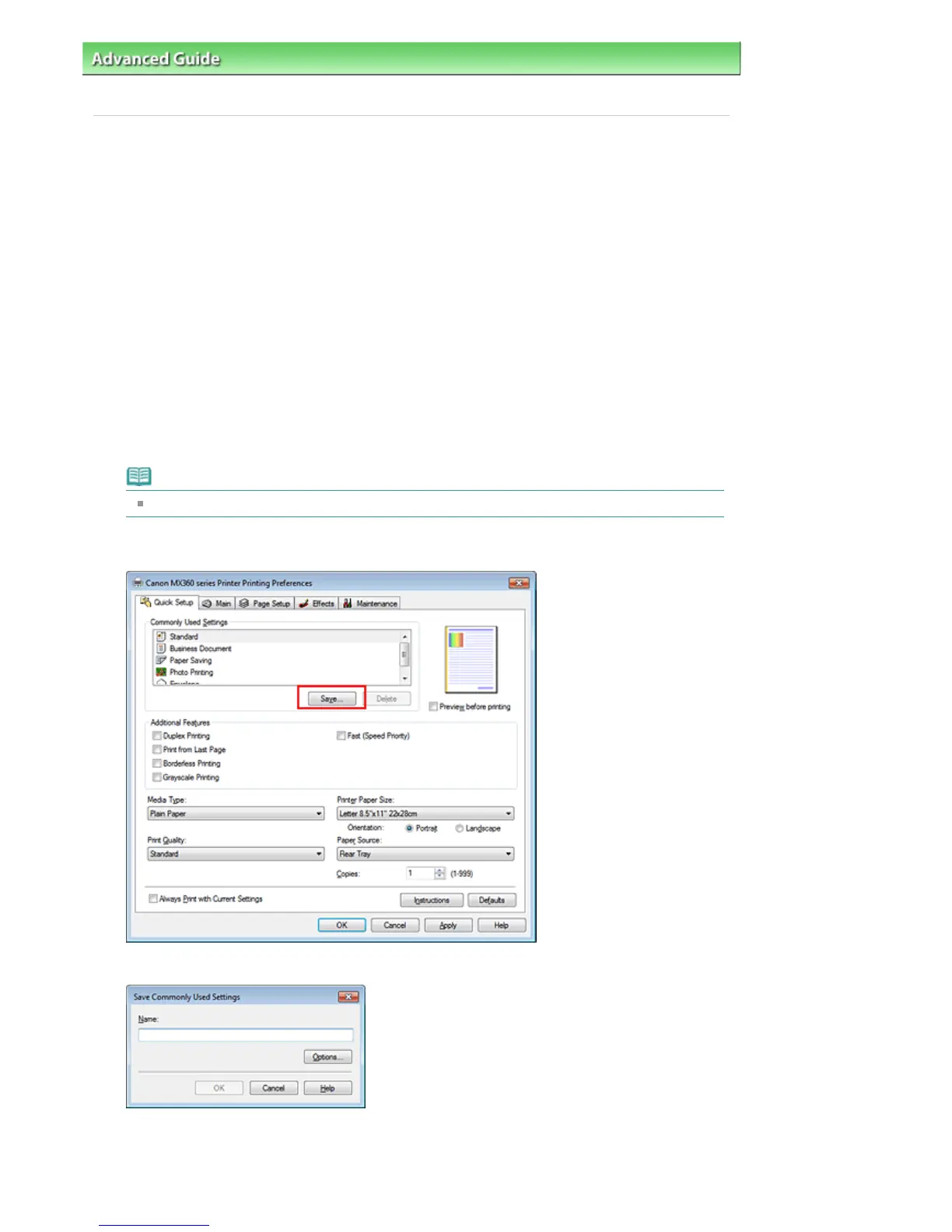
From Commonly Used Settings on the Quick Setup tab, select the printing profile to be used and if
necessary, change the settings after Additional Features.
You can also register necessary items on the Main, Page Setup, and Effects tabs.
Note
Effects tab cannot be used when the XPS printer driver is used.
3.
Click Save...
The Save Commonly Used Settings dialog box opens.
4.
Save the settings
Enter a name in the Name field, and if necessary, set the items in Options.... Then click OK.
Seite 792 von 922 SeitenRegistering a Frequently Used Printing Profile















 To Next Page