Advanced Guide
>
Appendix
> Sharing the Printer on a Network
P042
Sharing the Printer on a Network
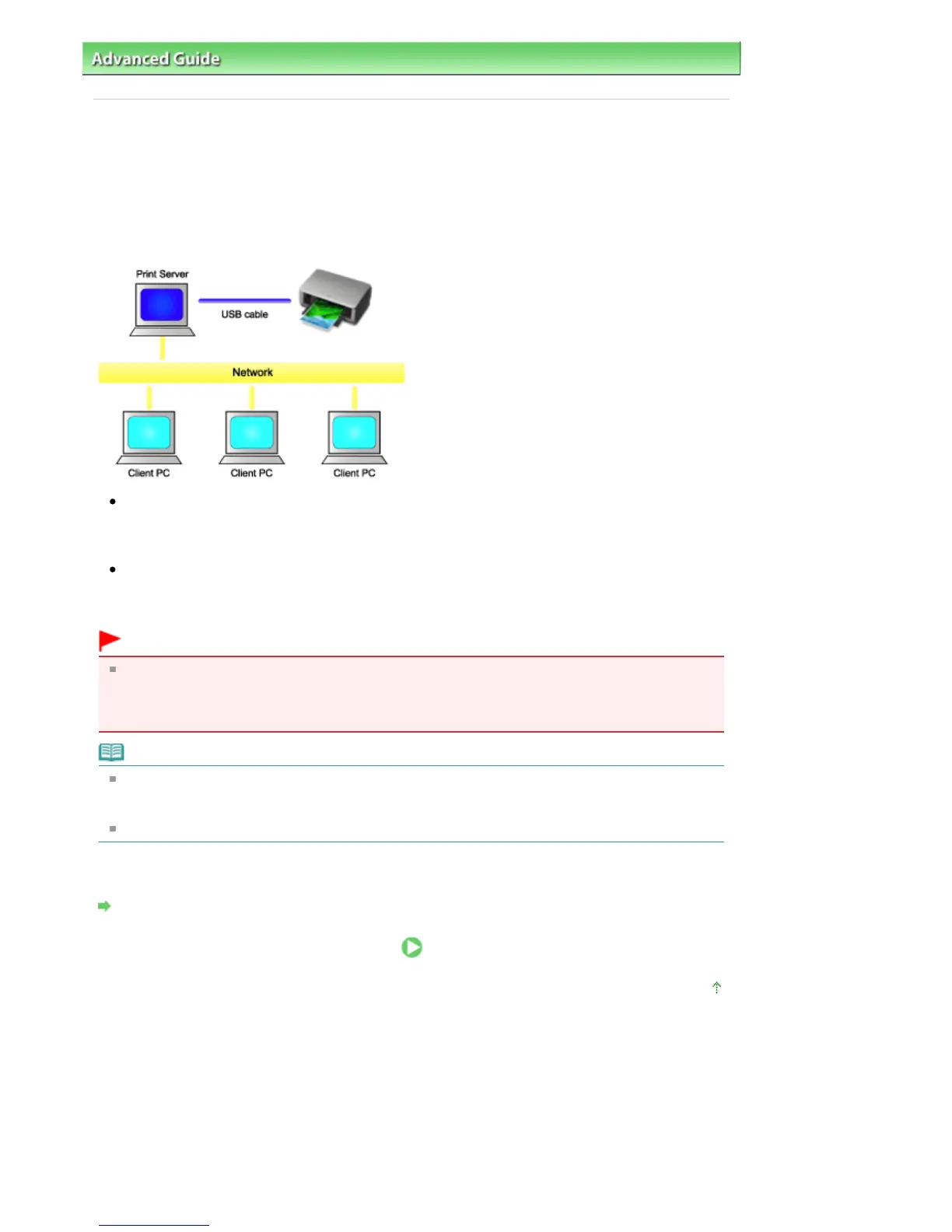
When multiple computers are being used in the network environment, you can share the printer
connected to one computer with the other computers.
The Windows versions of the computers connected to the network do not necessarily have to be the
same.
Settings on Print Server
This section describes the procedure for setting a computer that connects with this printer directly
through a USB cable.
Settings on Client PC
This section describes the procedure for setting a computer that uses this printer though a network.
When you execute print, the data is sent to the printer through the print server system.
Important
In case an error occurred when a document is printed by the client system to a shared printer, the
error message of Canon IJ Status Monitor will be displayed both on the client system and the print
server system. For regular printing, Canon IJ Status Monitor will be displayed only on the client
system.
Note
Making sure that the printer driver matches the operating system of each computer, install the
appropriate drivers onto the print server system and the client systems. The various printer drivers
are stored on the Setup CD-ROM provided with your machine.
You cannot share this printer with Macintosh computers.
Related Topic
Restrictions on Printer Sharing
Page top
Seite 914 von 922 SeitenSharing the Printer on a Network















 To Next Page