Advanced Guide
>
Scanning
>
Scanning with the Bundled Application Software
>
MP Navigator EX Screens
> Navigation Mode Screen
S735
Navigation Mode Screen
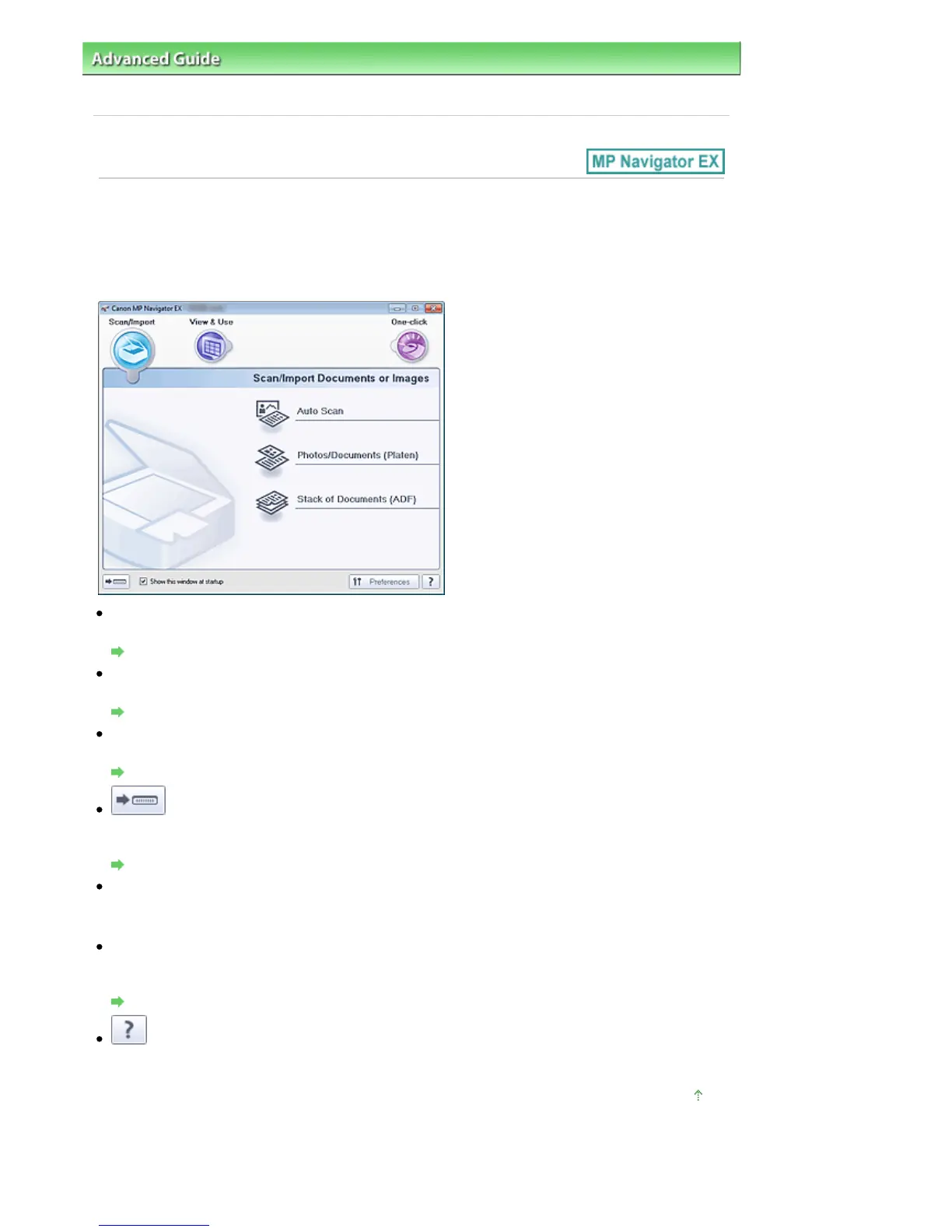
This is one of the startup screens of MP Navigator EX.
Select an icon at the top of the screen to display the corresponding tab. Use each tab depending on what
you want to do.
Scan/Import
You can scan photos and documents.
Scan/Import Documents or Images Tab
View & Use
You can open images saved on a computer and edit/print them or attach them to e-mail.
View & Use Images on your Computer Tab
One-click
You can complete from scanning to saving, etc. at one time by simply clicking the corresponding icon.
Custom Scan with One-click Tab
(Switch Mode)
Switches to One-click Mode screen. In the One-click Mode screen, you can complete from scanning to
saving, etc. at one time by simply clicking the corresponding icon.
One-click Mode Screen
Show this window at startup
Select this checkbox to open the Main Menu at startup. If this checkbox is not selected, the last used
screen appears.
Preferences
The Preferences dialog box opens. In the Preferences dialog box, you can make advanced settings to
MP Navigator EX functions.
Preferences Dialog Box
(Guide)
Opens this guide.
Page top
Seite 447 von 922 SeitenNavigation Mode Screen















 To Next Page