Advanced Guide
>
Scanning
>
Scanning with the Bundled Application Software
>
Appendix: Opening Files
Other than Scanned Images > Opening Images Saved on a Computer
S507
Opening Images Saved on a Computer
You can open images saved on a computer and edit/print them or attach them to e-mail using MP
Navigator EX.
1.
Start MP Navigator EX and open the Navigation Mode screen.
Starting MP Navigator EX
2.
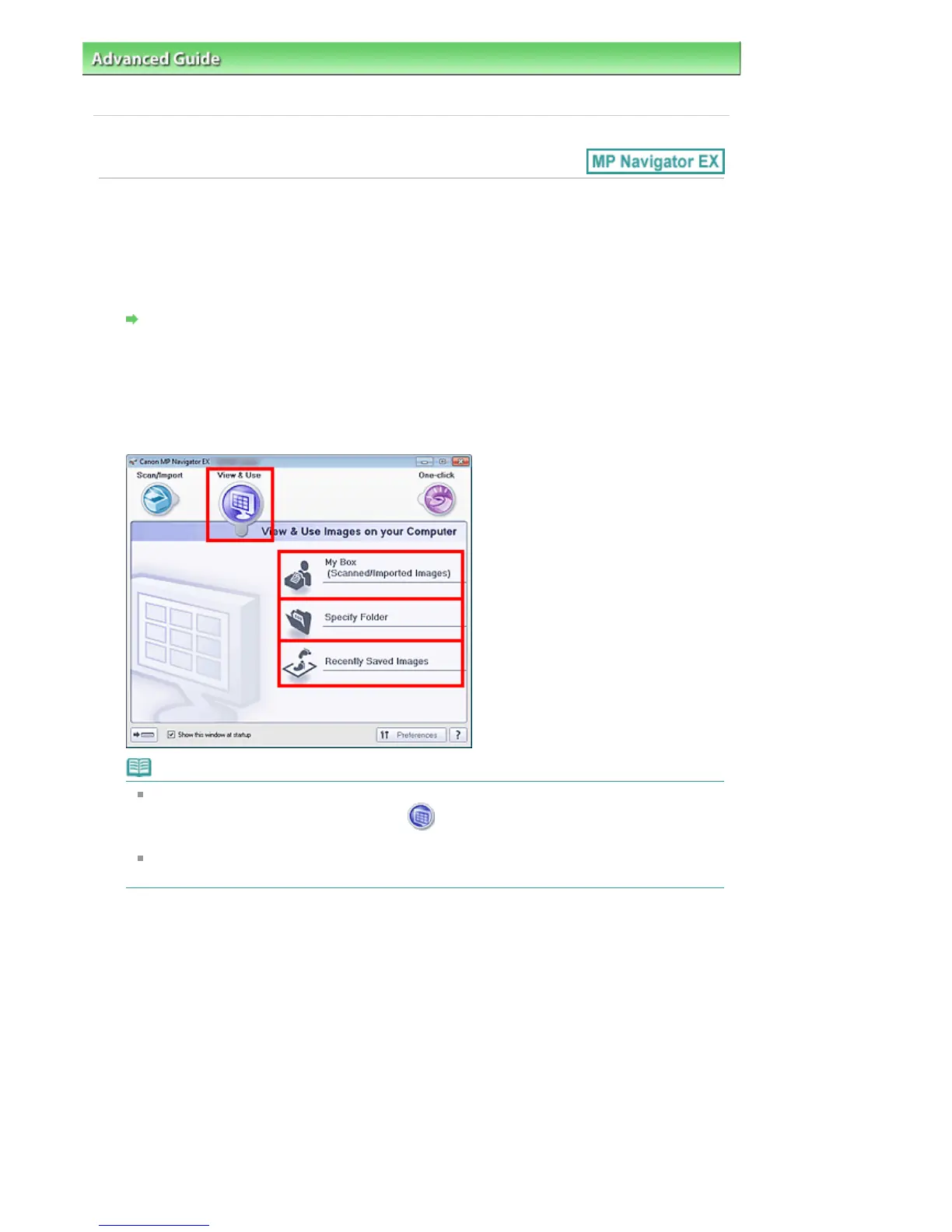
In the Navigation Mode screen, select View & Use and click My Box (Scanned/
Imported Images), Specify Folder, or Recently Saved Images.
Click My Box (Scanned/Imported Images) to open images saved in My Box (Scanned/Imported
Images), click Specify Folder to open images saved in a specific folder, or click Recently Saved
Images to open recently saved images.
Note
If the Show this window at startup checkbox is not selected, the last used screen appears. If
the Scan/Import window is displayed, click (View & Use) on the upper left of the screen.
The View & Use window opens.
See "
View & Use Images on your Computer Tab " for details on the View & Use Images on your
Computer tab.
3.
Click the folder containing the images you want to open.
Images saved in the folder appear in the Thumbnail window.
Seite 537 von 922 SeitenOpening Images Saved on a Computer















 To Next Page