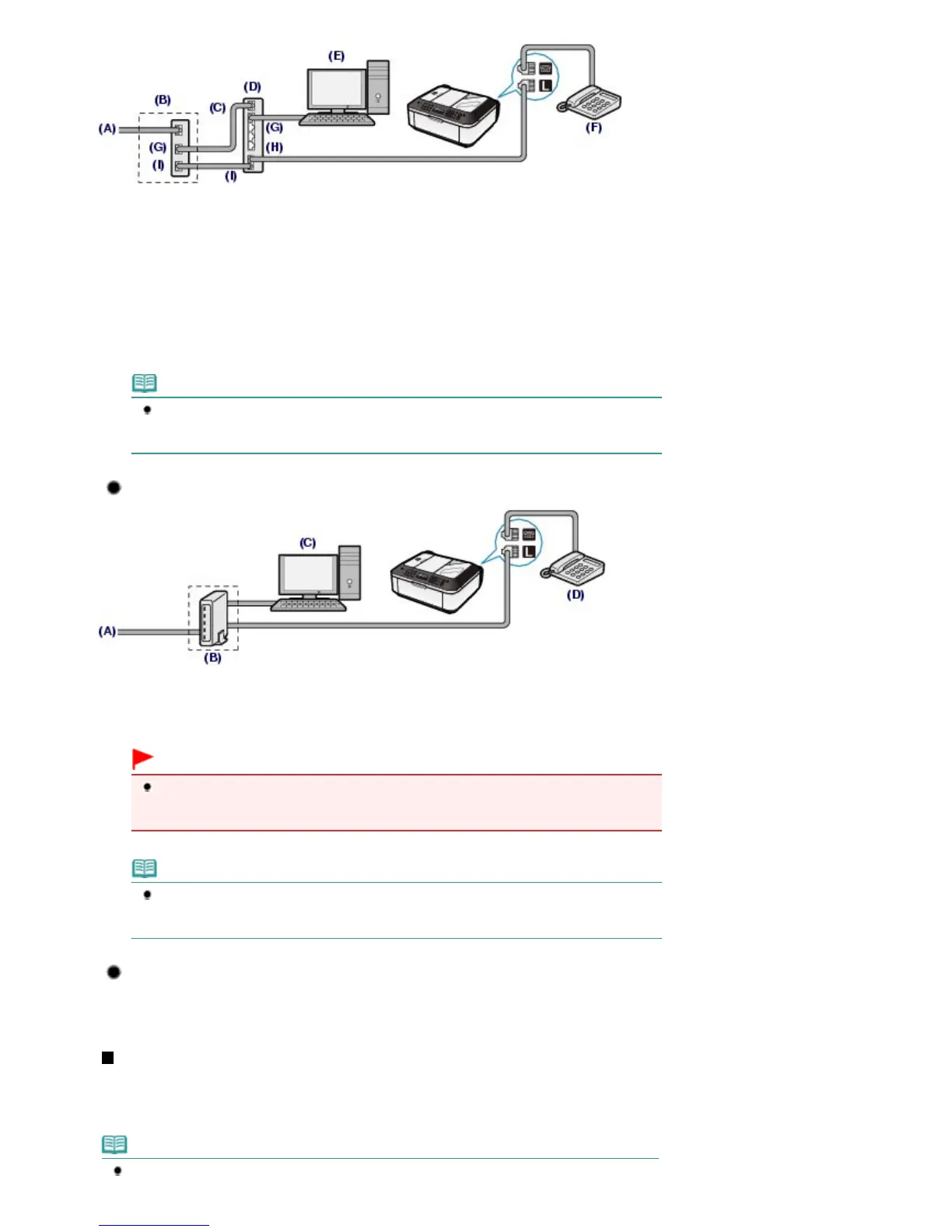
(A) Digital Subscriber Line
(B) xDSL modem (splitter may not be built-in to the modem)
(C) WAN (Wide Area Network)
(D) Broadband router compatible with Internet Telephone
(E) Computer
(F) Telephone or answering machine
(G) LAN (Local Area Network)
(H) TEL
(I) LINE
*Port configurations and names may vary depending on the product.
Note
When connecting to the xDSL line, select the same line type as you are subscribing to in
Telephone line type.
See Setting the Telephone Line Type
.
Connecting to an xDSL
(A) Analog Subscriber Line
(B) xDSL modem (splitter may not be built-in to the modem)
(C) Computer
(D) Telephone or answering machine
Important
When the splitter is not built-in to the modem, do not branch the telephone line before the
splitter (wall side). And also, do not connect splitters in parallel. The machine may not be able
to operate properly.
Note
When connecting to the xDSL line, select the same line type as you are subscribing to in
Telephone line type.
See Setting the Telephone Line Type
.
Connecting to an ISDN Line
For details on ISDN (Integrated Service Digital Network) connection and settings, refer to the
manuals supplied with your terminal adapter or dial-up router.
Setting the Telephone Line Type
Before using your machine, make sure you set the correct telephone line type for your telephone line. If
you are unsure of your telephone line type, contact your telephone company. For xDSL or ISDN
connections, contact the telephone company or service provider to confirm your line type.
Note
Telephone line type will not appear in countries or regions where Rotary pulse is not supported.
Seite 16 von 922 SeitenConfirming the Telephone Line Connection















 To Next Page