Advanced Guide
>
Faxing
>
Registering Recipients for Speed Dialing
>
Using Speed Dial Utility
> Speed
Dial Utility Dialog box
F029
Speed Dial Utility Dialog box
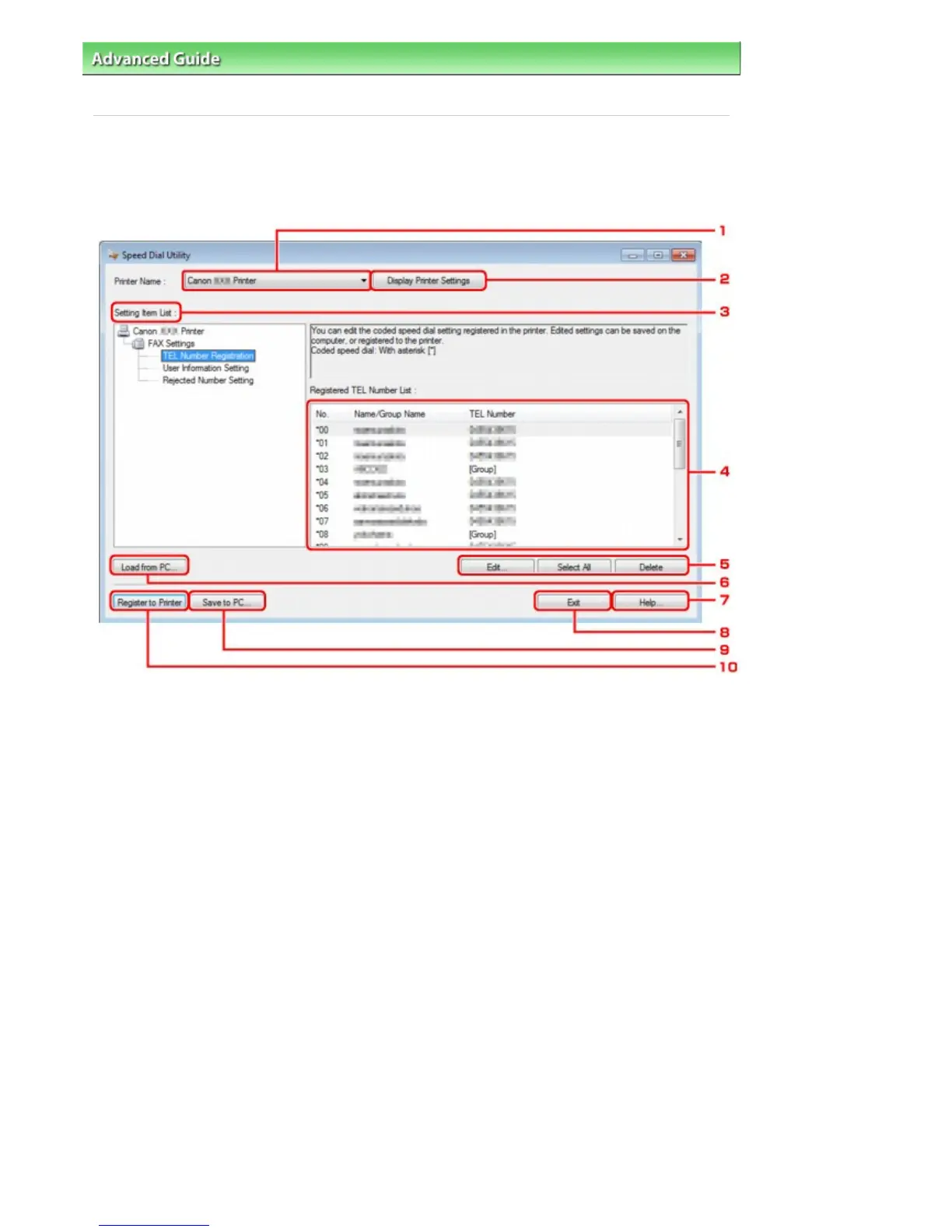
The following items are on the Speed Dial Utility dialog box.
1.
Printer Name
Selects the machine for editing the registered information using Speed Dial Utility.
2.
Display Printer Settings
Loads the registered information on the machine selected for Printer Name into Speed Dial Utility.
3.
Setting Item List
Selects the registered information for editing. Choose one item from TEL Number Registration,
User Information Setting, and Rejected Number Setting.
4.
Registered information list
Displays the registered information selected for Setting Item List.
5.
Edit.../Select All/Delete
Edits/deletes the registered information or selects all the registered information selected for Setting
Item List.
When multiple items on the registered information list are selected, you cannot use the Edit...
button.
6.
Load from PC...
Displays the registered information saved on the computer.
7.
Help...















 To Next Page