Advanced Guide
>
Printing from a Computer
>
Printing with Other Application Software
>
Changing the
Print Quality and Correcting Image Data
> Adjusting Intensity
P019
Adjusting Intensity
You can dilute (brighten) or intensify (darken) the colors of the overall image data during printing.
The following sample shows the case when the intensity is increased so that all colors become more
intense when the image data is printed.
No adjustment
Higher intensity
The procedure for adjusting intensity is as follows:
You can also set intensity on the Quick Setup tab by choosing Photo Printing under Commonly Used
Settings, and then choosing Color/Intensity Manual Adjustment under Additional Features.
1.
Open the
printer driver setup window
2.
Select the manual color adjustment
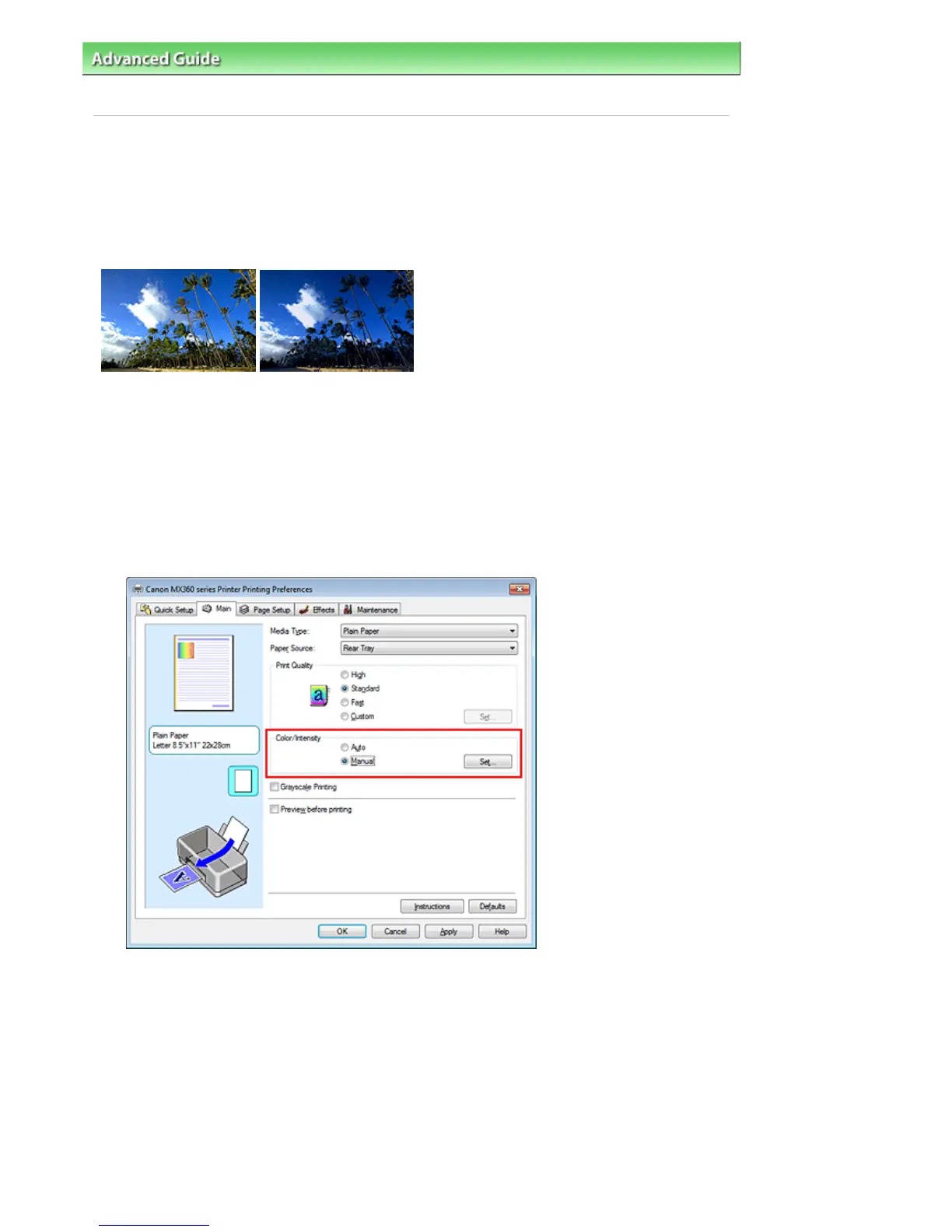
Select Manual for Color/Intensity on the Main tab, and click Set....
The Manual Color Adjustment dialog box opens.
3.
Moving the Intensity slider to the right intensifies (darkens) the colors. Moving the slider to the left
dilutes (brightens) the colors.
You can also directly enter a value linked to the slider. Enter a value in the range from -50 to 50. The
current settings are displayed in the settings preview on the left side of the printer driver.
After adjusting each color, click OK.
Seite 325 von 922 SeitenAdjusting Intensity















 To Next Page