Advanced Guide
>
Scanning
>
Scanning with Other Application Software
>
ScanGear (Scanner Driver)
Screens
> Advanced Mode Tab
S803
Advanced Mode Tab
This mode allows you to make advanced scan settings such as the color mode, output resolution,
image brightness and color tone.
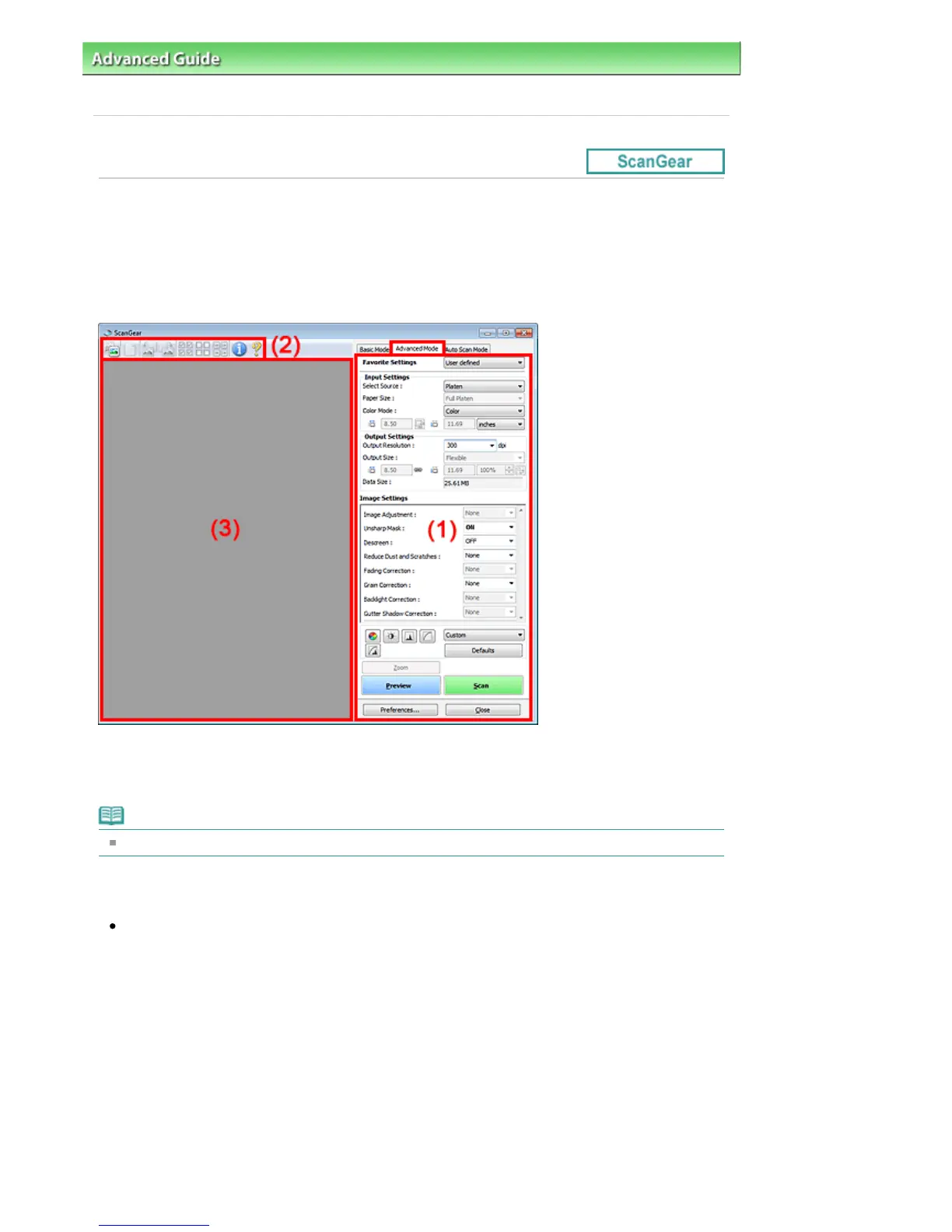
This section describes the settings and functions available on the Advanced Mode tab.
When scanning from the ADF (Auto Document Feeder), documents are scanned without preview.
(1)
Settings and Operation Buttons
(2)
Toolbar
(3)
Preview Area
Note
The displayed items vary by document type and how the screen was opened.
Settings and Operation Buttons
Favorite Settings
You can name and save a group of settings (Input Settings, Output Settings, Image Settings and
Color Adjustment Buttons) on the Advanced Mode tab, and load it as required. It is convenient to
save a group of settings if you will be using it repeatedly. You can also use this to reload the default
settings.
Select Add/Delete... from the pull-down menu and the Add/Delete Favorite Settings dialog box
opens.
Seite 580 von 922 SeitenAdvanced Mode Tab















 To Next Page