Advanced Guide
>
Scanning
>
Other Scanning Methods
> Scanning with WIA Driver
S604
Scanning with WIA Driver
You can scan an image from a Windows Imaging Acquisition (WIA)-compliant application and edit/print
the scanned image.
WIA is a driver model implemented in Windows XP or later. It allows you to scan documents without
using an application.
The procedure varies depending on the application. The following procedures are examples only.
For details, refer to the application's manual.
Important
Some applications do not support continuous scanning from the ADF (Auto Document Feeder). For
details, refer to the application's manual.
Scanning with WIA Driver 2.0
The following is an example of scanning using "Windows Fax and Scan."
1.
Place the document on the Platen or ADF.
Placing Documents
2.
Click Scan... from New on the File menu.
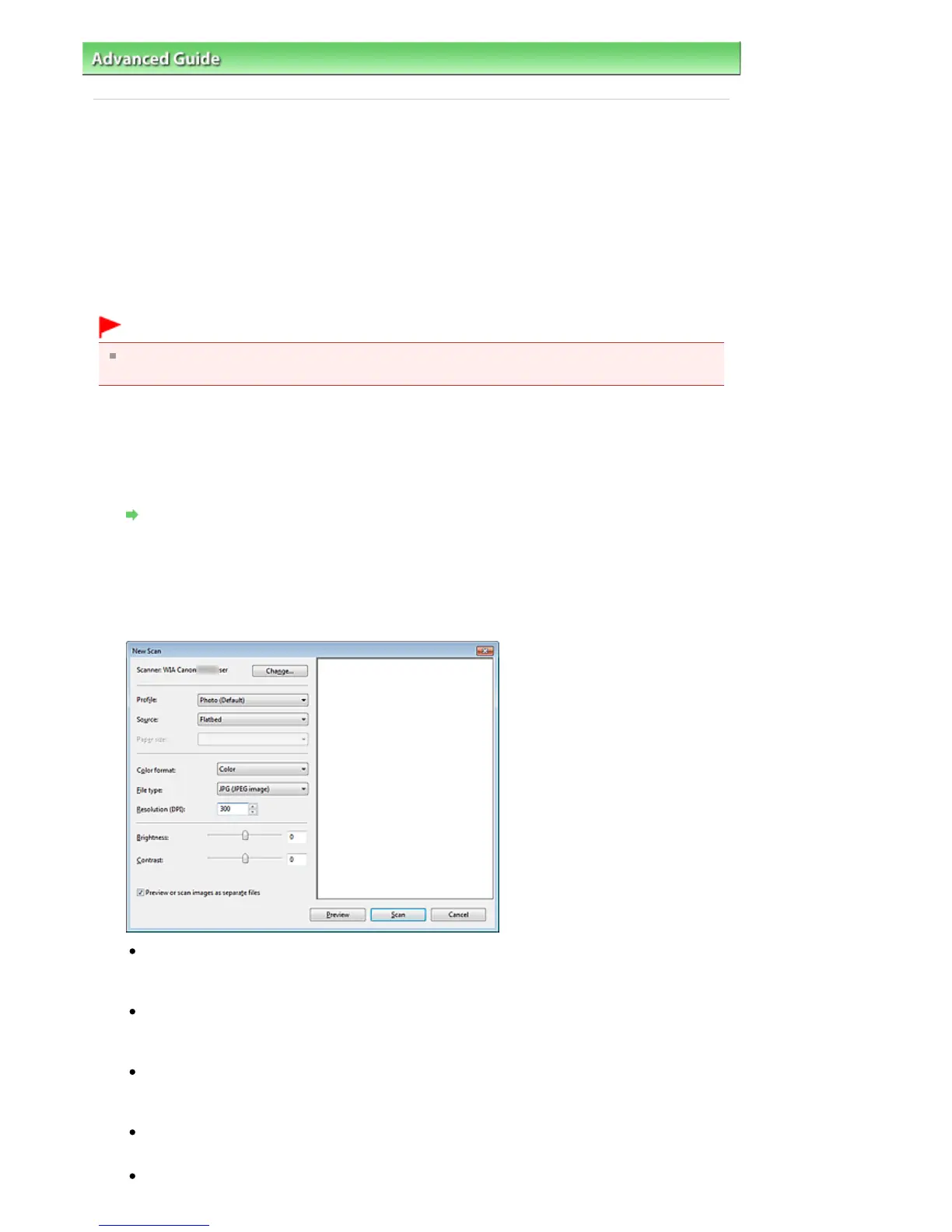
The scan setting screen appears.
3.
Specify the settings.
Scanner
The currently set product name is displayed. To change the scanner, click Change... and select
the product you want to use.
Profile
Select Photo (Default) or Documents according to the document to be scanned. To save a new
Profile, select Add profile.... You can specify the details in the Add New Profile dialog box.
Source
Select a scanner type. To scan from the Platen, select Flatbed. To scan from the ADF, select
Feeder (Scan one side).
Paper size
Select the paper size. Paper size can be specified only when Source is Feeder (Scan one side).
Color format
Seite 616 von 922 SeitenScanning with WIA Driver















 To Next Page