Advanced Guide
>
Printing from a Computer
>
Printing with Other Application Software
>
Various Printing
Methods
> Setting Paper Dimensions (Custom Size)
P010
Setting Paper Dimensions (Custom Size)
You can specify the height and width of paper when its size cannot be selected from the Page Size. Such
a paper size is called "custom size."
The procedure for specifying a custom size is as follows:
You can also set a custom size in Printer Paper Size on the Quick Setup tab.
1.
Set the custom size in the application software
Specify the custom size in the paper size setting of your application software.
Important
When the application software that created the document has a function for specifying the
height and width values, use the application software to set the values. When the application
software does not have such a function or if the document does not print correctly, use the
printer driver to set the values.
2.
Open the
printer driver setup window
3.
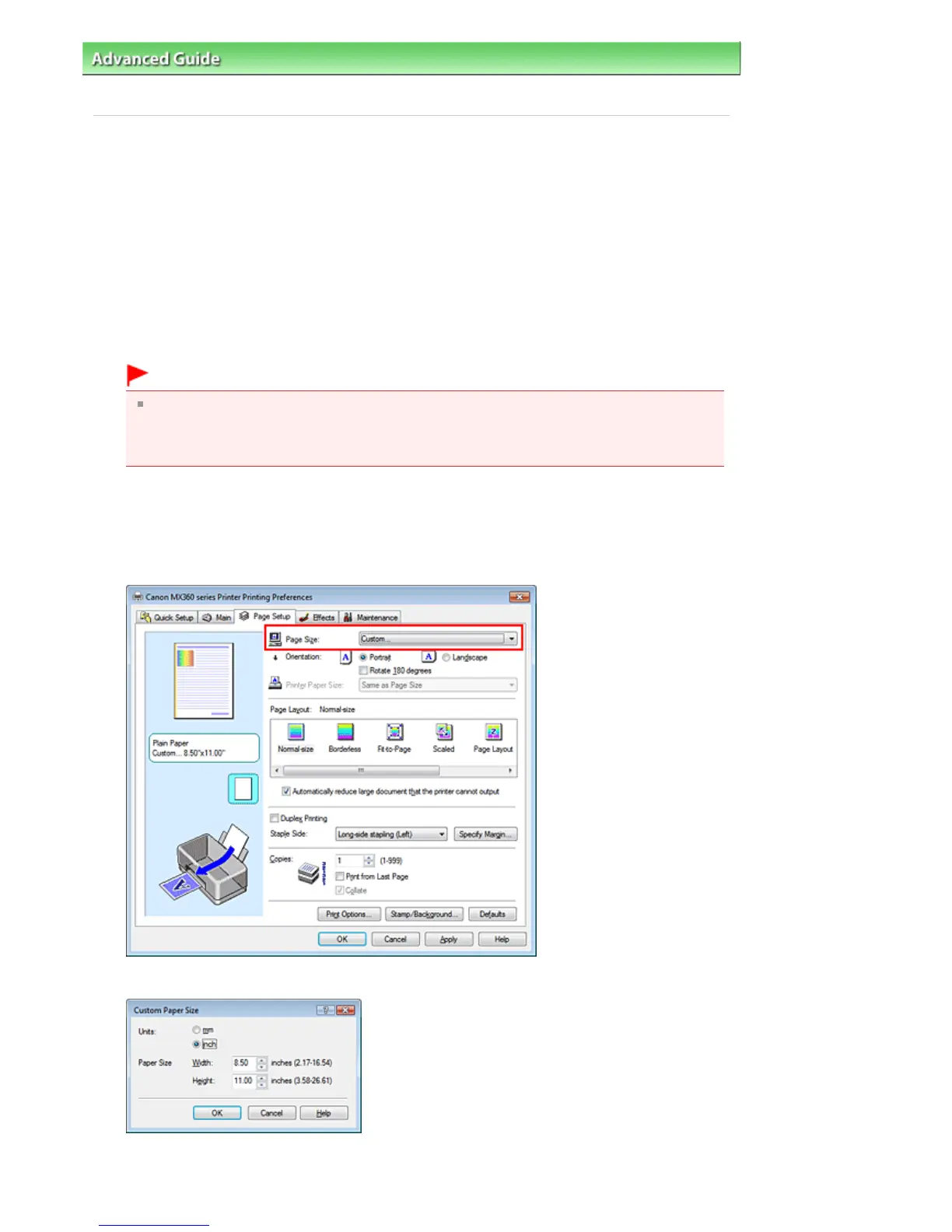
Select the paper size
Select Custom... for Page Size on the Page Setup tab.
The Custom Paper Size dialog box opens.
4.
Set the custom paper size
Seite 305 von 922 SeitenSetting Paper Dimensions (Custom Size)















 To Next Page