Advanced Guide
>
Scanning
>
Scanning with the Bundled Application Software
>
Useful MP Navigator EX
Functions > Classifying Images into Categories
S403
Classifying Images into Categories
Display images scanned with MP Navigator EX by category. You can classify images displayed in
Unclassified automatically, and also create custom categories. You can drag and drop an image to
move it from one category to another.
Note
If you have classified the images in MP Navigator EX 2.0 or later and then upgrade MP Navigator EX
to the latest version, the classification information on the second latest version is transferred upon
initial startup. After the initial startup, the classification information cannot be transferred.
1.
Scan documents into MP Navigator EX and save them, then open the View & Use
window from the Navigation Mode screen.
Note
See "
Let's Try Scanning
" to scan images into MP Navigator EX.
You can also select images saved on a computer.
Opening Images Saved on a Computer
2.
In
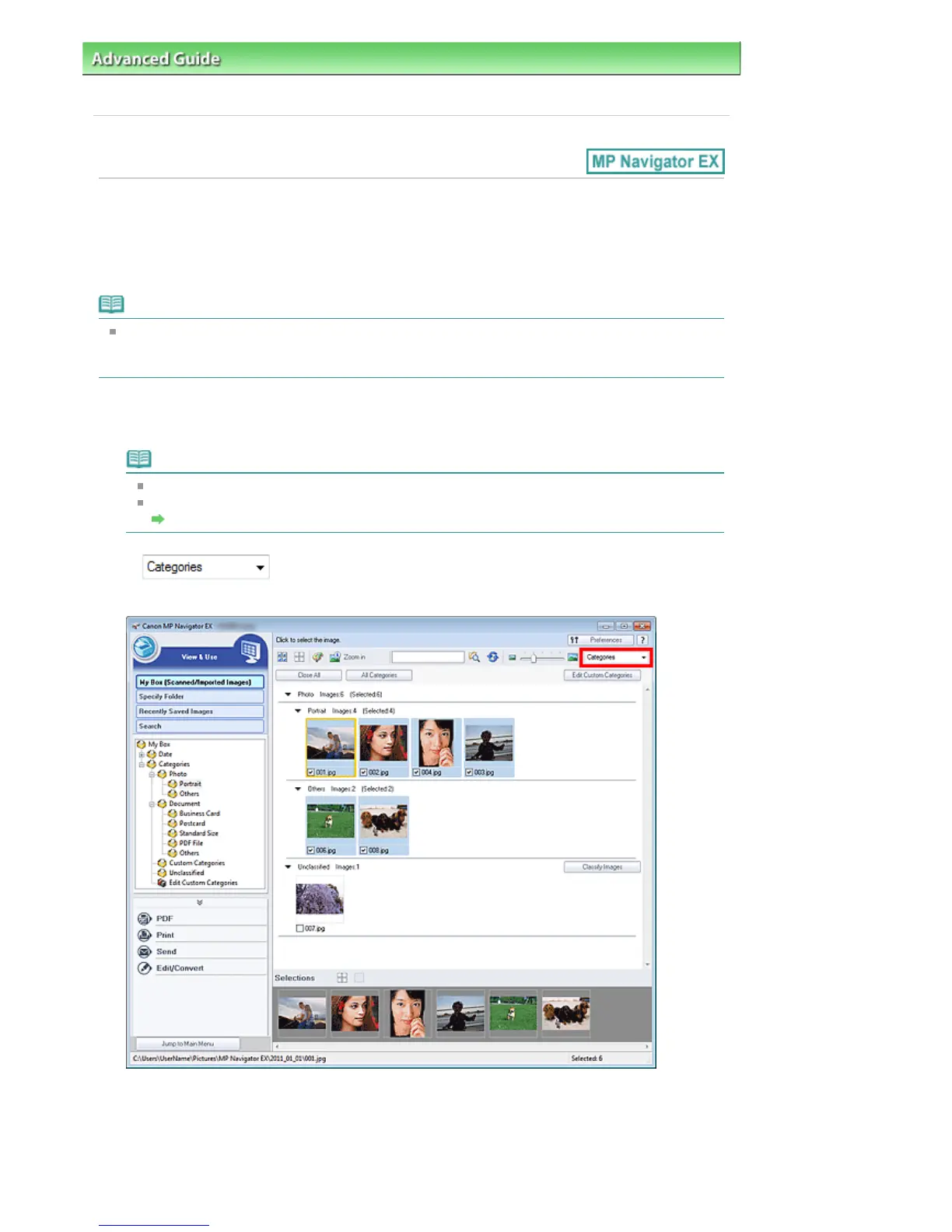
(Sort by), select Categories.
Images are automatically sorted by category and appear in the Thumbnail window.
Images are sorted into the following categories.
Photo: Portrait, Others
Document: Business Card, Postcard, Standard Size, PDF File, Others
Custom Categories: Displays your custom categories.
To create custom categories, see "
Creating Custom Categories
."
Seite 422 von 922 SeitenClassifying Images into Categories















 To Next Page