Advanced Guide
>
Printing from a Computer
>
Printing with the Bundled Application Software
>
Other
Settings
> Changing Background
A081
Changing Background
You can change the background of each page.
Important
You cannot change the background of the Stickers and Layout Print.
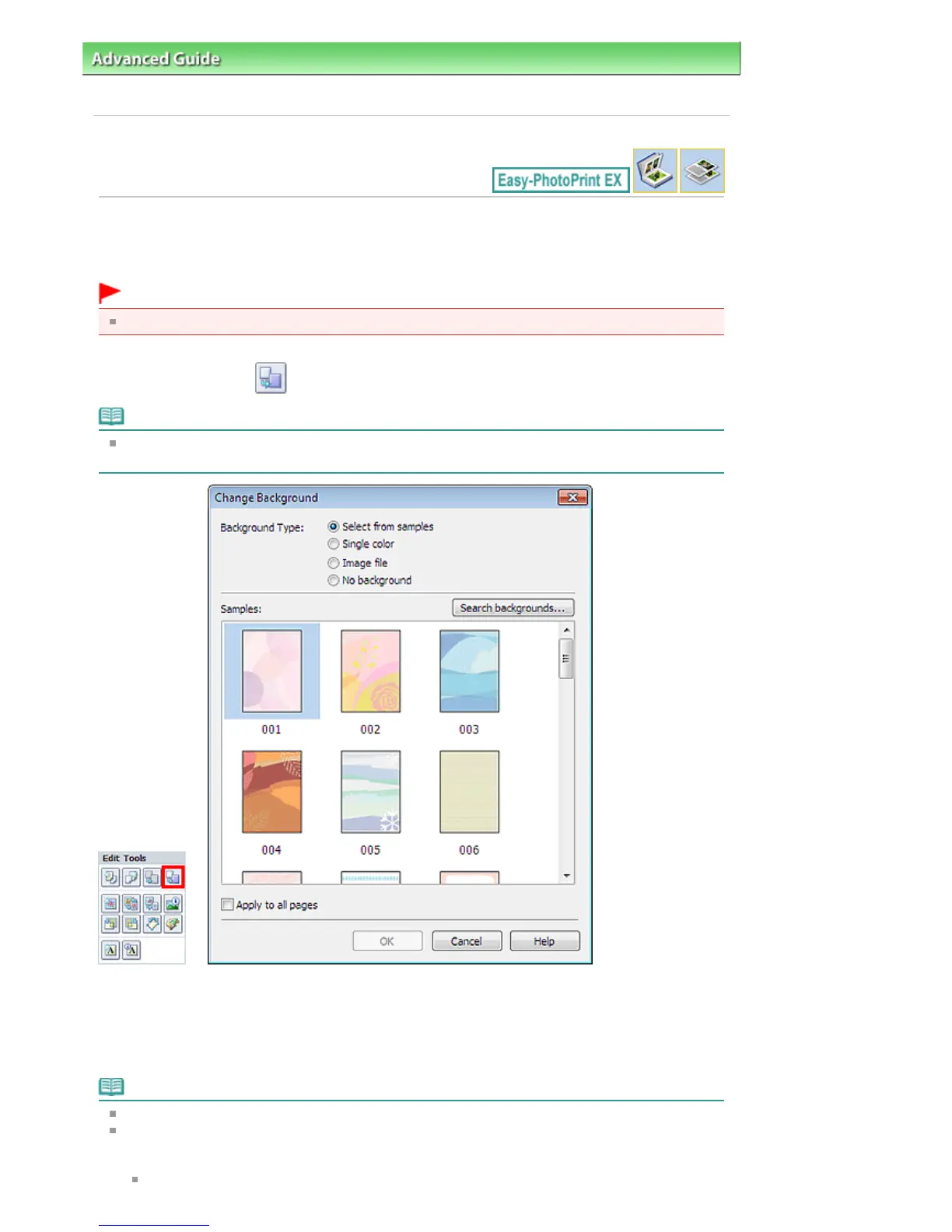
Click Background... in the Page Setup screen or select the page you want to change the background of in
the Edit screen, then click (Change Background).
Note
The screen(s) for Album printing is (are) used as example(s) in the following descriptions. The
screen(s) may vary depending on what you create.
Select the type of background you want to use in the Change Background dialog box.
When Select from samples Is Selected
Select the image you want to use from Samples and click OK.
Note
Select from samples will be displayed only if Album has been selected.
Various backgrounds are available on our website besides those saved in the application.
Click Search backgrounds... to access the Canon website from which you can download additional
materials for free.
Internet connection is required to access the website. Internet connection fees apply.
Seite 250 von 922 SeitenChanging Background



 To Next Page