Advanced Guide
>
Printing from a Computer
>
Printing with the Bundled Application Software
>
Downloading Images from Photo Sharing Sites
> Import Photos from Photo Sharing Sites Window
A171
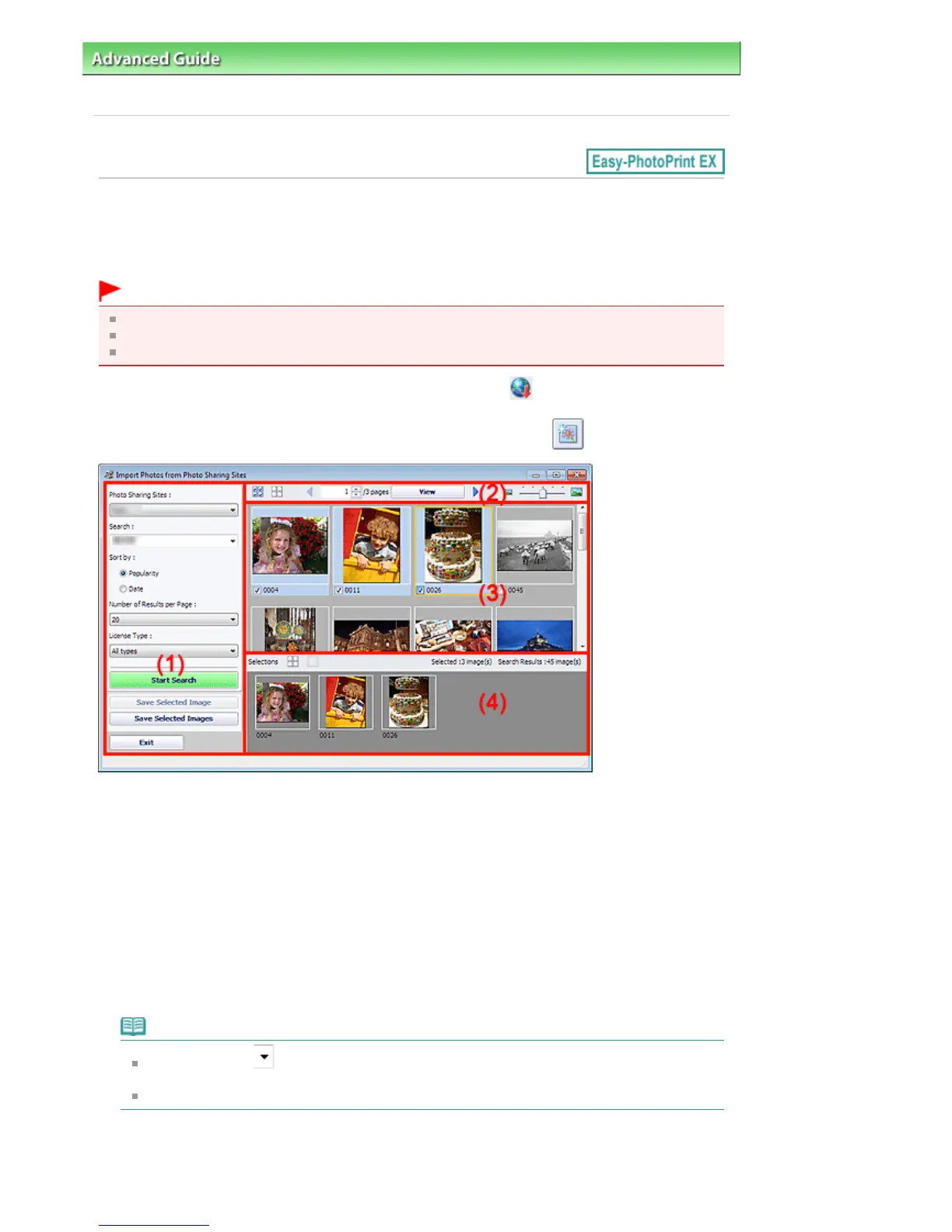
Import Photos from Photo Sharing Sites Window
In this window, you can search for images on photo sharing sites on the Internet and download the
images you want to print.
Important
Internet connection is required to use this function. Internet connection fees apply.
This function is supported under Windows XP or later.
This product uses the Flickr API but is not endorsed or certified by Flickr.
To display the Import Photos from Photo Sharing Sites window, click (Import photos from photo
sharing sites) in the Select Images screen or Add Image dialog box. To display the Add Image dialog
box, select the page you want to add images to in the Edit screen, then click
(Add Image).
(1)
Settings and Operation Buttons Area
(2)
Toolbar
(3)
Thumbnail Window
(4)
Selections Area
(1) Settings and Operation Buttons Area
Photo Sharing Sites
Displays the name of the photo sharing site.
Search
Enter the search text.
Note
Alternatively, click
(Down arrow) to display up to 20 search history records and select
among them.
When you want to enter multiple keywords, insert a space between the keywords.
Sort by
Select how to sort the search results in the Thumbnail window. Select Popularity or Date.
You cannot change the setting after a search.
Seite 226 von 922 SeitenImport Photos from Photo Sharing Sites Window















 To Next Page