Advanced Guide
>
Printing Using the Operation Panel of the Machine
>
Copying > Making Copies
U031
Making Copies
This section describes the basic procedure to make copies. Refer also to
Copying
.
1.
Make sure that the machine is turned on.
2.
Press the
COPY
button.
The Copy standby screen is displayed.
3.
Load paper.
4.
Load the original document on the Platen Glass or in the ADF.
Note
For details on the types and conditions of originals which you can copy, refer to
Loading Paper /
Originals
.
5.
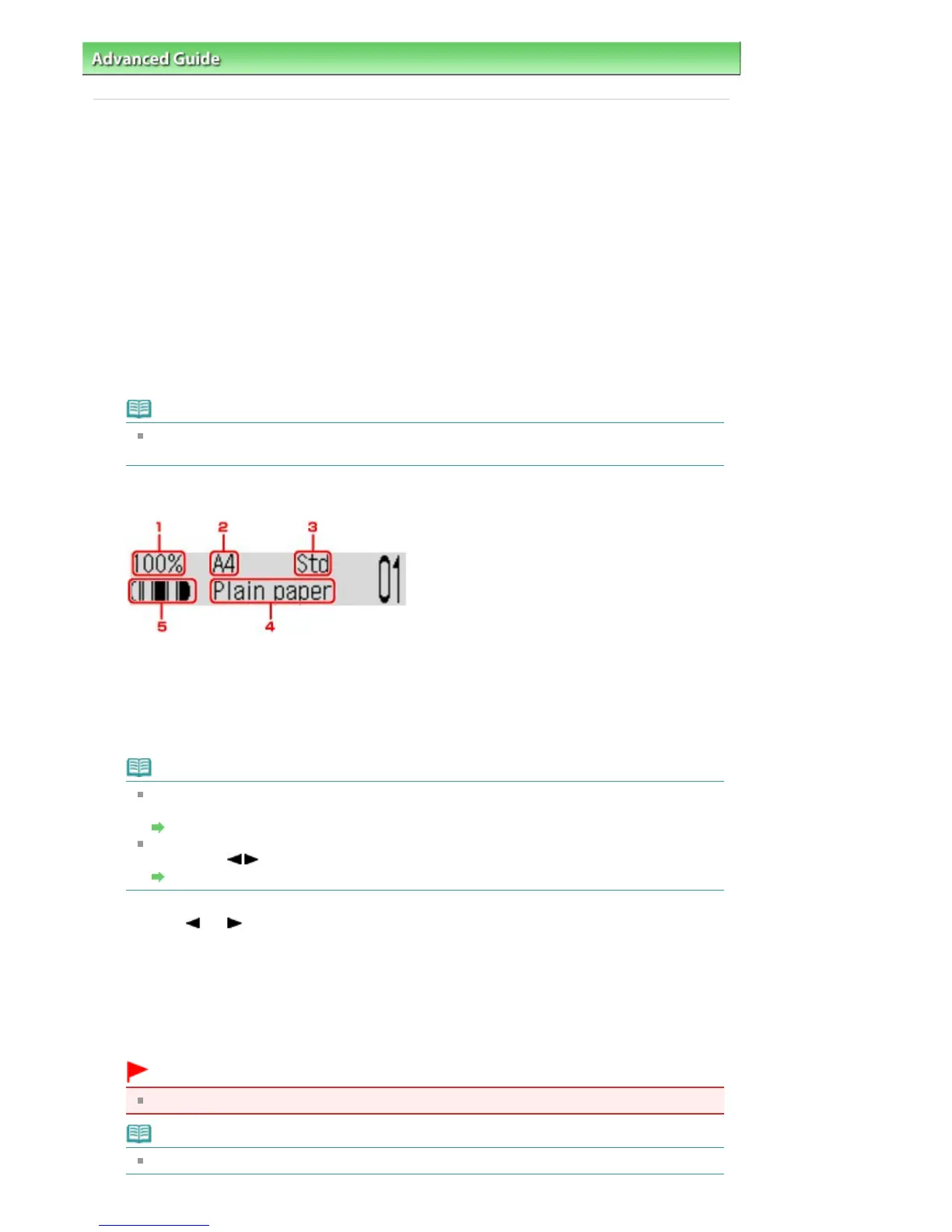
Confirm the page size, media type, and other settings.
1.
Magnification
2.
Page size
3.
Image quality
4. Media type
5.
Intensity
Note
To change or confirm the page size, media type, or other settings, press the
Settings
button
repeatedly until the desired setting item appears.
Setting Items
To make copies in various layout, press the
Menu
button to display the Special copy screen,
and use the
button to select a copy menu.
Using Useful Copy Functions
6.
Use the
(-) (+) button or the Numeric buttons to specify the number of copies.
7.
Press the
Color
button for color copying, or the
Black
button for black & white
copying.
The machine starts copying.
Remove the original on the Platen Glass or from the Document Output Slot after copying is
complete.
Important
Do not open the Document Cover or move the original until copying is complete.
Note
To cancel copying, press the
Stop
button.
Seite 348 von 922 SeitenMaking Copies















 To Next Page