Advanced Guide
>
Printing Using the Operation Panel of the Machine
>
Copying
>
Using Useful Copy
Functions
> Making Multiple Copies of an Entire Document (Collated copy)
U067
Making Multiple Copies of an Entire Document (Collated copy)
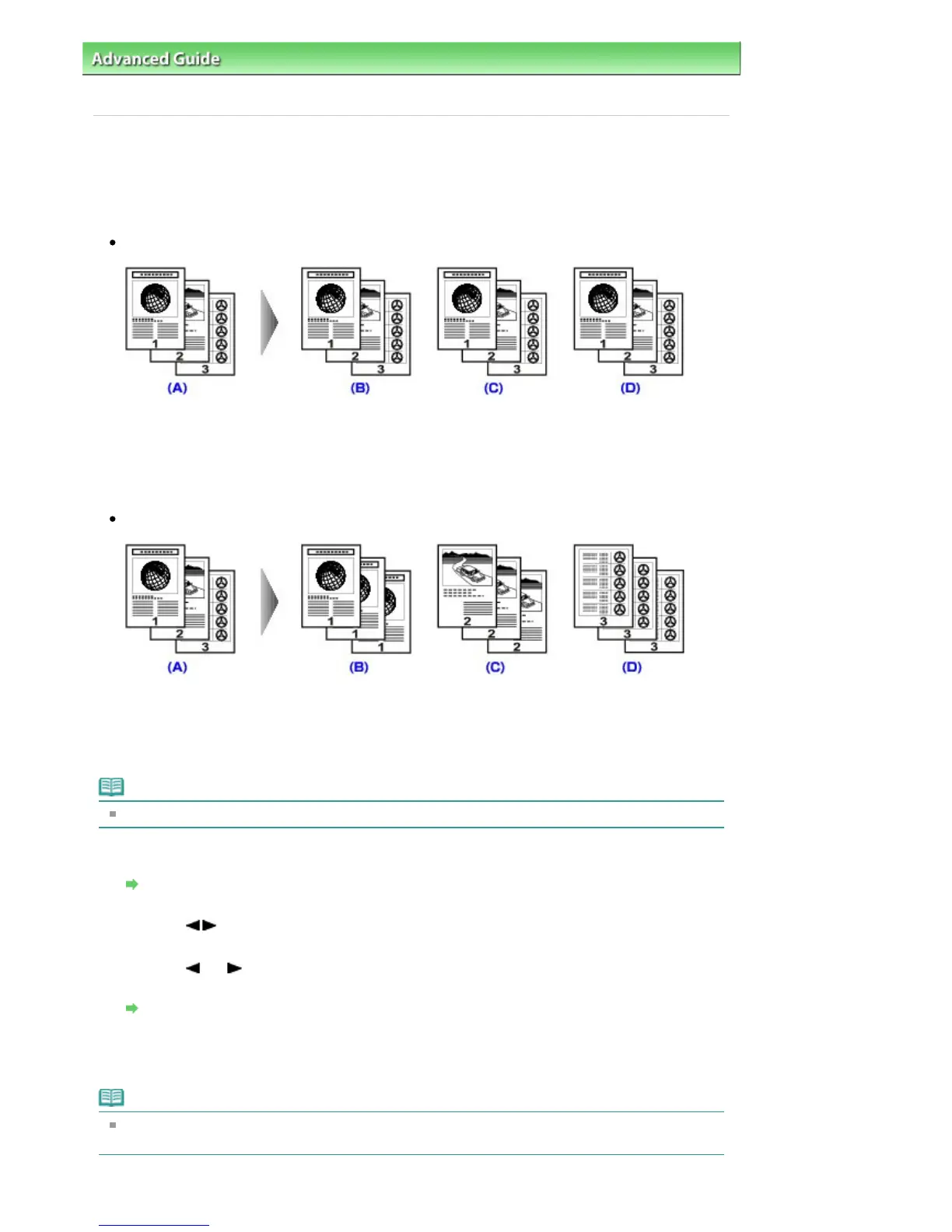
You can obtain sorted printouts when making multiple copies of a multi-paged original.
Collated copy selected.
(A) Originals
(B) Copy 1
(C) Copy 2
(D) Copy 3
Collated copy not selected.
(A) Originals
(B) Copy 1
(C) Copy 2
(D) Copy 3
Note
When you use this function, load the original in the ADF.
1.
Display the Special copy screen.
How to Select a Copy Menu
2.
Use the
button to select Collated copy, then press the
OK
button.
3.
Use the
(-) (+) button or the Numeric buttons to specify the number of copies.
Change the print settings as necessary.
Setting Items
4.
Press the
Color
button for color copying, or the
Black
button for black & white
copying.
Note
The number of pages the machine can read varies with the document. If Memory is full appears on
the LCD when scanning, reduce the number of document pages to scan and try copying again.
Seite 359 von 922 SeitenMaking Multiple Copies of an Entire Document (Collated copy)















 To Next Page