Advanced Guide
>
Scanning
>
Scanning with the Bundled Application Software
>
MP Navigator EX Screens
> View & Use Window
S711
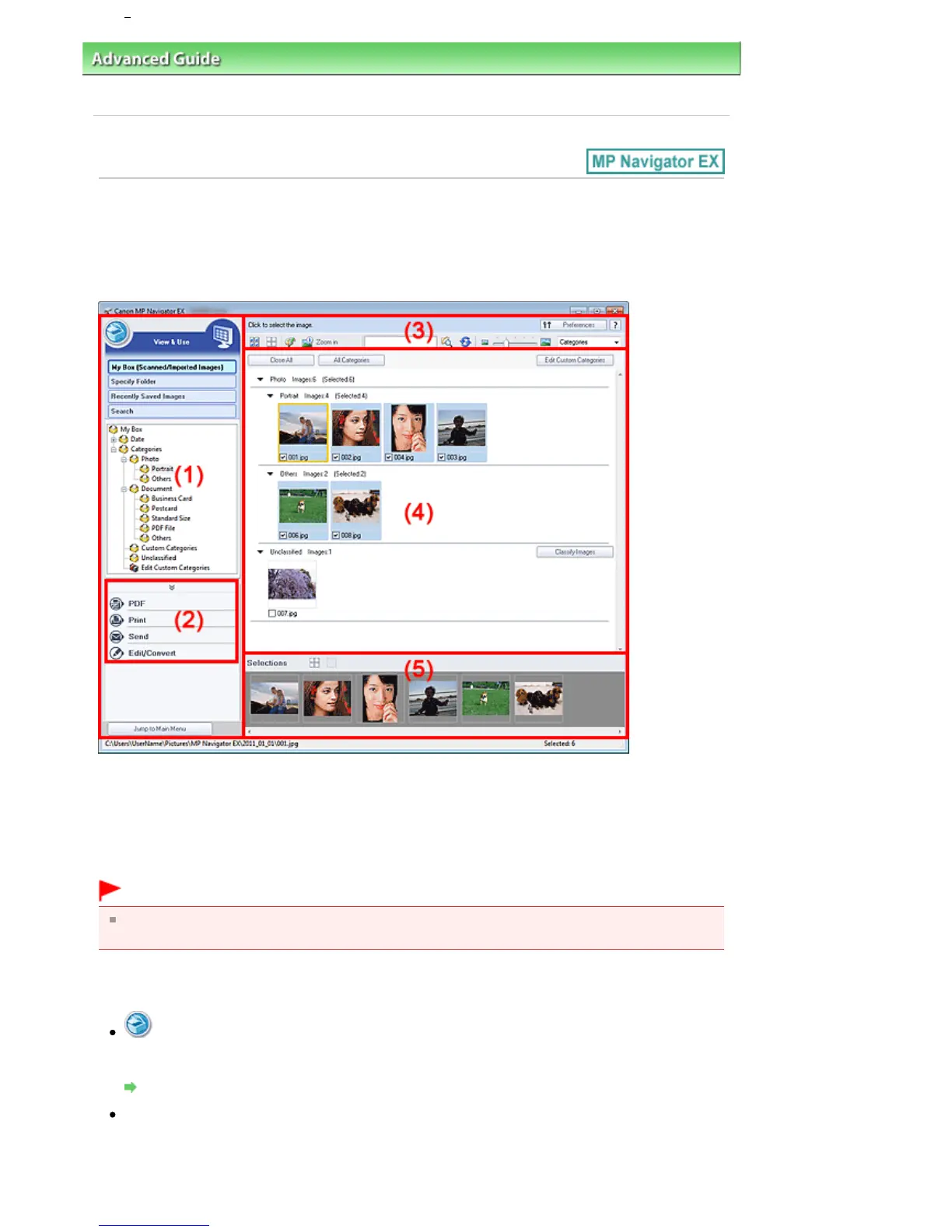
View & Use Window
Select View & Use in the Navigation Mode screen and click My Box (Scanned/Imported Images), Specify
Folder or Recently Saved Images to open the View & Use window.
Open this window to display or use scanned images or images saved on a computer.
(1)
Display Setting Items
(2)
Image Handling Buttons
(3)
Toolbar
(4)
Thumbnail Window
(5)
Selected Images Area
Important
For PDF files, only those created with MP Navigator EX are displayed. You cannot display PDF files
created with other applications. PDF files edited in other applications cannot be displayed as well.
Display Setting Items
(Scan/Import)
Click this when you want to scan photos, documents, magazines, and other printed materials. The
Scan/Import window opens.
Photos/Documents (Platen) Screen (Scan/Import Window)
My Box (Scanned/Imported Images)
Displays folders of images (grouped by year, month/year and month/date/year) in My Box in tree
view. Select a folder to display its contents in the Thumbnail window to the right.
Image date is the scanned, captured, or updated date.
Seite 477 von 922 SeitenView Use Window















 To Next Page