Advanced Guide
>
Scanning
>
Scanning with the Bundled Application Software
>
MP Navigator EX Screens
> Save Dialog Box
S731
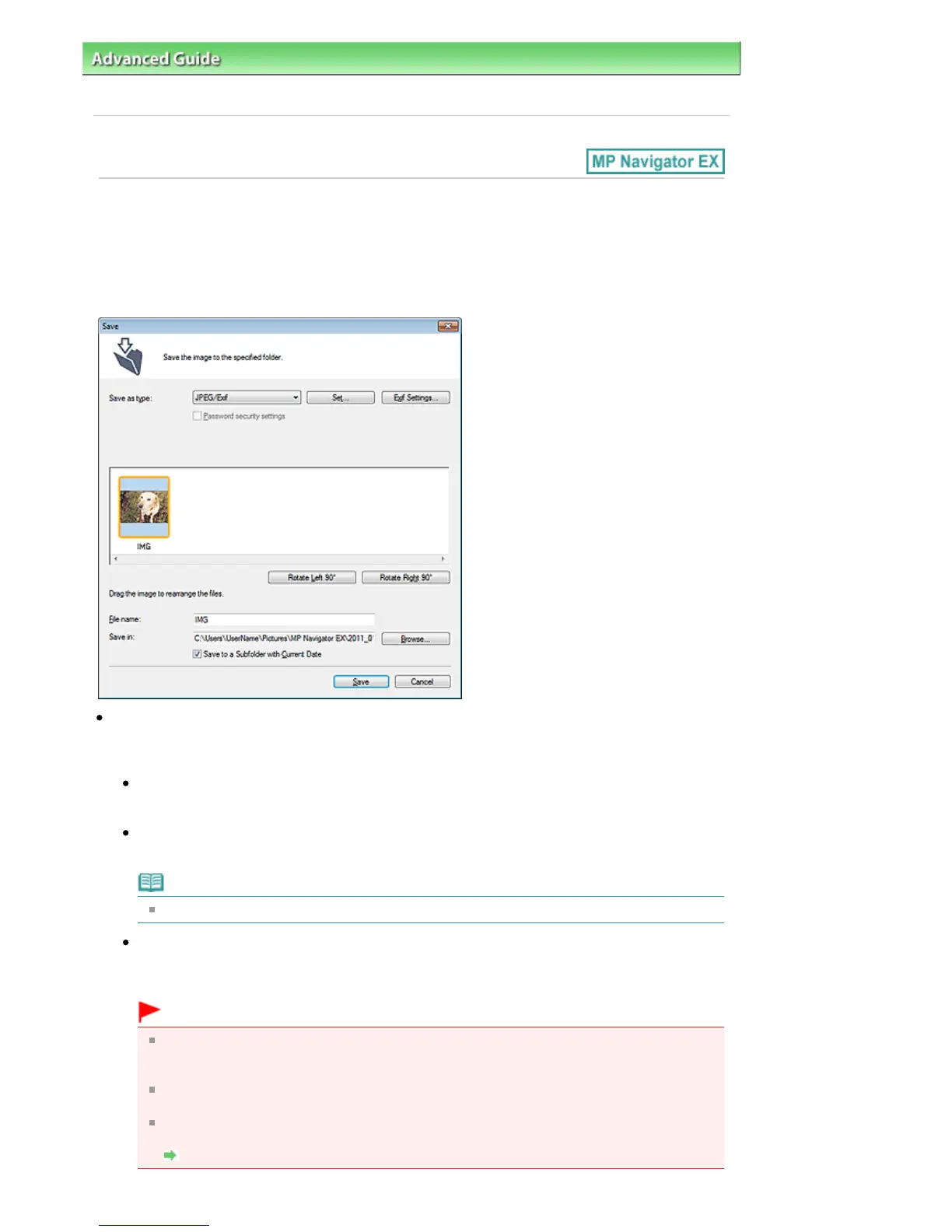
Save Dialog Box
The Save dialog box opens when you scan from the Save dialog box or Custom dialog box of the One-
click Mode screen after selecting Open the save dialog box after scanning the image (Input Exif
information).
You can specify the file type and destination while viewing the thumbnails.
Save as type
Select a file type to save the scanned images.
Select JPEG/Exif, TIFF, BMP, PDF, PDF(Multiple Pages), or PDF(Add Page).
PDF
Save each of the selected images as a separate PDF file.
PDF(Multiple Pages)
Save multiple images in one PDF file.
Note
PDF(Multiple Pages) is displayed when multiple images are scanned.
PDF(Add Page)
Add the scanned images to a PDF file. The images are added to the end of the PDF file. You
cannot rearrange the pages of the PDF file to which the images are added.
Important
Images can only be added to PDF files created with MP Navigator EX. You cannot specify
PDF files created with other applications. PDF files edited in other applications cannot be
specified as well.
PDF(Add Page) cannot be selected for images scanned using the Operation Panel of the
machine.
If a password-protected PDF file is edited, the passwords will be deleted. Reset the
passwords.
Setting Passwords for PDF Files
Seite 509 von 922 SeitenSave Dialog Box















 To Next Page