Advanced Guide
>
Scanning
>
Scanning with the Bundled Application Software
>
MP Navigator EX Screens
> Scan Settings Dialog Box (Scanner Button Settings)
S743
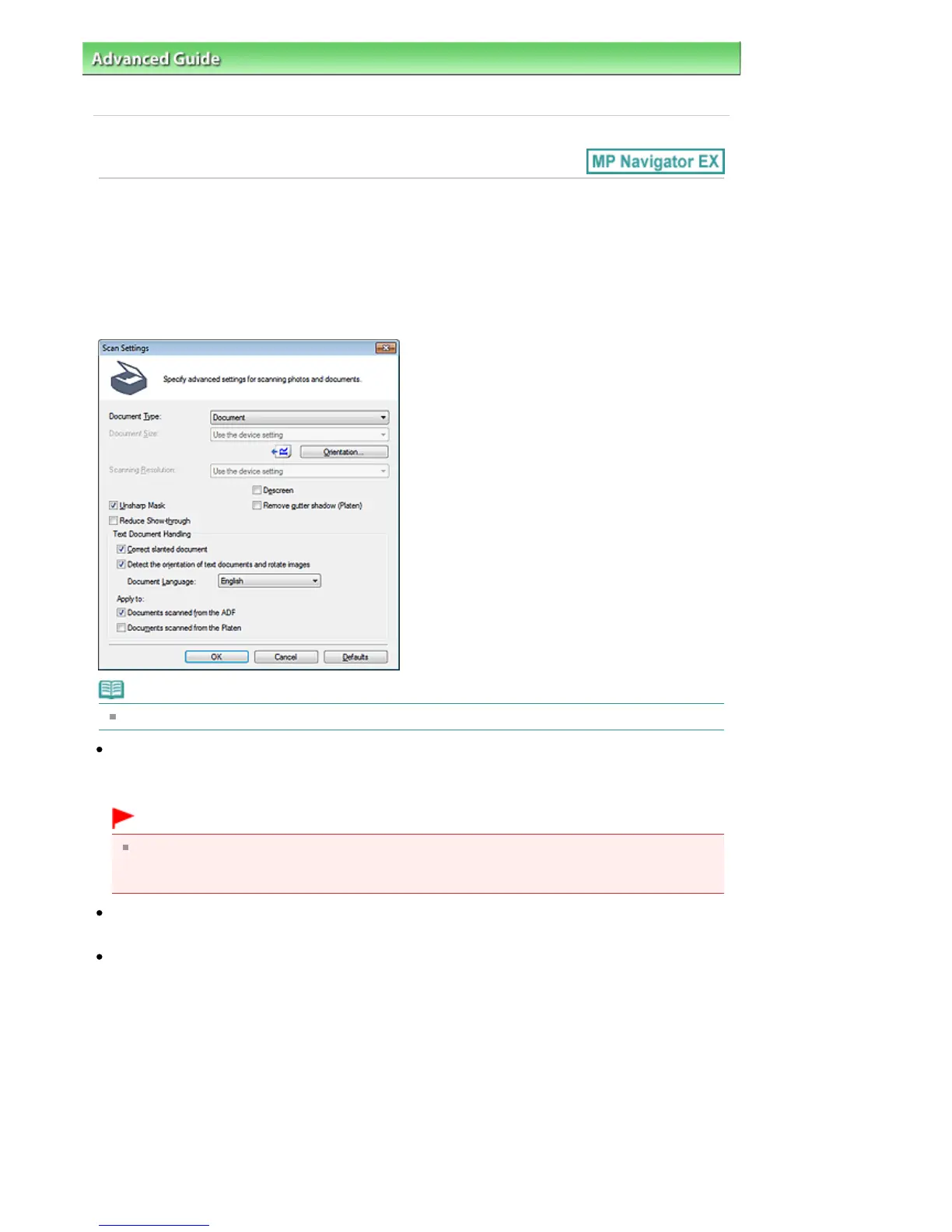
Scan Settings Dialog Box (Scanner Button Settings)
The Scan Settings dialog box opens when you click Specify... on the Scanner Button Settings tab of the
Preferences dialog box.
In the Scan Settings dialog box, you can make advanced scan settings.
See "
Setting Items on the Operation Panel of the Machine
" for details on the items to be set using the
Operation Panel of the machine.
Note
The displayed items vary by document type and how the screen was opened.
Document Type
The Document Type specified in the Scanner Button Settings tab of the Preferences dialog box is
displayed. When Auto Scan is selected, the document type is automatically detected.
Important
Place documents correctly according to the type of document to be scanned. Otherwise,
documents may not be scanned correctly.
See "
Placing Documents
" for details on how to place documents.
Document Size
Set this item using the Operation Panel of the machine.
Orientation...
Set the orientation of the documents to scan from the ADF (Auto Document Feeder).
Seite 533 von 922 SeitenScan Settings Dialog Box (Scanner Button Settings)















 To Next Page