Adjusting Tone Curve
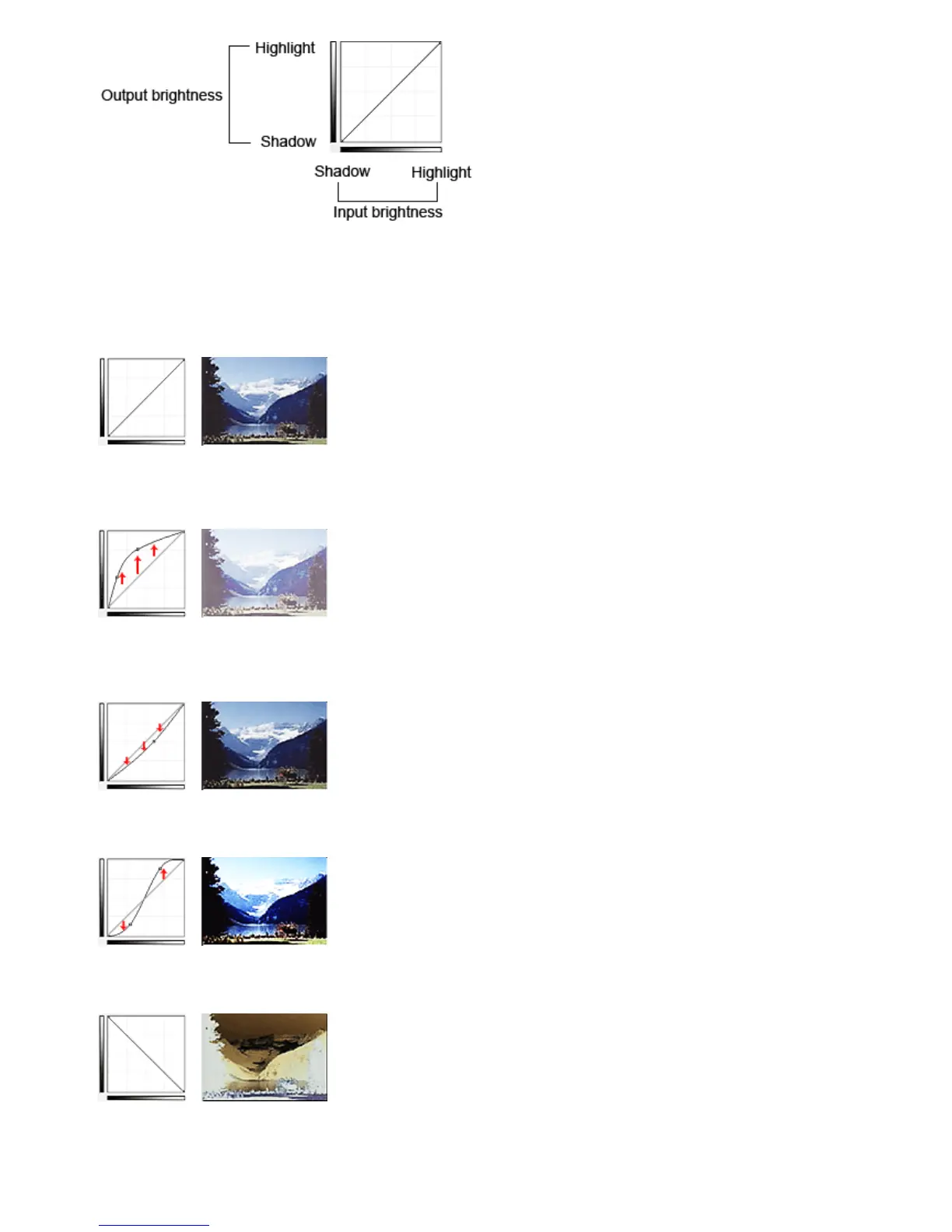
In Select Tone Curve, select a tone curve from No correction, Overexposure, Underexposure, High
contrast, Reverse the negative/positive image and Edit custom curve.
No correction (No adjustment)
Overexposure (Convex curve)
The midtone data of the input side is stretched toward the highlight of the output side, resulting in a
bright-toned image when viewed on a monitor.
Underexposure (Concave curve)
The midtone data of the input side is stretched toward the shadow of the output side, resulting in a dark-
toned image when viewed on a monitor.
High contrast (S curve)
The highlight and shadow of the input side are enhanced, resulting in a high-contrast image.
Reverse the negative/positive image (Downward-sloping line)
The input and output sides are reversed, resulting in a negative-positive inverted image.
Edit custom curve
You can drag specific points on the Tone Curve to freely adjust the brightness of the corresponding
areas.
Seite 570 von 922 SeitenAdjusting Tone Curve















 To Next Page