Advanced Guide
>
Faxing
>
Registering Recipients for Speed Dialing
>
Using Speed Dial Utility
>
Changing a Fax/telephone Number Using Speed Dial Utility
F032
Changing a Fax/telephone Number Using Speed Dial Utility
Follow the procedure below to change fax/telephone numbers.
Note
Before you change fax/telephone numbers using Speed Dial Utility, make sure that no fax
operations are in progress.
1.
Start up Speed Dial Utility.
Starting Up Speed Dial Utility
2.
Select the machine from the Printer Name list box, then click Display Printer
Settings.
3.
Click TEL Number Registration from Setting Item List.
The list of registered fax/telephone numbers is displayed.
4.
Select a code to change from the list, then click Edit....
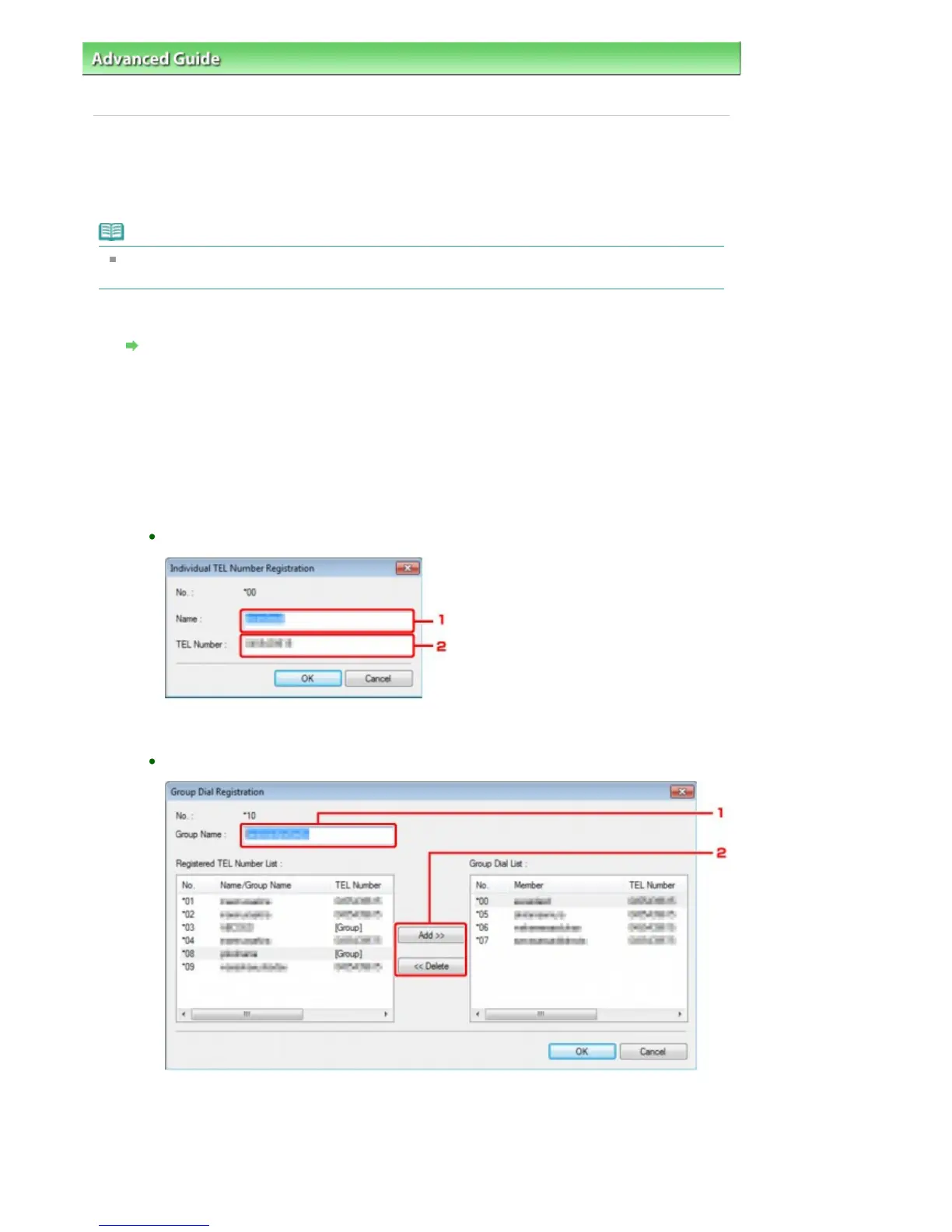
If an individual fax/telephone number is selected:
1.
Enter the new name.
2.
Enter the new fax/telephone number.
If a group dial is selected:
1.
Enter the new group name.
2.
Add or delete a member to/from the group dial.
To add a member:
Select the code to add to the group dial, then click Add.
To delete a member:
Seite 670 von 922 SeitenChanging a Fax/telephone Number Using Speed Dial Utility















 To Next Page