Garmin G2000 Pilot’s Guide for the Cessna T240
190-01263-01 Rev. A98
Flight inStrumentS
SyStem
oVerVieW
Flight
inStrumentS
eiS
Audio pAnel
& cnS
Flight
mAnAgement
hAzArd
AVoidAnce
AFcS
AdditionAl
FeAtureS
AppendiceSindeX
Wind dAtA
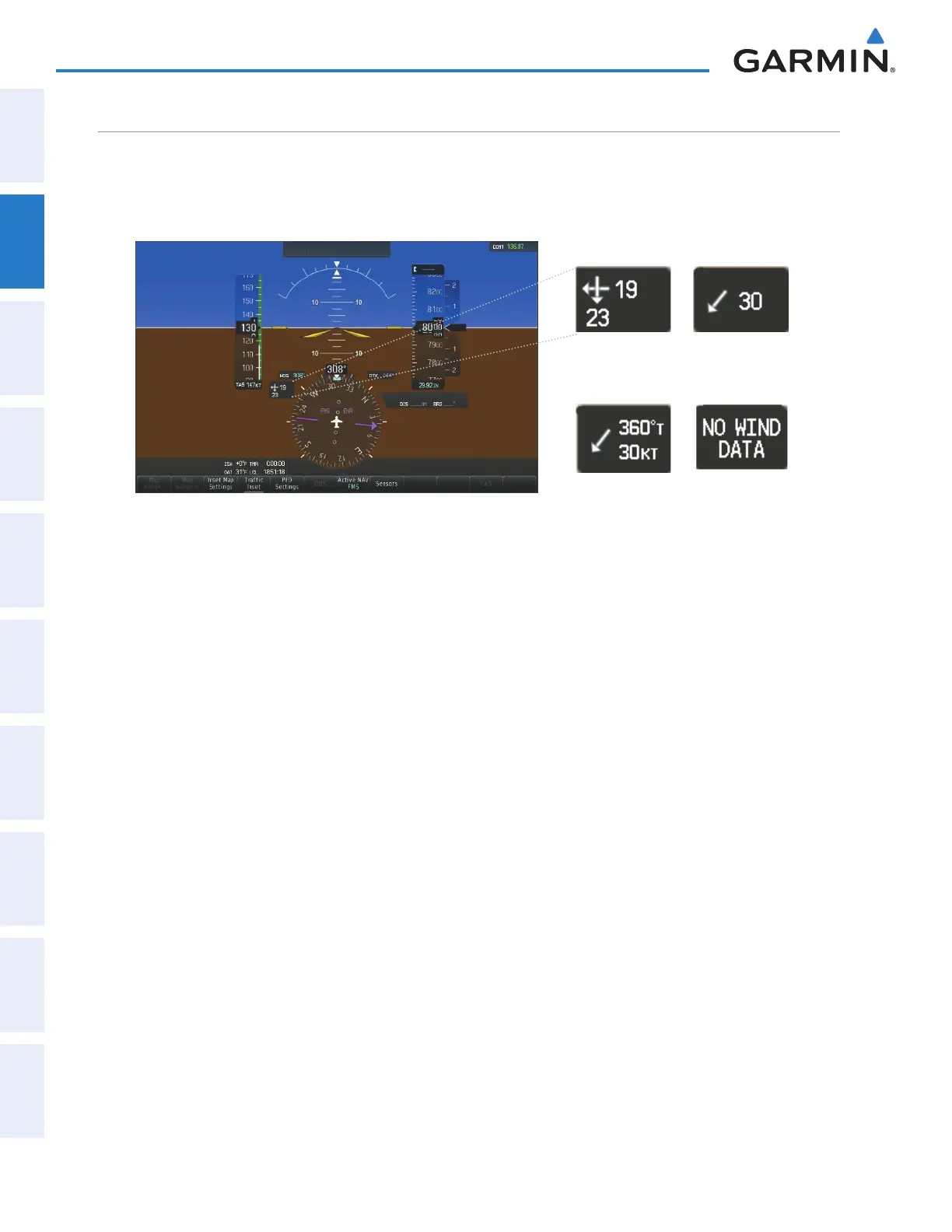
Wind direction and speed (relative to the aircraft) in knots can be displayed in a window to the upper left of
the HSI. When the window is selected for display, but wind information is invalid or unavailable, the window
shows “NO WIND DATA”. Wind data can be displayed in three different ways:
Figure 2-43 Wind Data
No Data
Option 2
Option 1
Option 3
Displaying wind data:
1) Select the PFD Settings Softkey.
2) Select the Wind Softkey to display wind data display options.
3) Select one of the Option softkeys to change how wind data is displayed:
• Option 1: Wind direction arrows with headwind and crosswind components
• Option 2: Wind direction arrow and speed
• Option 3: Wind direction arrow with direction and speed
4) To remove the window, select the Off Softkey.
This manual downloaded from http://www.manualowl.com



 To Next Page