190-01263-01 Rev. A
Garmin G2000 Pilot’s Guide for the Cessna T240
547
AdditionAl FeAtures
sYsteM
oVerVieW
FliGHt
instruMents
eis
Audio PAnel
& Cns
FliGHt
MAnAGeMent
HAZArd
AVoidAnCe
AFCs
AdditionAl
FeAtures
APPendiCes indeX
8.13 ABNORMAL OPERATION
GDL 69/69A DATA LINK RECEIVER TROUBLESHOOTING
Some quick troubleshooting steps listed below can be performed to find the possible cause of a failure.
• Ensure the owner/operator of the aircraft in which the Data Link Receiver is installed has subscribed to
SiriusXM
• Ensure the SiriusXM subscription has been activated
• Check the circuit breakers to ensure that power is applied to the Data Link Receiver
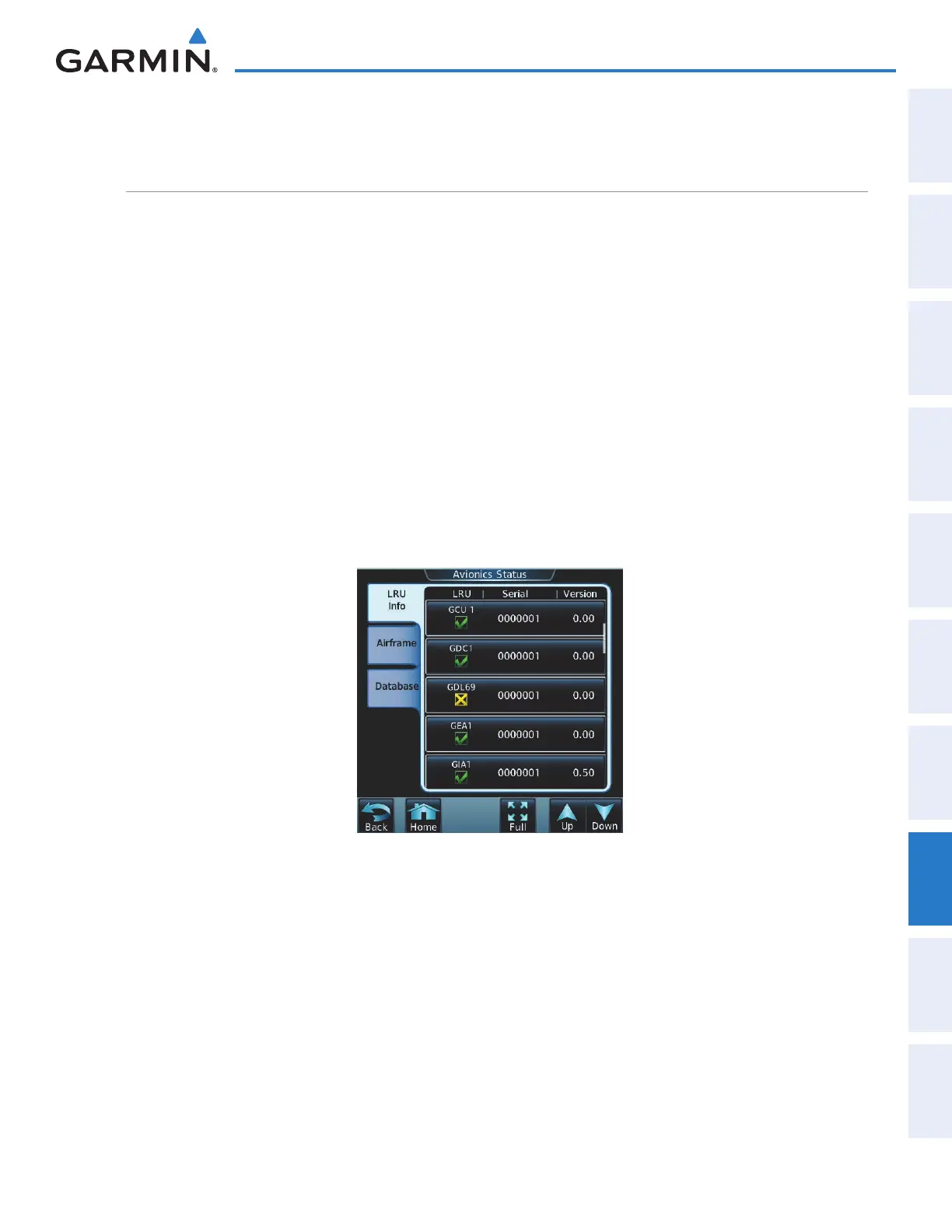
For troubleshooting purposes, check the LRU Information for Data Link Receiver (GDL 69 or GDL 69A)
status, serial number, and software version number. If a failure has been detected the status is marked with a
yellow X.
To check LRU status:
1) From the Home Screen, touch Utilities > Setup > Avionics Status.
2) If necessary, touch the LRU Info Tab.
3) Scroll to display the GDL69 or GDL69A field as shown in Figure 8-128.
Figure 8-128 Detected Failure in Data Link Reciever
This manual downloaded from http://www.manualowl.com



 To Next Page