Garmin G2000 Pilot’s Guide for the Cessna T240
190-01263-01 Rev. A78
Flight instruments
sYstem
OVerVieW
Flight
instruments
eis
AuDiO PAnel
& Cns
Flight
mAnAgement
hAZArD
AVOiDAnCe
AFCs
ADDitiOnAl
FeAtures
APPenDiCesinDeX
courSe deViAtion indicAtor (cdi)
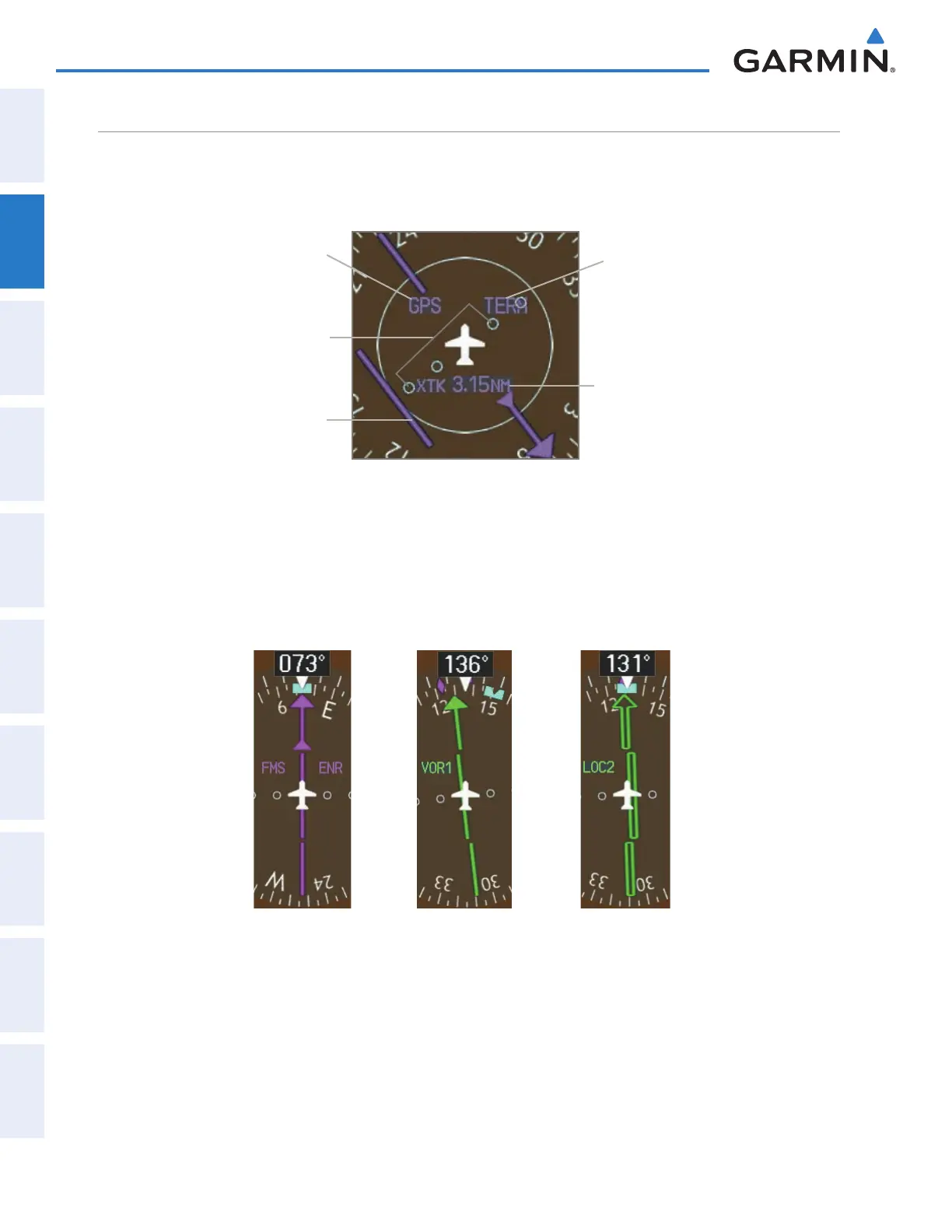
The Course Deviation Indicator (CDI) moves left or right from the course pointer along a lateral deviation
scale to display aircraft position relative to the course. If the course deviation data is not valid, the CDI is not
displayed.
Figure 2-22 Course Deviation Indicator
Crosstrack
Error
Navigation
Source
Scale
CDI
Flight
Phase
The CDI can display two sources of navigation, FMS or VOR/LOC. Color indicates the current navigation
source, magenta for FMS and green for VOR and LOC. The full scale limits for the CDI are defined by a GPS-
derived distance when coupled to GPS. When navigating using a VOR or localizer (LOC), the CDI uses the
same angular limits as a mechanical CDI. If the CDI exceeds the maximum deviation on the scale (two dots)
while navigating with GPS, the crosstrack error (XTK) is displayed below the white aircraft symbol.
Figure 2-23 Navigation Sources
This manual downloaded from http://www.manualowl.com



 To Next Page