Garmin G2000 Pilot’s Guide for the Cessna T240
190-01263-01 Rev. A486
AdditionAl FeAtures
sYsteM
oVerVieW
FliGHt
instruMents
eis
Audio PAnel
& Cns
FliGHt
MAnAGeMent
HAZArd
AVoidAnCe
AFCs
AdditionAl
FeAtures
APPendiCesindeX
8.1 SAFETAXI
SafeTaxi is an enhanced feature that gives greater map detail when viewing airports at close range on the
Navigation Map or the Inset Map on the PFD. The maximum map ranges for enhanced detail are pilot configurable.
When viewing at ranges close enough to show the airport detail, the map reveals taxiways with identifying
letters/numbers, airport Hot Spots, and airport landmarks including ramps, buildings, control towers, and other
prominent features. Resolution is greater at lower map ranges. When the aircraft’s current position is within the
SafeTaxi view, the airplane symbol on the airport provides enhanced position awareness.
Designated Hot Spots are recognized at airports with many intersecting taxiways and runways, and/or complex
ramp areas. Airport Hot Spots are outlined to caution pilots of areas on an airport surface where positional
awareness confusion or runway incursions happen most often. Hot Spots are defined with a magenta circle or
outline around the region of possible confusion.
Any map display that show the navigation view can also show the SafeTaxi airport layout within the maximum
configured range. The following is a list of displays where the SafeTaxi feature can be seen:
• Navigation Map
• Inset Map (PFD)
• Weather Datalink
• Airport Information
• Intersection Information
• NDB Information
• VOR Information
• User Waypoint Information
• Trip Planning
• Nearest
• Active Flight Plan
• Stored Flight Plan
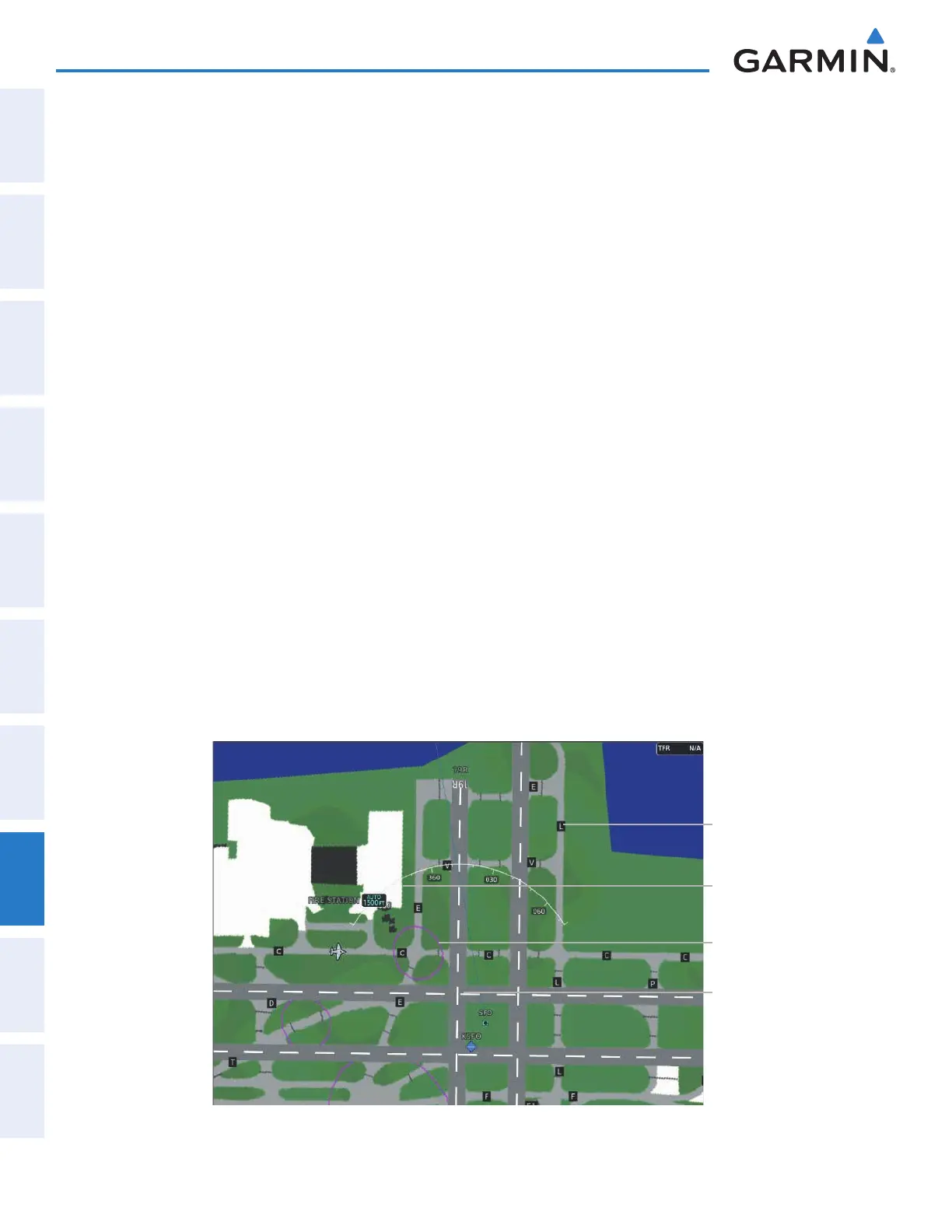
During ground operations the aircraft’s position is displayed in reference to taxiways, runways, and airport
features. In the example shown, the aircraft is on taxiway Charlie approaching a designated Airport Hot Spot
boundary on KSFO airport. Airport Hot Spots are outlined in magenta. When panning over the airport, features
such as runway holding lines and taxiways are shown at the cursor.
Airport
Features
Taxiway
Identification
Airport Hot
Spot Outline
Figure 8-1 SafeTaxi Depiction on the Navigation Map Display
Aircraft
Position
This manual downloaded from http://www.manualowl.com



 To Next Page