190-01263-01 Rev. A
Garmin G2000 Pilot’s Guide for the Cessna T240
519
AdditionAl FeAtures
sYsteM
oVerVieW
FliGHt
instruMents
eis
Audio PAnel
& Cns
FliGHt
MAnAGeMent
HAZArd
AVoidAnCe
AFCs
AdditionAl
FeAtures
APPendiCes indeX
TEXT MESSAGING (SMS)
The pilot or copilot can send and receive text messages on the Iridium satellite network. Messages may be
sent to an email address or text message capable cellular telephone. Message length is limited to 160 characters,
including the email address.
VIEWING A TEXT MESSAGE WHEN RECEIVED
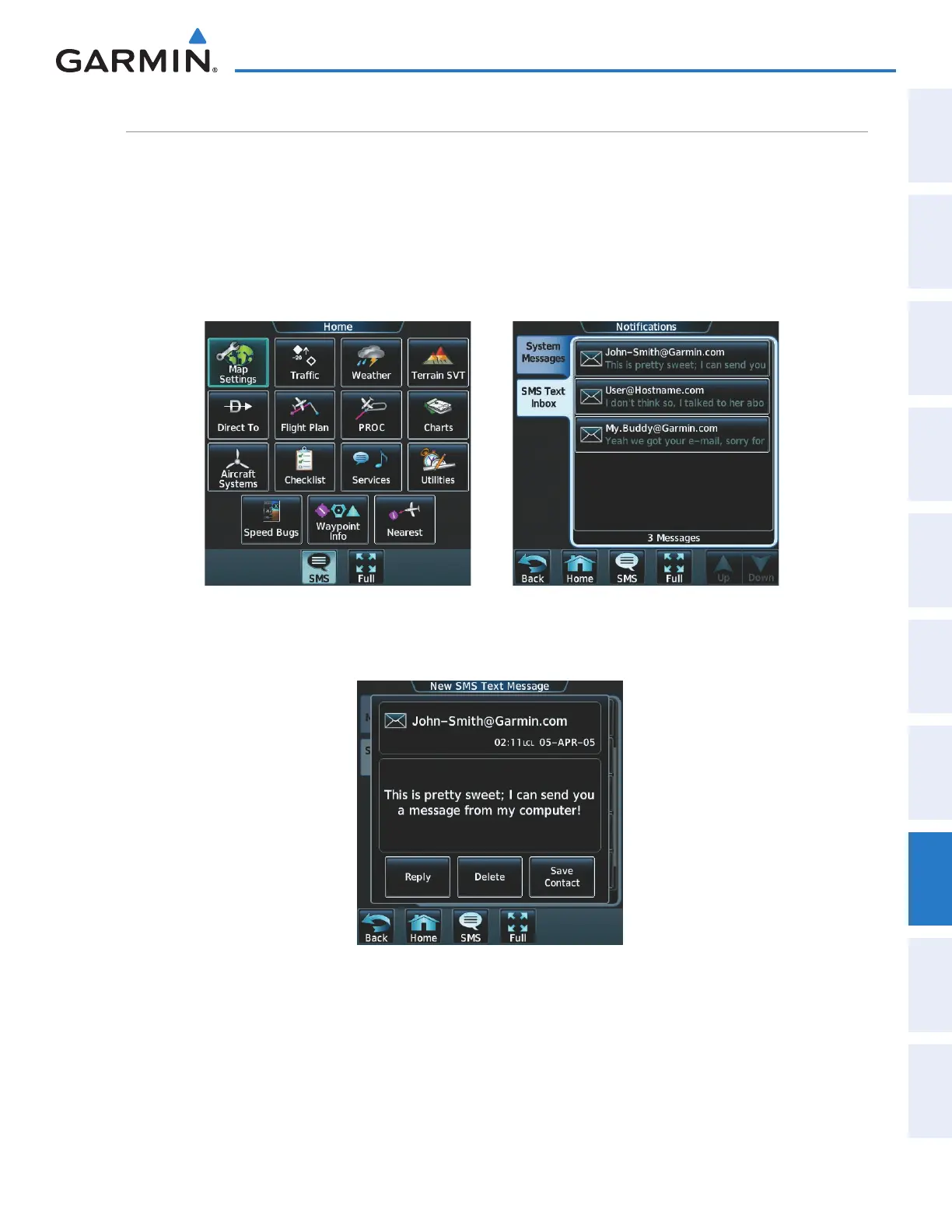
1) Touch the flashing SMS Button as shown in Figure 8-60. The SMS Text Inbox Tab is automatically selected
and the newly received text message is shown at the top of the list, as in Figure 8-61.
Figure 8-61 New Text Message at Top of ListFigure 8-60 New SMS Text Message Annunciation
2) Touch the desired message to display its contents as seen in Figure 8-62.
Figure 8-62 New Text Message Contents
3) If desired, touch Reply to create a reply to the message.
4) Touch Delete to delete the message from the list.
5) Touching Save Contact saves the contact information in the system contact list.
This manual downloaded from http://www.manualowl.com



 To Next Page