190-01263-01 Rev. A
Garmin G2000 Pilot’s Guide for the Cessna T240
124
Audio And cnS
SySteM
overview
FligHt
inStruMentS
eiSAudio & cnS
FligHt
MAnAgeMent
HAZArd
AvoidAnce
AFcS
AdditionAl
FeAtureS
AppendiceSindeX
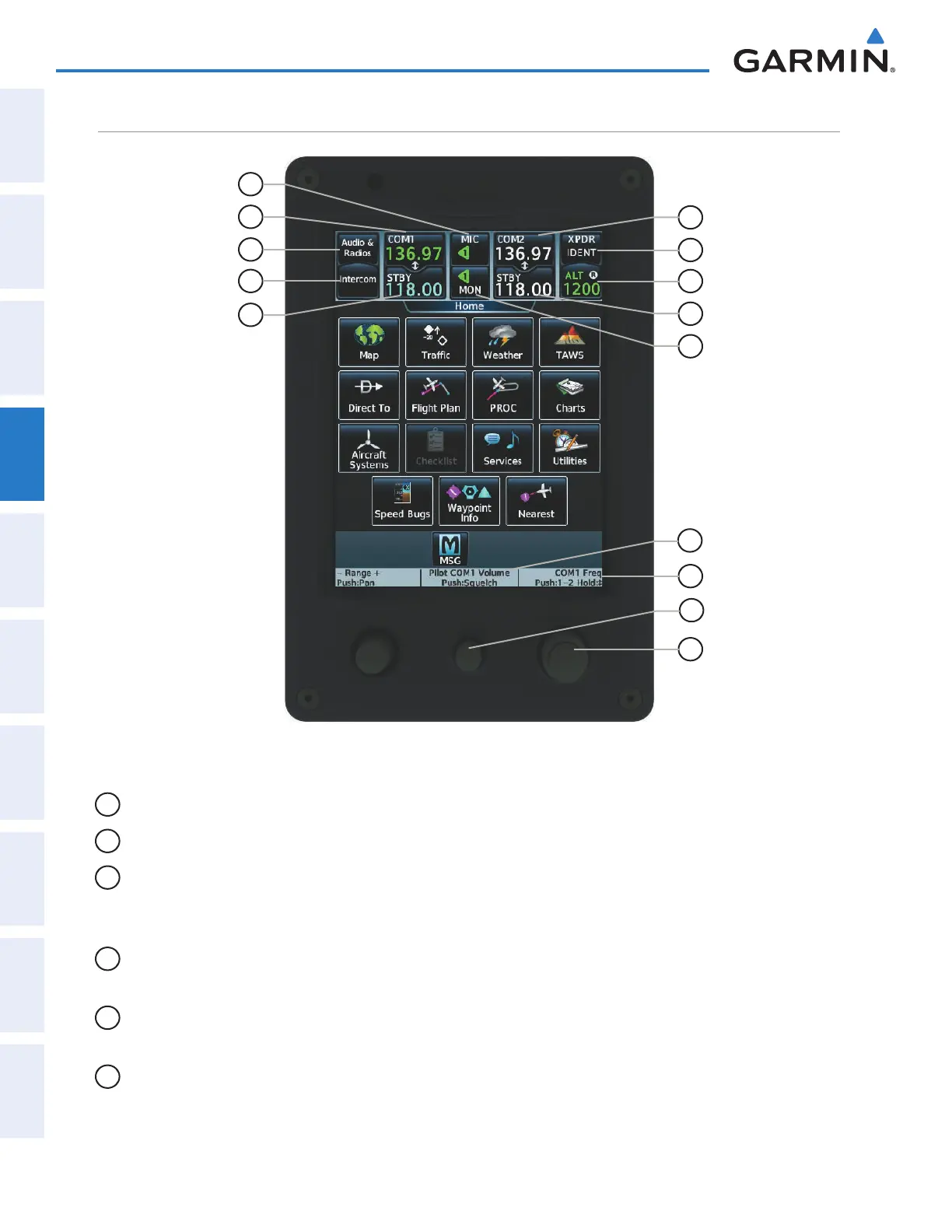
toucHScreen controller Audio And cnS controlS
Figure 4-3 Touchscreen CNS Bar Controls
4
3
6
7
14
12
1
2
5
8
9
10
13
11
1
MIC
Button – Switches between the #1 transceiver and the #2 transceiver.
2
COM1
Button – Transfers the standby and active COM1 frequencies.
3
Audio & Radios
Button – Displays/removes the Audio & Radios Screen. The Audio & Radios Screen
is used to control the Communication/Navigation/Surveillance (CNS) and Audio settings for the pilot,
copilot, and passengers.
4
Intercom
Button – Displays/removes the Intercom Screen. The Intercom Screen is used to control the
intercom isolation, volume, and squelch settings for the pilot, copilot, and passengers.
5
STBY Button (COM1)
– Displays/removes the COM1 Standby Screen. The COM1 Standby Screen is used
to enter and transfer COM1 frequencies.
6
COM2
Button– Transfers the standby and active COM2 frequencies.
This manual downloaded from http://www.manualowl.com



 To Next Page