Garmin G2000 Pilot’s Guide for the Cessna T240
190-01263-01 Rev. A230
Flight ManageMent
SYSteM
OVeRVieW
Flight
inStRUMentS
eiS
aUDiO Panel
& CnS
Flight
ManageMent
haZaRD
aVOiDanCe
aFCS
aDDitiOnal
FeatUReS
aPPenDiCeSinDeX
5.4 airSpaceS
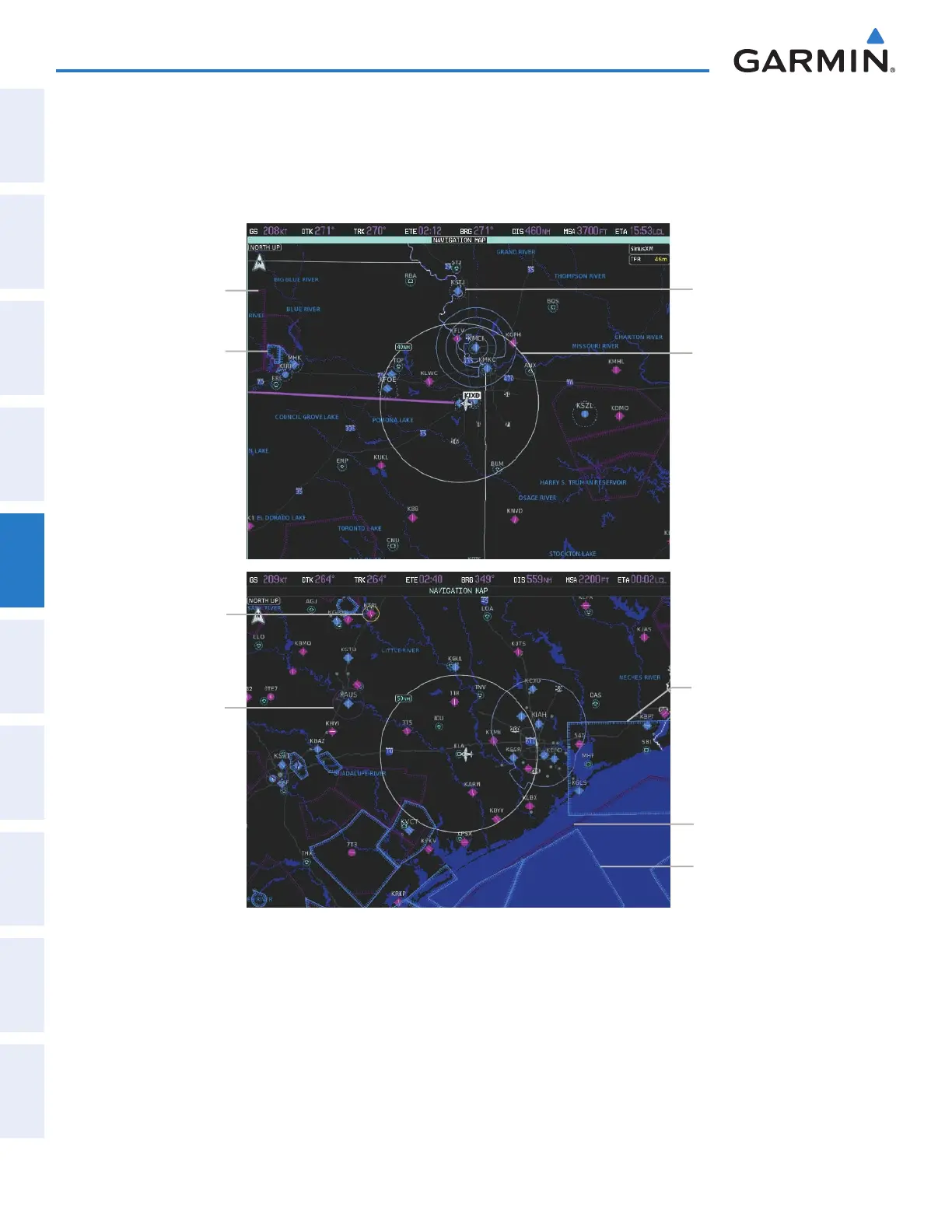
The system can display the following types of airspaces: Class B/TMA, Class C/TCA, Class D, Restricted, MOA
(Military), Other Airspace, Air Defense Interdiction Zone (ADIZ), and Temporary Flight Restriction (TFR).
Figure 5-68 Airspaces
MOA (Military)
Class D Airspace
Class B Airspace
Restricted Area
Class C Airspace
Alert Area
ADIZ
Warning Area
TFR
The Nearest Airspace Screen and the Message window on the Touchscreen Controller provide additional
information about airspaces and the location of the aircraft in relationship to them.
The Alerts Tab on the Avionics Settings Screen allows the pilot to turn the controlled/special-use airspace alerts
on or off. This does not affect the alerts listed on the Nearest Airspace Screen or the airspace boundaries depicted
on the Navigation Map pane. It simply turns on/off the alert provided when the aircraft is approaching or near
an airspace.
This manual downloaded from http://www.manualowl.com



 To Next Page