190-01263-01 Rev. A
Garmin G2000 Pilot’s Guide for the Cessna T240
231
Flight ManageMent
SYSteM
OVeRVieW
Flight
inStRUMentS
eiS
aUDiO Panel
& CnS
Flight
ManageMent
haZaRD
aVOiDanCe
aFCS
aDDitiOnal
FeatUReS
aPPenDiCeS inDeX
An altitude buffer is also provided which “expands” the vertical range above or below an airspace. For example,
if the buffer is set at 500 feet, and the aircraft is more than 500 feet above/below an airspace, an alert message is
not generated, but if the aircraft is less than 500 feet above/below an airspace and projected to enter it, the pilot
is notified with an alert message. The default setting for the altitude buffer is 200 feet.
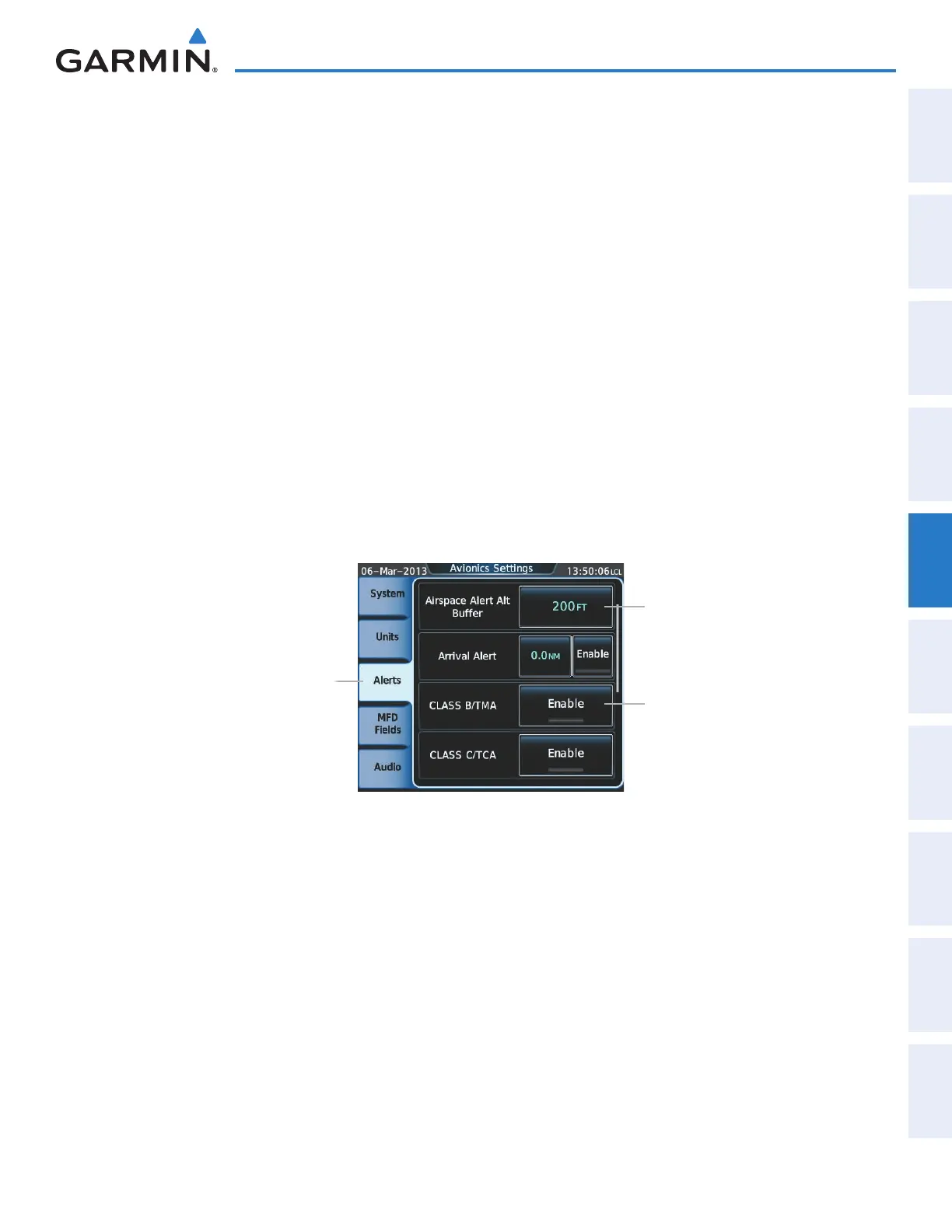
Changing the altitude buffer distance setting:
1) From Home, touch Utilities > Setup > Avionics Settings.
2) Touch the Alerts Tab to display the list of alert settings.
3) Touch the Airspace Alert Alt Buffer Button to display the keypad.
4) Use the keypad and the Enter Button to select the buffer distance.
Turning an airspace alert on or off:
1) From Home, touch Utilities > Setup > Avionics Settings.
2) Touch the Alerts Tab to display the list of alert settings.
3) Scroll the list if necessary.
4) Touch the airspace alert enable button to enable/disable the alert. When the annunciator on the button is
green, the alert is enabled When the annunciator is gray, the alert is disabled.
Figure 5-69 Avionics Settings Screen - Alerts Tab
Alerts Tab
Airspace Alert Alt Buffer Button
- Airspace Altitude Buffer
- Alert On/Off
(Default Settings Shown)
Airspace Alert Enable Button
Map ranges for the airspace boundaries are selected on the Aviation Tab on the Map Settings Screen-Map
Options. See Table 5-2 for the default and maximum ranges for each type of airspace and the symbol used to
define the airspace area.
The Nearest Airspace Screen and the Nearest Airspace pane can be used to quickly find airspaces close to the
flight path. The Nearest Airspace pane shows a map of airspace boundaries and surrounding area. The Nearest
Airspace Screen displays airspace information. In addition, a selected frequency associated with the airspace can
be loaded from the Nearest Airspace Screen.
This manual downloaded from http://www.manualowl.com



 To Next Page