Garmin G2000 Pilot’s Guide for the Cessna T240
190-01263-01 Rev. A120
engine indication SyStem
SyStem
oVerVieW
fligHt
inStrUmentS
eiS
aUdio panel
& cnS
fligHt
management
HaZard
aVoidance
afcS
additional
featUreS
appendiceSindeX
engine lean aSSiSt mode
NOTE:
Consult the Airplane Flight Manual (AFM) for leaning procedures.
The Engine Lean Assist Mode is accessed using the Touchscreen Controller.
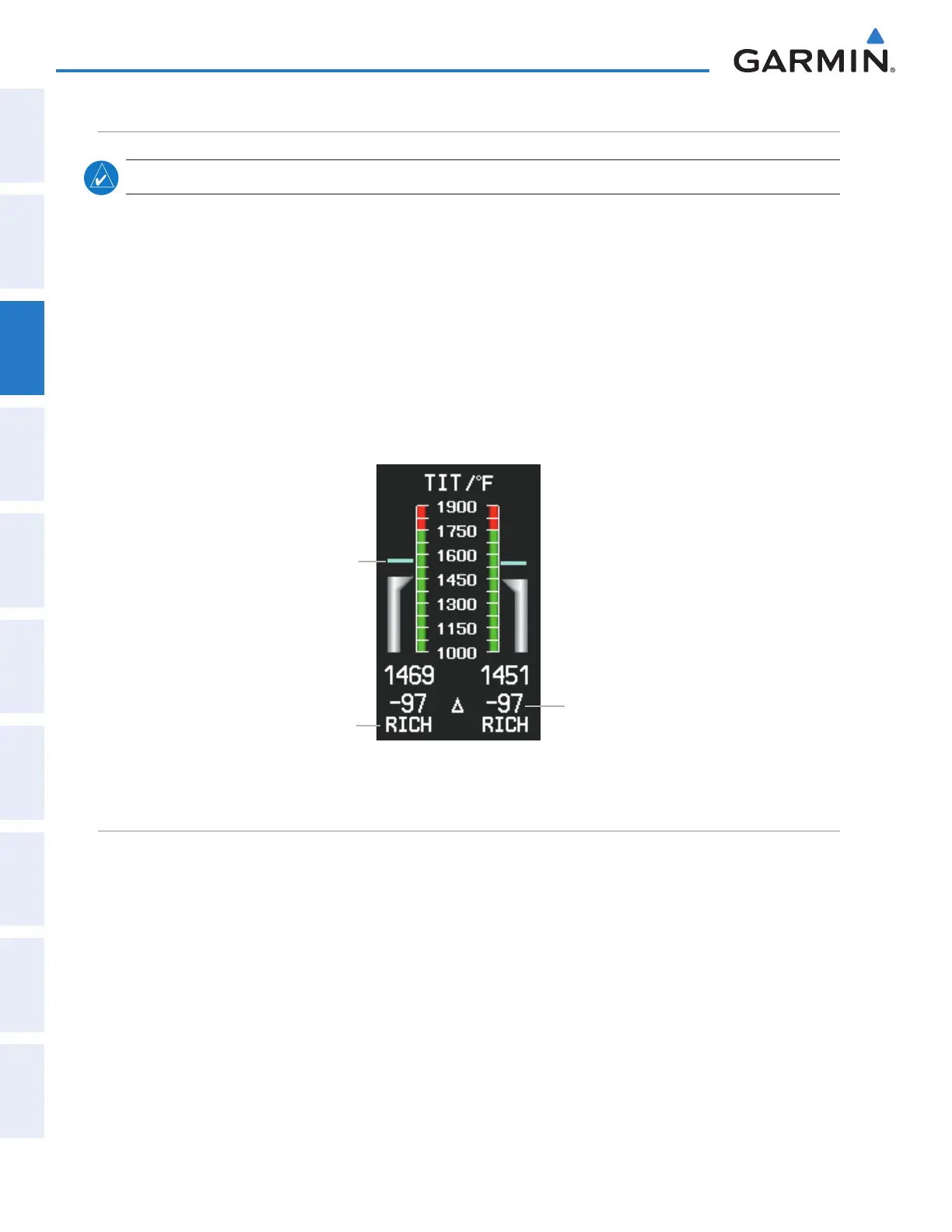
While the Lean Assist Mode is active, the system indicates the peak of each TIT on the EIS display with a
light blue bar which remains at the peak Turbo Inlet Temperature. Readouts below each TIT gauge indicate the
difference between each peak TIT and the current temperature. An indicator below the readout shows whether
each TIT is operating ‘LEAN’ or ‘RICH’ of peak TIT.
Enabling/Disabling Lean Assist Mode:
1) From Home, touch Aircraft Systems.
2) Touch the Lean Assist Button. The button annunciator is green when Lean Assist Mode is enabled, annunciator
is gray when disabled.
Lean or Rich
from Peak
TIT Deviation
from Peak
Peak TIT
Figure 3-23 Engine Lean Assist Mode (EIS Display)
SUpplemental oXygen SyStem
The Oxygen Button on the Touchscreen Controller enables or disables the supplemental oxygen system.
Enabling/Disabling the Oxygen System:
1) From Home, touch Aircraft Systems.
2) Touch the Oxygen Button. When the button annunciator is green, oxygen is enabled, annunciator is gray when
disabled.
This manual downloaded from http://www.manualowl.com



 To Next Page