190-01263-01 Rev. A
Garmin G2000 Pilot’s Guide for the Cessna T240
166
Audio And cnS
SySteM
overview
FligHt
inStruMentS
eiSAudio & cnS
FligHt
MAnAgeMent
HAZArd
AvoidAnce
AFcS
AdditionAl
FeAtureS
AppendiceSindeX
cleArAnce recorder And plAyer
The Audio Controller contains a digital clearance recorder that records up to 2.5 minutes of the selected COM
radio signal. Recorded COM audio is stored in separate memory blocks. Once 2.5 minutes of recording time
have been reached, the recorder begins recording over the stored memory blocks, starting from the oldest block.
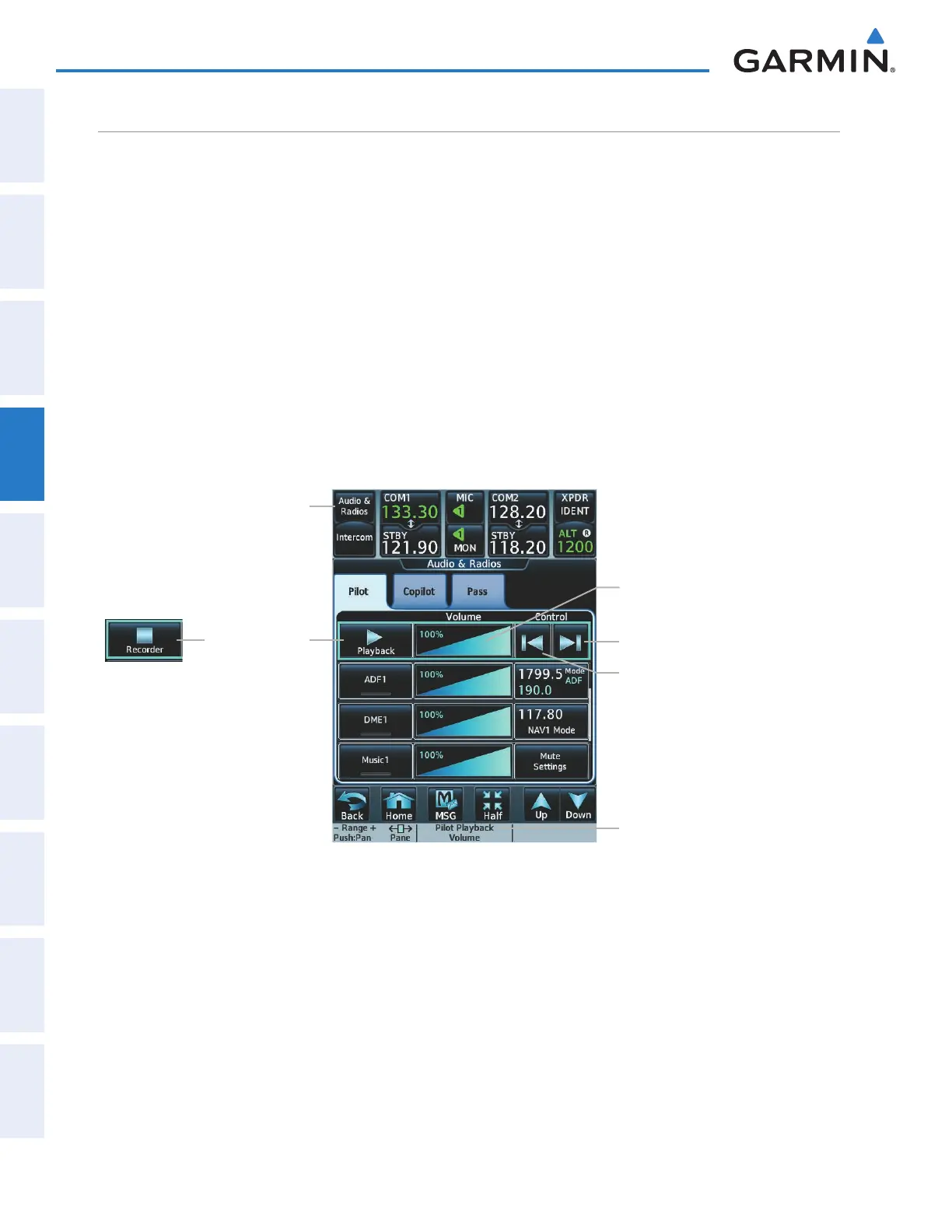
Touching the Recorder (Play) Button plays the latest recorded memory block. The Recorder (Stop) Button
is displayed while the audio is playing. When the present memory block has fi nished playing the Recorder
(Play) Button is displayed again.
Touching the Recorder (Stop) Button during play of a memory block stops play. If a COM input signal is
detected during play of a recorded memory block, play is halted.
Touching the Previous button begins playing the previously recorded memory block. Each subsequent press
of the Previous button selects the previously recorded memory block, if any more exist. Touching the Next
button begins playing the next recorded memory block. Each subsequent press of the Next button selects the
next recorded memory block, if any more exist.
Powering down the system automatically clears all recorded blocks.
Figure 4-56 Recorder Controls
Recorder Button
Stop Play
Audio & Radios Button
Recorder Volume Slider
Recorder Volume Knob Label
Audio Playback Controls
Play next block
Play previous block
This manual downloaded from http://www.manualowl.com



 To Next Page