190-01263-01 Rev. A
Garmin G2000 Pilot’s Guide for the Cessna T240
213
Flight ManageMent
SYSteM
OVeRVieW
Flight
inStRUMentS
eiS
aUDiO Panel
& CnS
Flight
ManageMent
haZaRD
aVOiDanCe
aFCS
aDDitiOnal
FeatUReS
aPPenDiCeS inDeX
interSectionS
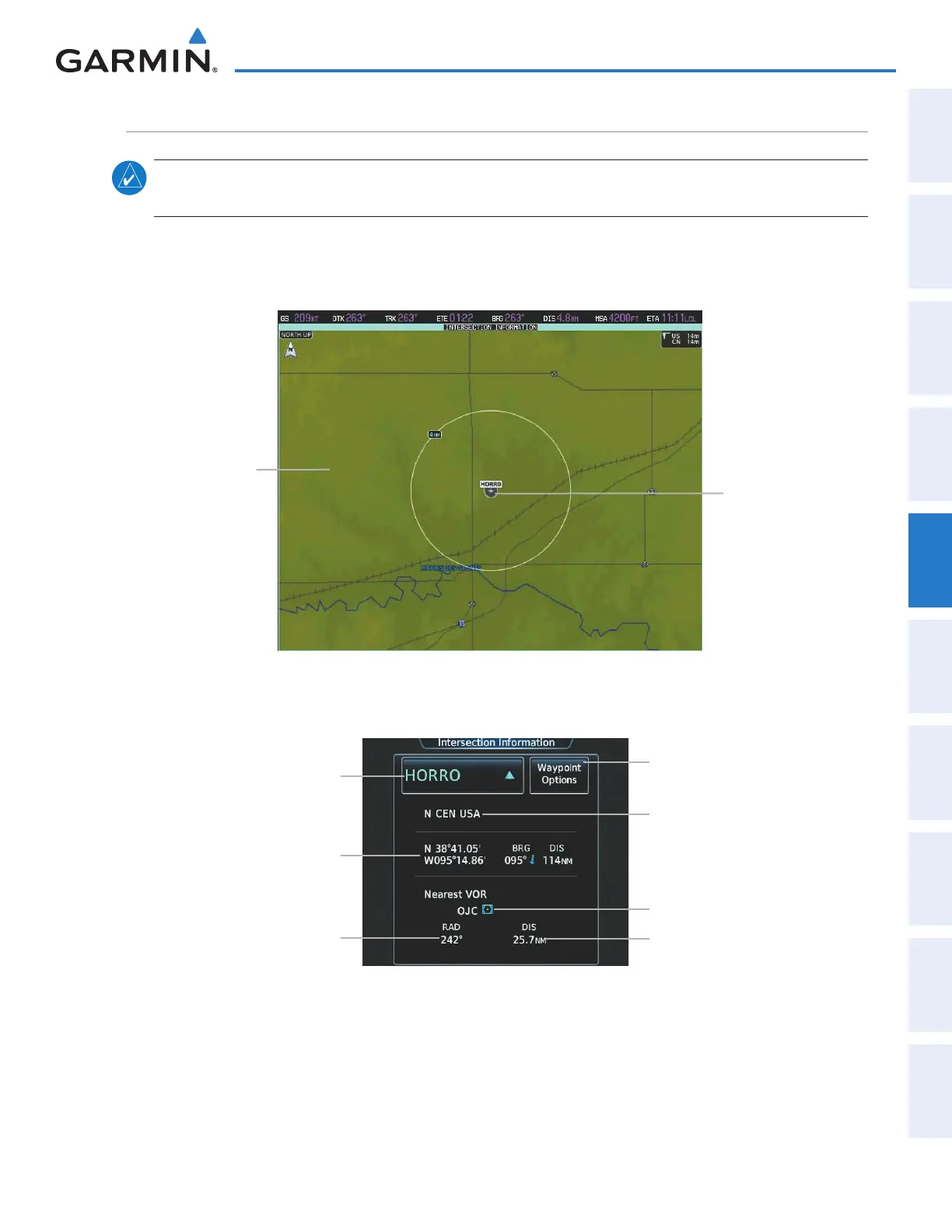
note: The VOR displayed on the Intersection Information pane is the nearest VOR, not necessarily the VOR
used to define the intersection.
The Intersection Information pane displays a map of the currently selected intersection and surrounding area,
and the Intersection Information Screen on the Touchscreen Controller allows the pilot to view intersection
information.
Figure 5-46 Intersection Information Pane
Navigation Map
Showing
Selected
Intersection
Selected Intersection
Figure 5-47 Intersection Information Screen
Selected Intersection Button
(Identifier, Symbol)
Intersection Latitude/Longitude,
Bearing & Distance
Waypoint Options Button
Direct-To, Insert in Flight Plan,
Show On Map
Region
Nearest VOR Identifier
Nearest VOR Radial
Nearest VOR Distance
This manual downloaded from http://www.manualowl.com



 To Next Page