190-01263-01 Rev. A
Garmin G2000 Pilot’s Guide for the Cessna T240
135
Audio And CnS
SYSTEM
oVERViEW
FLiGHT
inSTRuMEnTS
EiS Audio & CnS
FLiGHT
MAnAGEMEnT
HAZARd
AVoidAnCE
AFCS
AddiTionAL
FEATuRES
APPEndiCES indEX
Frequency SpAcing
The COM radios can tune either 25-kHz spacing (118.000 to 136.975 MHz) or 8.33-kHz spacing (118.000
to 136.990 MHz) for 760-channel or 3040-channel configuration. When 8.33-kHz channel spacing is selected,
all of the 25-kHz channel spacing frequencies are also available in the complete 3040-channel list.
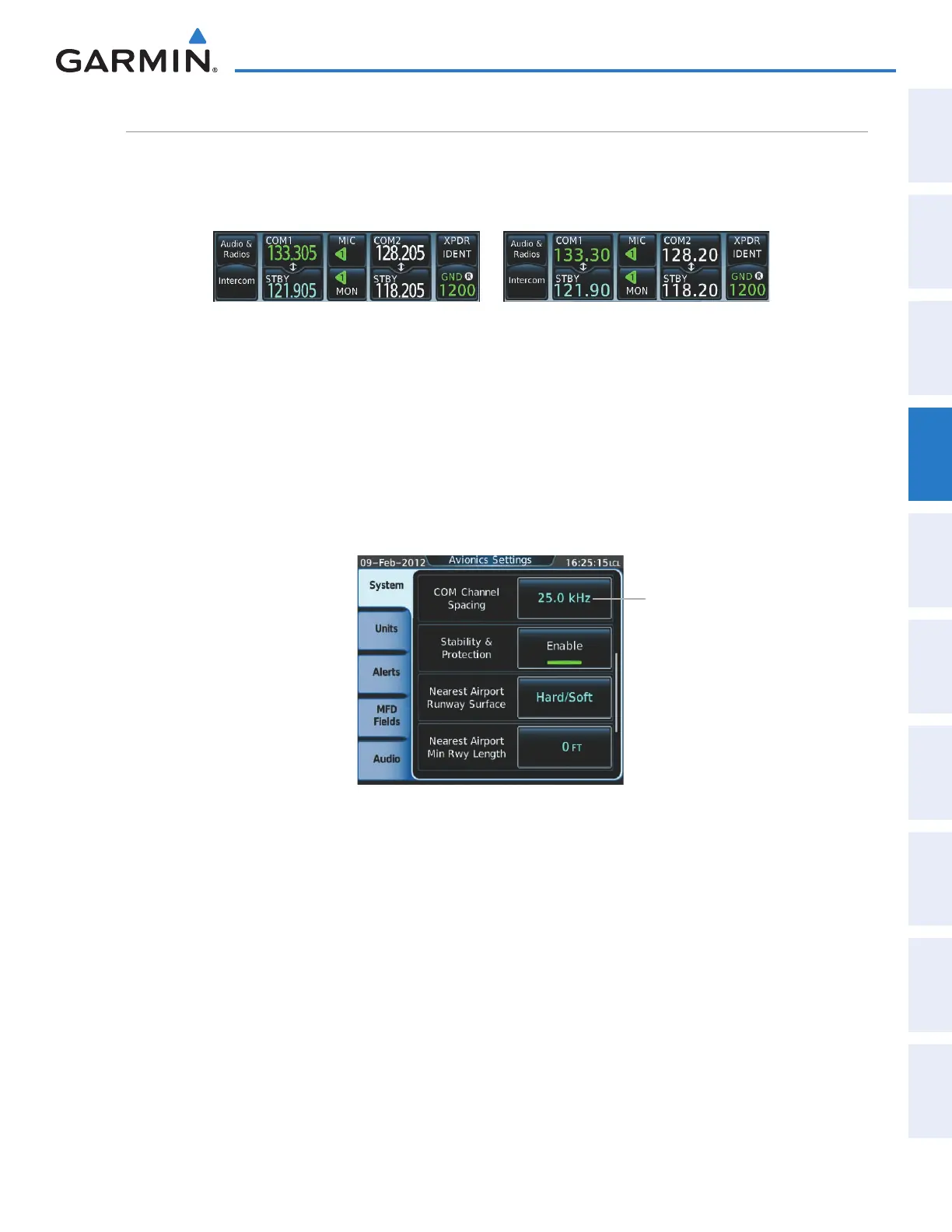
Figure 4-13 COM Channel Spacing
25-kHz Channel Spacing
8.33-kHz Channel Spacing
Changing COM frequency channel spacing:
1) From Home, touch Utilities > Setup > Avionics Settings.
2) Scroll the list to show the COM Channel Spacing button.
3) Touch the COM Channel Spacing button to display the choice of 25.0 kHz or 8.33 kHz.
4) Touch the channel spacing button.
Figure 4-14 Changing COM Frequency Channel Spacing
Select 8.33-kHz
or 25.0-kHz
COM Frequency
Channel Spacing
This manual downloaded from http://www.manualowl.com



 To Next Page