190-01263-01 Rev. A
Garmin G2000 Pilot’s Guide for the Cessna T240
181
Flight ManageMent
SYSteM
OVeRVieW
Flight
inStRUMentS
eiS
aUDiO Panel
& CnS
Flight
ManageMent
haZaRD
aVOiDanCe
aFCS
aDDitiOnal
FeatUReS
aPPenDiCeS inDeX
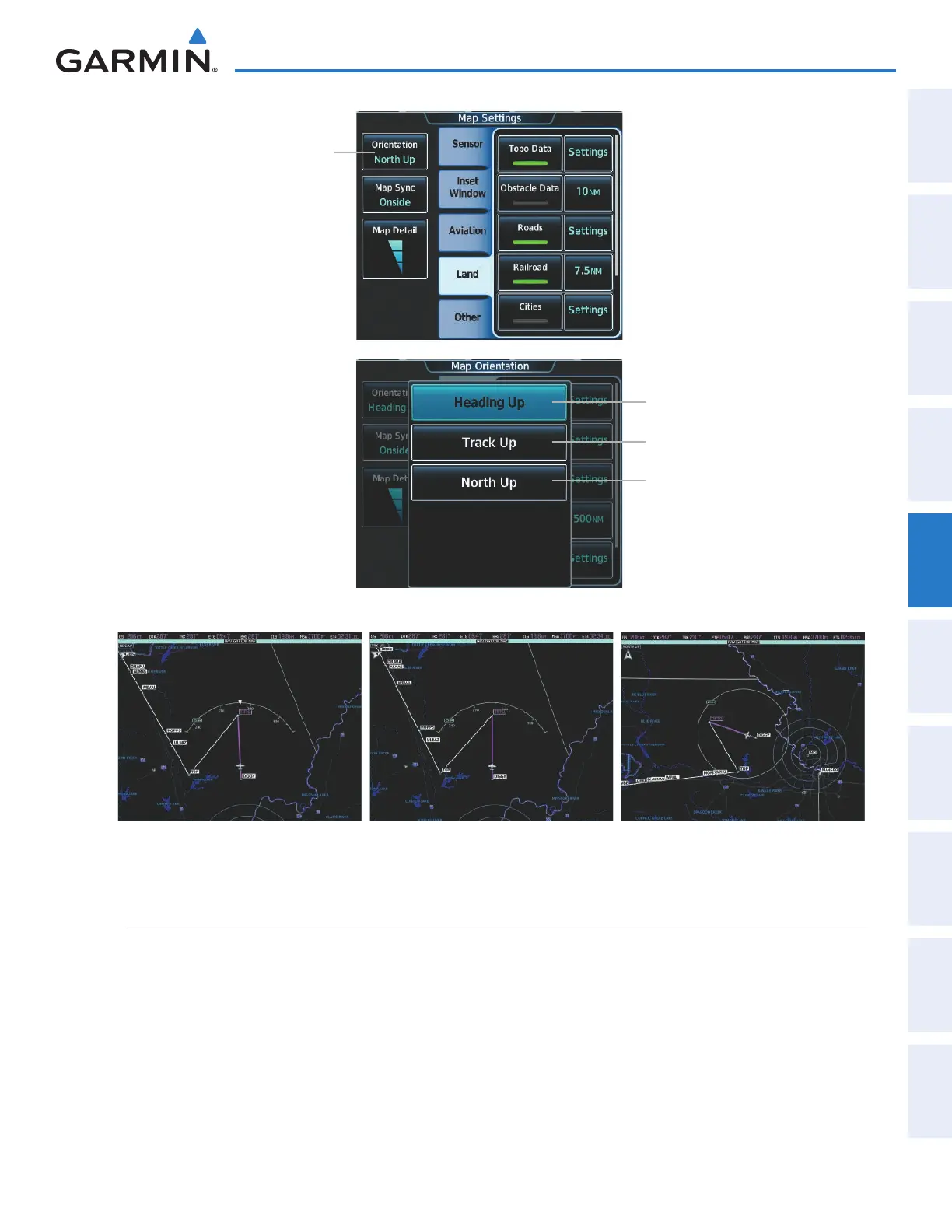
Heading Up Orientation
Figure 5-6 Map Orientation Selection
Orientation
Button
Track Up Button
Heading Up Button
North Up Button
Track Up Orientation North Up Orientation
Map range
There are 28 different map ranges available, from 250 feet to 1000 nm. Range is indicated in the upper left
quadrant of the range ring shown around the aircraft icon. This indicated range is the range from the aircraft icon
to the range ring, and roughly half the range to the top edge of the displayed map. To change the map range on
any MFD map, turn the Joystick counter-clockwise to decrease the range, or clockwise to increase the range. To
change the Inset Map range, use the Map Range - and the Map Range + softkeys, or turn the Joystick on the
GDU Controller.
This manual downloaded from http://www.manualowl.com



 To Next Page