Garmin G2000 Pilot’s Guide for the Cessna T240
190-01263-01 Rev. A100
Flight instruments
sYstem
OVerVieW
Flight
instruments
eis
AuDiO PAnel
& Cns
Flight
mAnAgement
hAZArD
AVOiDAnCe
AFCs
ADDitiOnAl
FeAtures
APPenDiCesinDeX
2.4 pFd AnnunciAtionS And Alerting FunctionS
The following annunciations and alerting functions are displayed on the PFD. Refer to Appendix A for more
information on alerts and annunciations.
SyStem Alerting
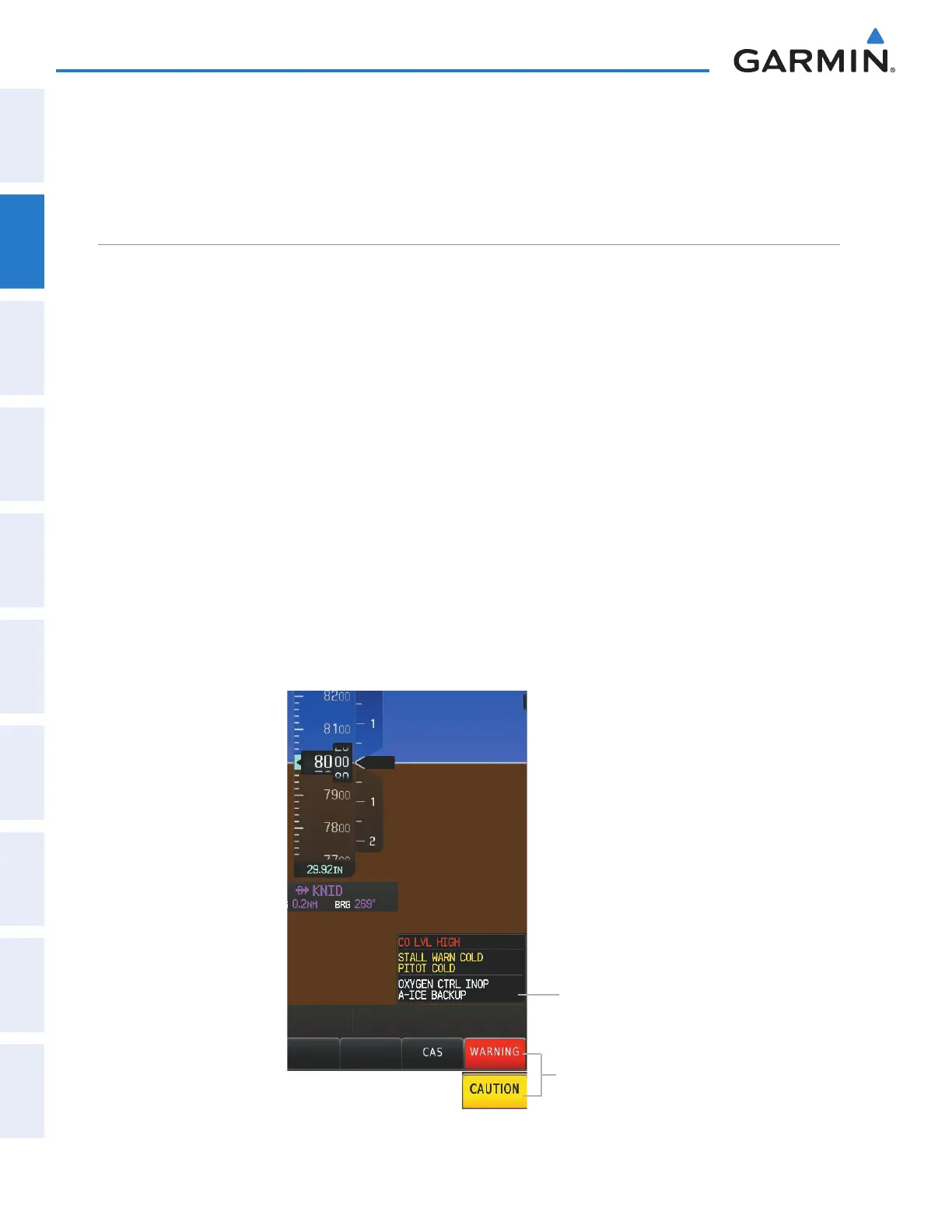
The G2000 CAS (Crew Alerting System), as installed in Cessna T240 aircraft, uses three alert levels.
•
WARNING:
This level of alert requires immediate pilot attention. The system displays a warning alert
in the CAS Window with a continuous aural chime. Text appearing in the CAS Annunciation Window
is red. A warning alert is accompanied by a flashing red
WARNING
Softkey annunciation. Pressing the
WARNING
Softkey acknowledges the presence of the warning alert, stops the aural chime, and extinguishes
the WARNING Softkey annunciation.
•
CAUTION:
This level of alert indicates the existence of abnormal conditions on the aircraft that may require
pilot intervention. The system displays a caution alert in the CAS Window with a single aural chime. Text
appearing in the CAS Annunciation Window is yellow. A caution alert is accompanied by a flashing yellow
CAUTION
Softkey annunciation. Pressing the
CAUTION
Softkey acknowledges the presence of the caution
alert and extinguishes the CAUTION Softkey annunciation.
•
ADVISORY:
This level of alert provides general information to the pilot. The system displays a white advisory
alert in the CAS Window. No softkey annunciations accompany an advisory alert.
System messages and aircraft advisory messages are accompanied by a MSG annunciation on the upper-left
of the PFD in addition to a flashing MSG Button on the Touchscreen Controller Button Bar. Touching the
MSG Button acknowledges the presence of the message and displays/removes the Messages Screen on the
Touchscreen Controller.
Figure 2-45 System Alerting
Softkey
Annunciations
CAS
Annunciation
Window
This manual downloaded from http://www.manualowl.com



 To Next Page