190-01263-01 Rev. A
Garmin G2000 Pilot’s Guide for the Cessna T240
533
AdditionAl FeAtures
sYsteM
oVerVieW
FliGHt
instruMents
eis
Audio PAnel
& Cns
FliGHt
MAnAGeMent
HAZArd
AVoidAnCe
AFCs
AdditionAl
FeAtures
APPendiCes indeX
8.9 SCHEDULED MESSAGES
The Scheduled Messages feature can be used to enter and display reminder messages (e.g., Change oil, Switch
fuel tanks, or Altimeter-Transponder Check) on the Messages Screen of the Touchscreen Controller. Messages
can be set to display based on a specific date and time (Event), once the message timer reaches zero (One
Time), or recurrently whenever the message timer reaches zero (Periodic). Message timers set to periodic alerting
automatically reset to the original timer value once the message is displayed. When power is cycled, all messages
are retained until deleted, and message timer countdown is resumed.
Entering a scheduled message:
1) From the Home Screen, touch Utilities > Scheduled Messages.
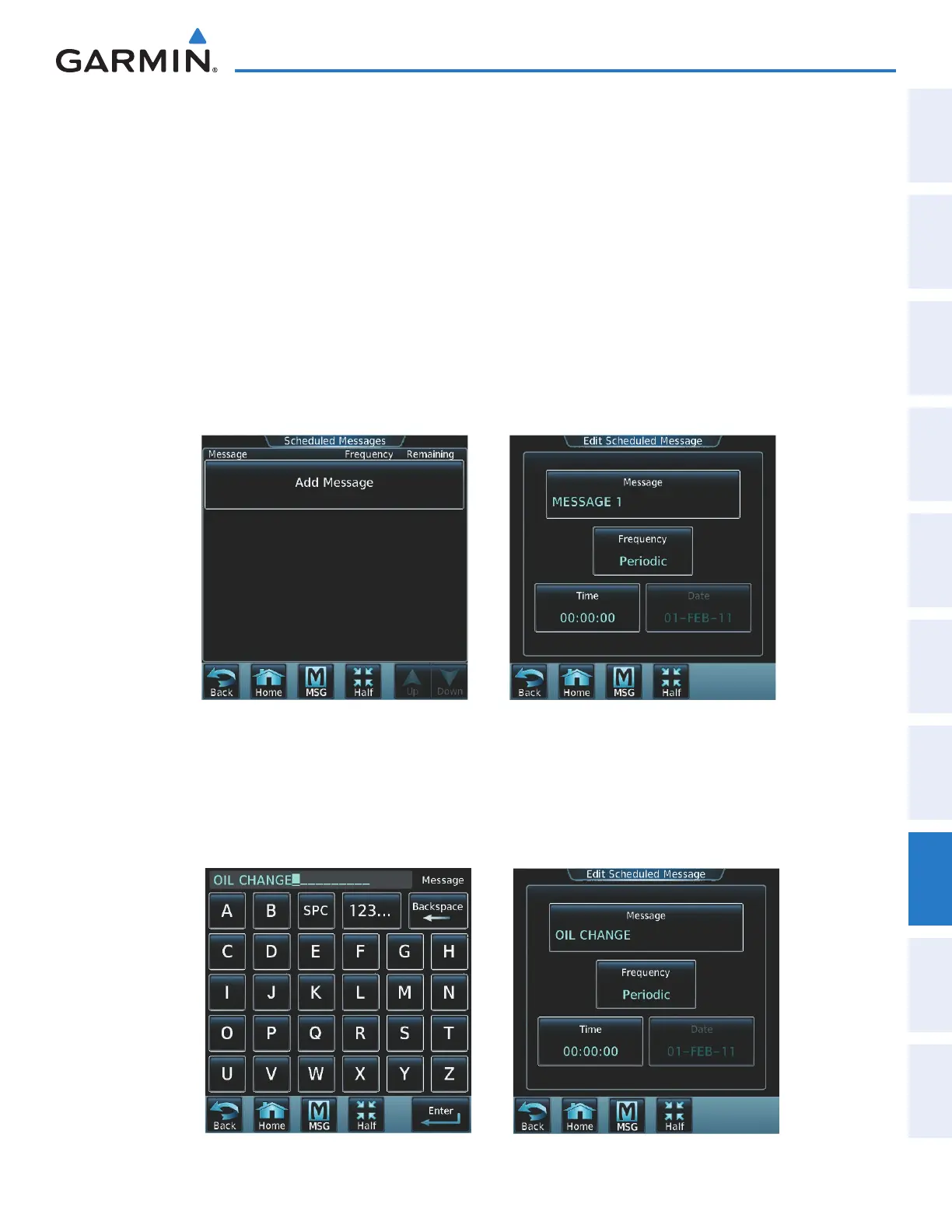
2) Touch the Add Message Button as shown in Figure 8-91.
3) Touch the Message Button as shown in Figure 8-92.
Figure 8-92 Touch Message ButtonFigure 8-91 Touch Add Message
4) The keypad is displayed as in Figure 8-93. Enter the message name using the keypad. The large and small Right
Knob can also be used to enter the characters.
5) Touch the Enter Button. The message name is displayed on the Message Button.
6) Touch the Frequency Button as shown in Figure 8-94.
Figure 8-94 Touch Frequency ButtonFigure 8-93 Enter Message Name
This manual downloaded from http://www.manualowl.com



 To Next Page