190-01263-01 Rev. A
Garmin G2000 Pilot’s Guide for the Cessna T240
439
AutomAtic Flight control SyStem
SyStem
oVerVieW
Flight
inStrumentS
eiS
AuDio PAnel
& cnS
Flight
mAnAgement
hAZArD
AVoiDAnce
AFcS
ADDitionAl
FeAtureS
APPenDiceS inDeX
7.1 AFcS controlS
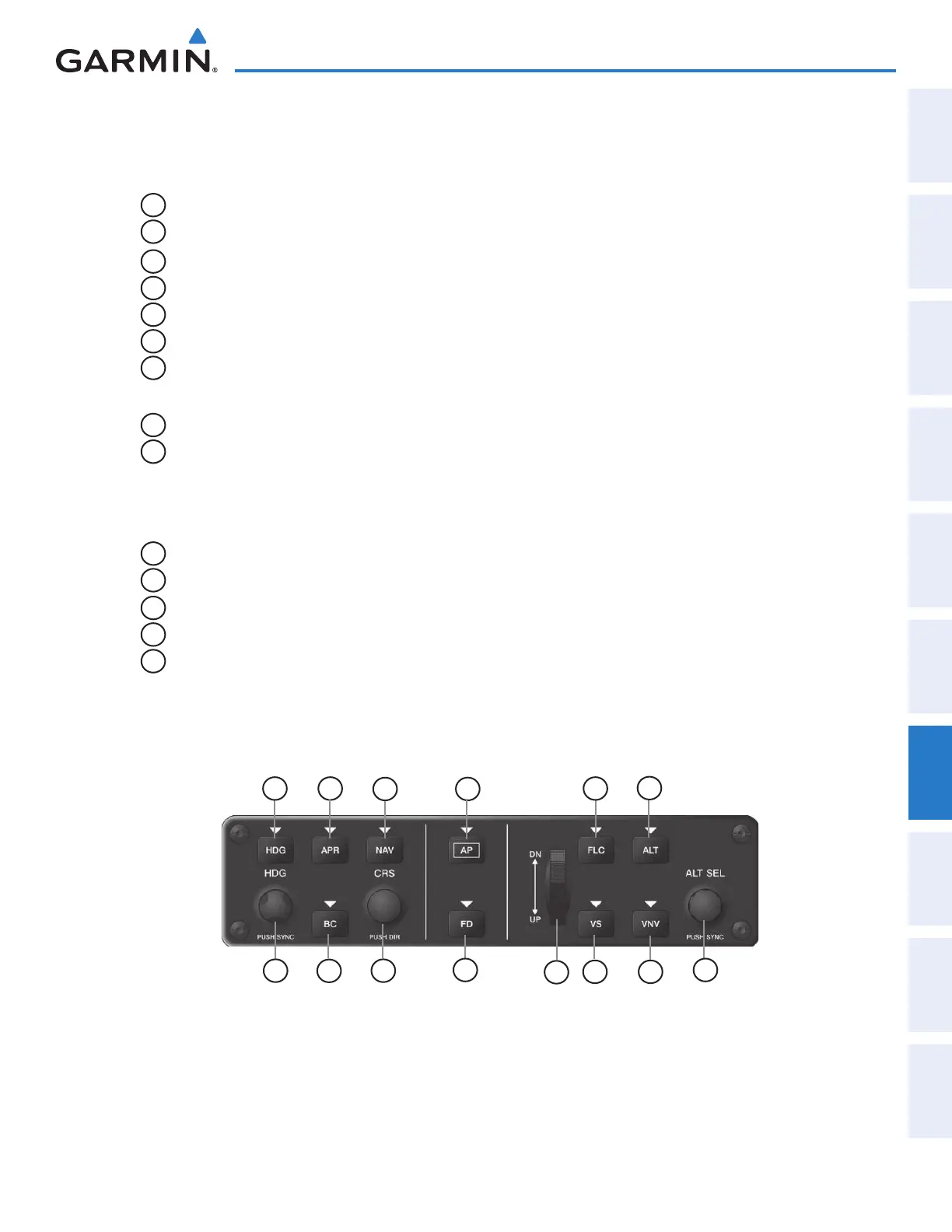
The AFCS Control Unit is positioned above the MFD, and has the following controls:
1
HDG Key
Selects/deselects Heading Select Mode
2
APR Key
Selects/deselects Approach Mode
3
NAV Key
Selects/deselects Navigation Mode
4
AP Key
Engages/disengages the autopilot
5
FLC Key
Selects/deselects Flight Level Change Mode
6
ALT Key
Selects/deselects Altitude Hold Mode
7
HDG SEL Knob
Adjusts the Selected Heading and bug in 1° increments on the HSI
Press to synchronize the Selected Heading to the current heading
8
BC Key
Selects/deselects Backcourse Mode
9
CRS Knob
Adjusts the Selected Course (while in VOR, LOC, or OBS Mode) in 1° increments
on the Horizontal Situation Indicator (HSI)
Press to re-center the Course Deviation Indicator (CDI) and return course pointer
directly TO the bearing of the active waypoint/station
10
FD Key
Activate/deactivate the flight director in default vertical and lateral modes
11
UP/DN Wheel
Adjusts the Vertical Speed Reference and bug in 100-fpm increments
12
VS Key
Selects/deselects Vertical Speed Mode
13
VNV Key
Selects/deselects Vertical Path Tracking Mode for Vertical Navigation flight control
14
ALT SEL Knob
Adjusts the Selected Altitude and bug in 100-ft increments (a finer resolution of 10
feet is available under approach conditions)
Figure 7-1 GMC 720 AFCS Control Unit
1
12
13
4
2
8
3
5
6
7 9
10 14
11
This manual downloaded from http://www.manualowl.com



 To Next Page