190-01263-01 Rev. A
Garmin G2000 Pilot’s Guide for the Cessna T240
179
Flight ManageMent
SYSteM
OVeRVieW
Flight
inStRUMentS
eiS
aUDiO Panel
& CnS
Flight
ManageMent
haZaRD
aVOiDanCe
aFCS
aDDitiOnal
FeatUReS
aPPenDiCeS inDeX
5.2 uSing Map diSplayS
Map displays are used extensively to provide situational awareness in flight. Most maps can display the following
information:
• Airports, NAVAIDs, airspaces, airways, land data
(highways, cities, lakes, rivers, borders, etc.) with
names
• Map Pointer information (distance and bearing
to pointer, location of pointer, name, and other
pertinent information)
• Map range
• Wind direction and speed
• Map orientation
• Icons for enabled map features
• Aircraft icon (representing present position)
• Fuel range ring
• Flight plan legs
• User waypoints
• Track vector
• Topography scale
• Topography data
• Obstacle data
The information in this section applies any displays that show the navigation map.
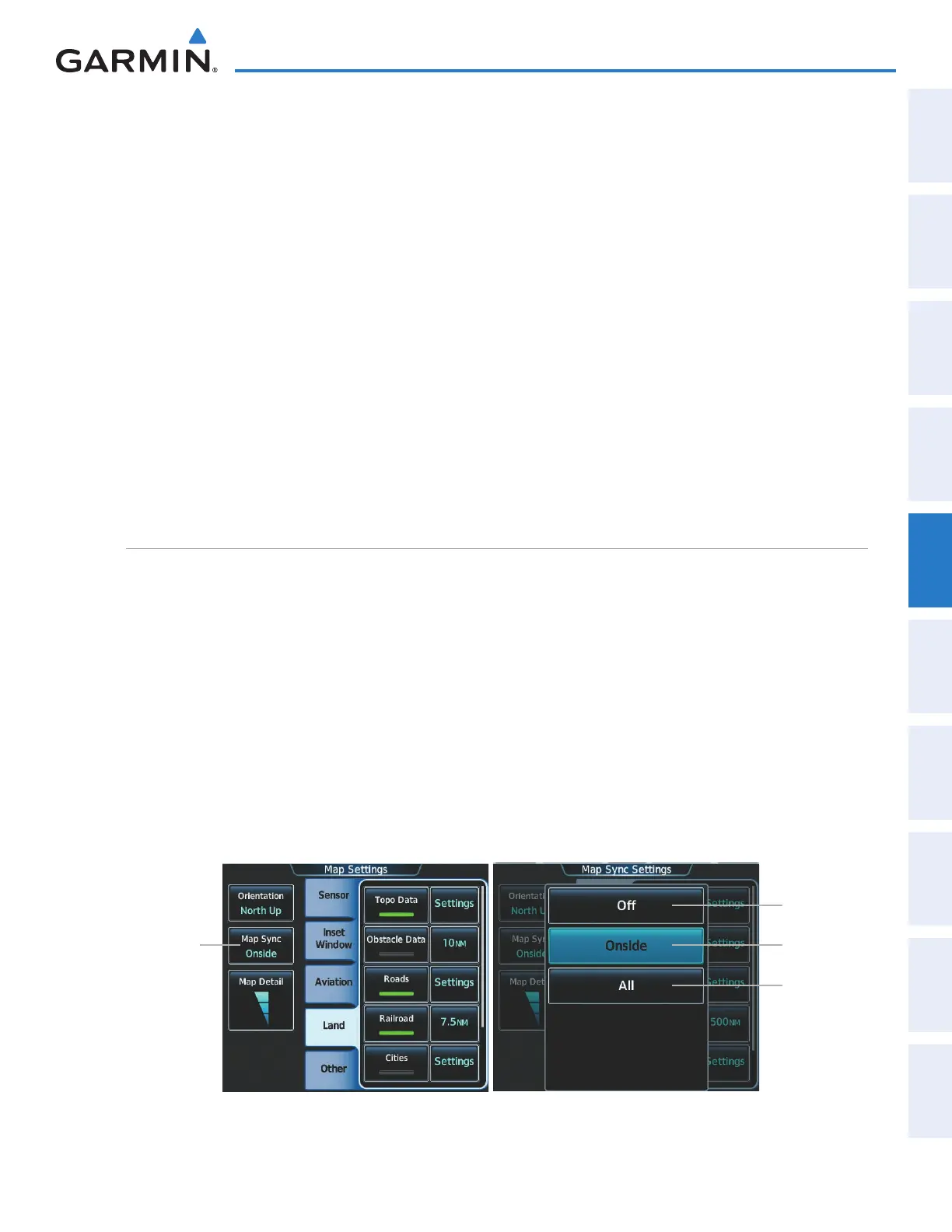
Map SettingS Sync
Map settings can be synchronized with with the settings of any display, and will keep them synchronized
when changes are made to the settings. The synchronization can be for the onside or offside independently, or
for all displays.
Enabling/disabling map settings synchronization:
1) From Home, touch Map > Map Settings > Map Settings Sync.
2) Touch the Onside Button or the All Button.
3) Touch the PFD1, MFD Left, PFD2, or MFD Right Button to initially synchronize the onside map settings or all
map settings with the selected display.
Or:
1) Touch the Off Button to disable synchronization.
Figure 5-4 Map Settings Synchronization
Map Settings
Sync Button
Onside
Button
Off Button
All Button
This manual downloaded from http://www.manualowl.com



 To Next Page