Garmin G2000 Pilot’s Guide for the Cessna T240
190-01263-01 Rev. A178
Flight ManageMent
SYSteM
OVeRVieW
Flight
inStRUMentS
eiS
aUDiO Panel
& CnS
Flight
ManageMent
haZaRD
aVOiDanCe
aFCS
aDDitiOnal
FeatUReS
aPPenDiCeSinDeX
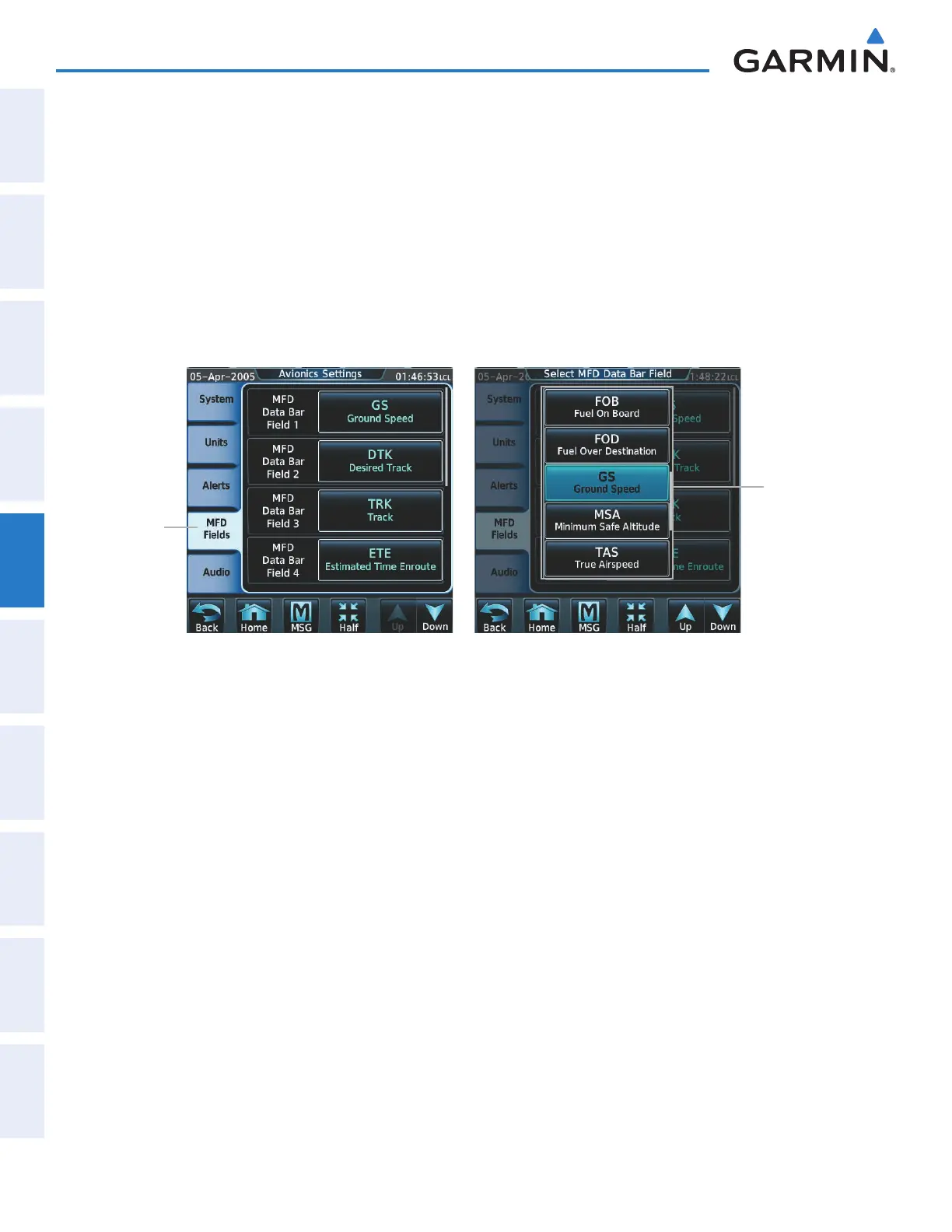
Changing a field in the MFD Navigation Data Bar:
1) From Home, touch Utilities > Setup > Avionics Settings to display the Avionics Settings Screen.
2) Touch the MFD Fields Tab to display the MFD Data Bar Field selection list.
3) If necessary, scroll through the data field list to find the desired field.
4) Touch the MFD Data Bar Field Button to display the data options list.
5) If necessary, scroll through the data options list to find the desired option.
6) Touch the desired data option button.
7) Repeat steps 3 - 6 as necessary.
Figure 5-3 MFD Data Bar Field Selection
Data Bar
Field Select
Buttons
MFD Fields
Tab
This manual downloaded from http://www.manualowl.com



 To Next Page