190-01263-01 Rev. A
Garmin G2000 Pilot’s Guide for the Cessna T240
139
Audio And CnS
SYSTEM
oVERViEW
FLiGHT
inSTRuMEnTS
EiS Audio & CnS
FLiGHT
MAnAGEMEnT
HAZARd
AVoidAnCE
AFCS
AddiTionAL
FEATuRES
APPEndiCES indEX
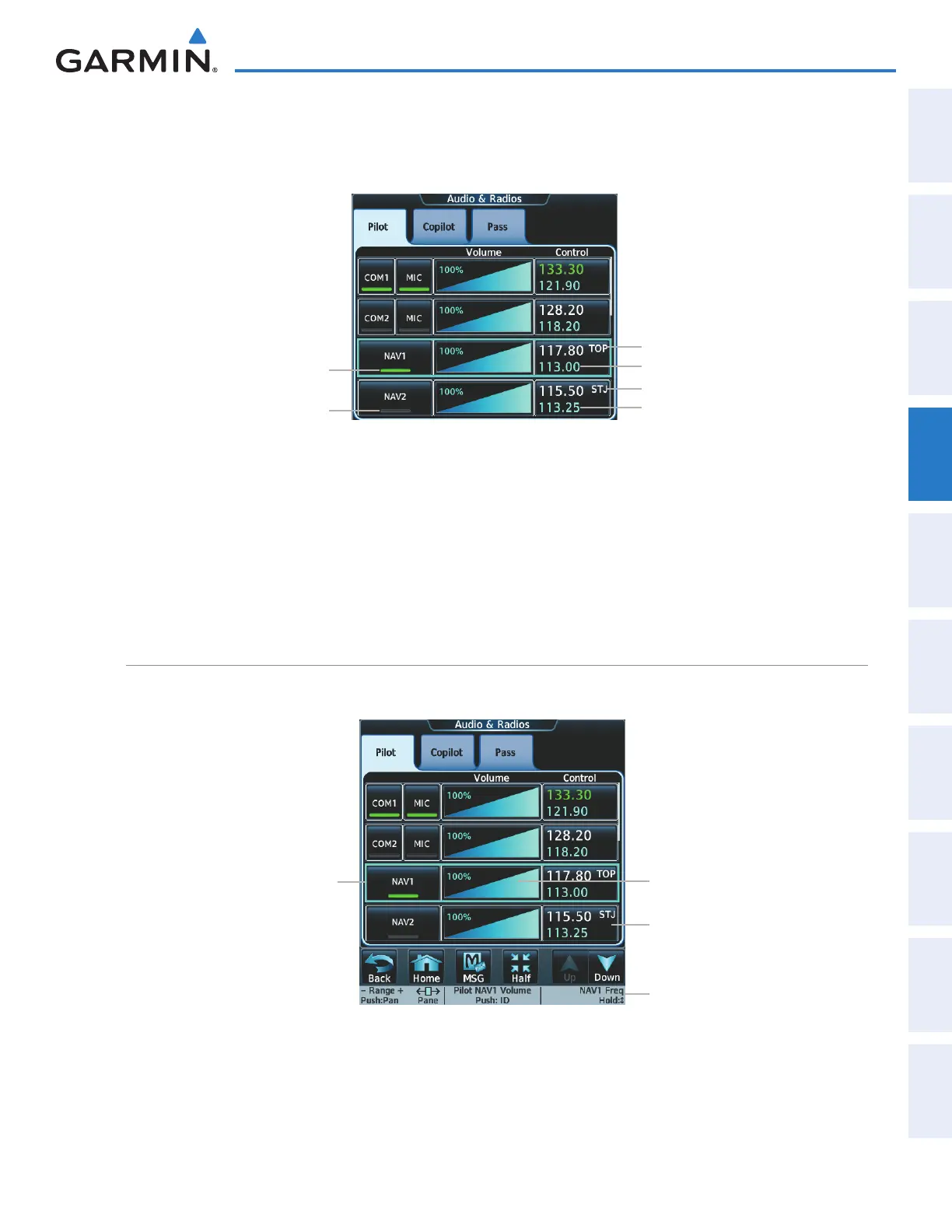
NAV radios are selected for listening by pressing the corresponding buttons on the Touchscreen Controller.
Touching the NAV1 or NAV2 Button selects and deselects the navigation radio source. Selected audio can be heard
over the headset and the speaker (if selected). All radios can be selected individually or simultaneously.
Figure 4-18 Selecting a NAV Radio for Monitoring
NAV1 Standby Frequency
NAV2 Active Frequency/ID
NAV2 Standby Frequency
NAV2 Button
(not selected)
NAV1 Button
(selected for monitoring)
NAV1 Active Frequency/ID
Selecting/deselecting a navigation radio for monitoring:
1) Touch the Audio & Radios Button to display the Audio & Radios Screen.
2) If selecting for the Copilot, touch the Copilot Tab. (If necessary, also touch the Sync to Pilot Button to disable
synchronizing selections to the pilot.)
3) Touch the NAV1 or NAV2 Button on the Audio & Radios Screen to select/deselect the radio for monitoring.
nAv receiver tuning
The NAV frequencies are tuned from the Touchscreen Controller and the GDU Controller.
Figure 4-19 Audio & Radios Screen - NAV Frequency Tuning
NAV selected for
tuning (light blue
border)
NAV1 Volume Slider
Knob function labels
NAV2 Frequency Button
This manual downloaded from http://www.manualowl.com



 To Next Page