190-01263-01 Rev. A
Garmin G2000 Pilot’s Guide for the Cessna T240
160
Audio And CnS
SYSTEM
oVERViEW
FLiGHT
inSTRuMEnTS
EiSAudio & CnS
FLiGHT
MAnAGEMEnT
HAZARd
AVoidAnCE
AFCS
AddiTionAL
FEATuRES
APPEndiCESindEX
intercoM
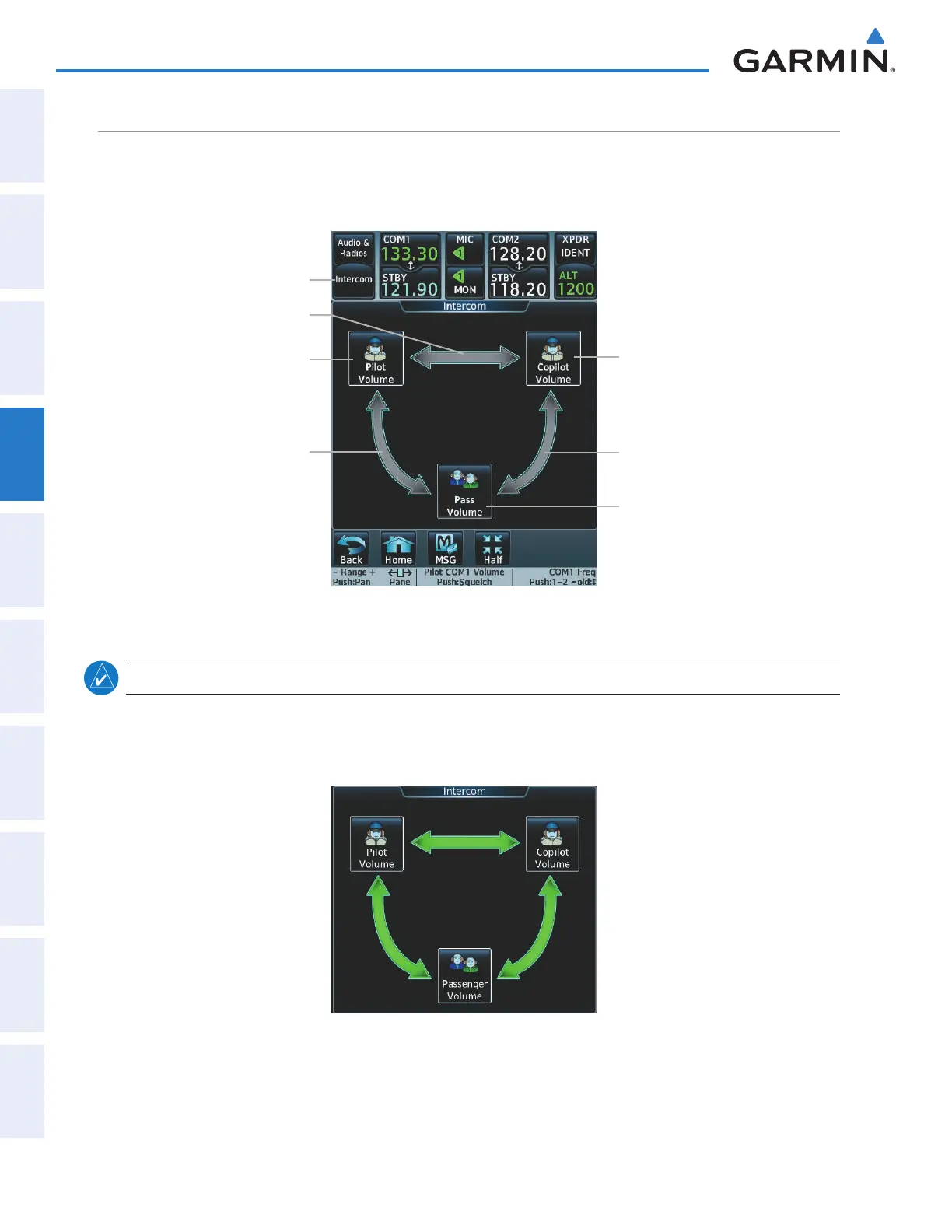
The Audio Panel includes an eight-mode intercom system (ICS) and two stereo music inputs for the pilot,
copilot and passengers. The intercom provides Pilot and Copilot isolation from the passengers and aircraft
radios. Each of the three link arrows are selected/deselected by touching the arrow.
Figure 4-46 Intercom Controls
Pilot Volume Button
Pilot/Copilot Link Arrow
Pilot/Passenger Link Arrow
Intercom Button
Copilot/Passenger Link
Arrow
Copilot Volume Button
Passenger Volume
Button
note: In the default ICS configuration, only the pilot and copilot positions can hear aircraft alerts.
all intercom moDe
In ‘All Intercom’ mode the Pilot, Copilot, and Passengers hear each other and hear the aircraft audio.
Figure 4-47 All Intercom Mode
This manual downloaded from http://www.manualowl.com



 To Next Page