Garmin G2000 Pilot’s Guide for the Cessna T240
190-01263-01 Rev. A256
Flight ManageMent
SYSteM
OVeRVieW
Flight
inStRUMentS
eiS
aUDiO Panel
& CnS
Flight
ManageMent
haZaRD
aVOiDanCe
aFCS
aDDitiOnal
FeatUReS
aPPenDiCeSinDeX
adding procedureS to a Stored Flight plan
The system allows the pilot to insert pre-defined instrument procedures from the navigation database into a
flight plan. The procedures are designed to facilitate routing of traffic leaving an airport (departure), arriving at
an airport (arrival), and landing at an airport (approach). See the procedures section for more details.
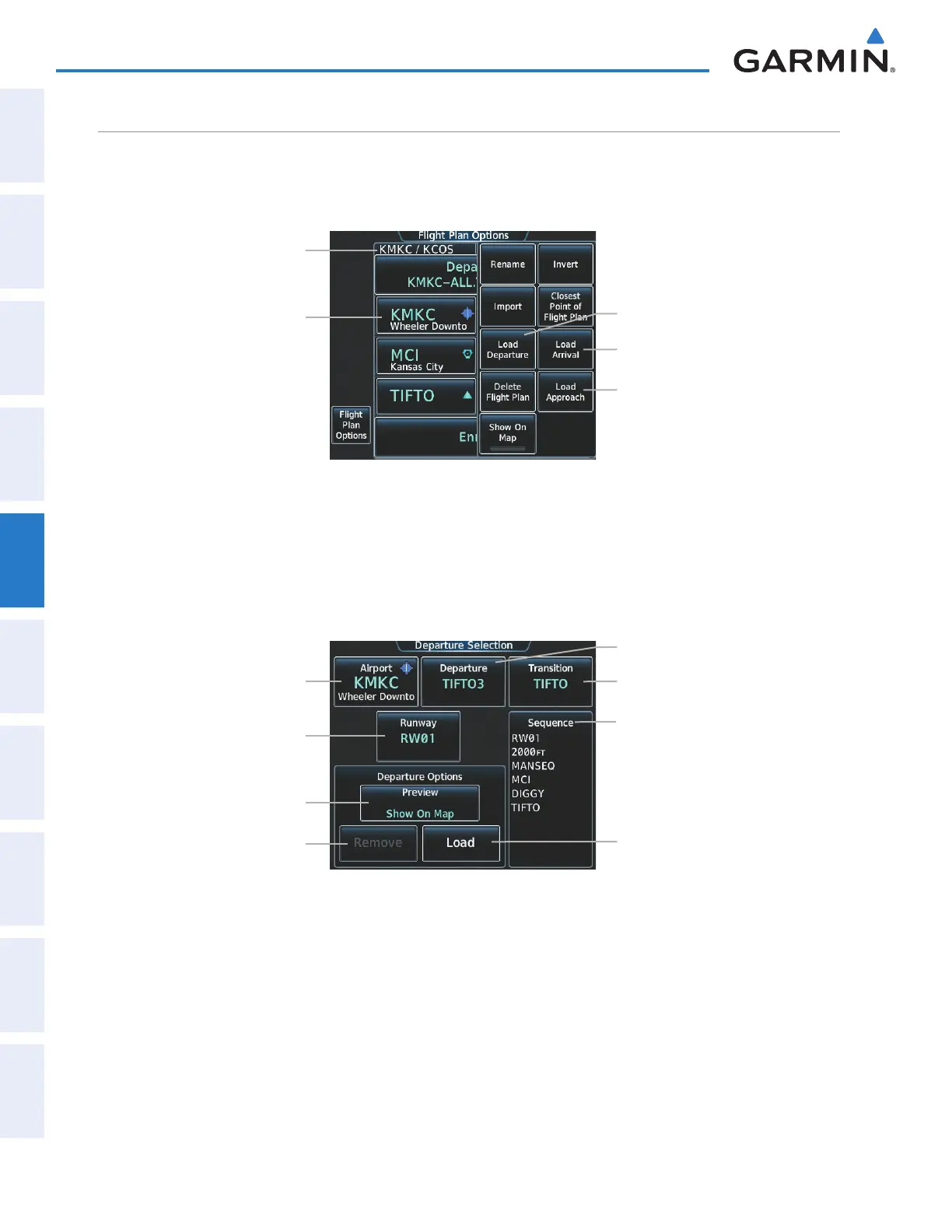
Figure 5-101 Edit Stored Flight Plan Screen - Flight Plan Options
Load Arrival Button
Stored Flight Plan Waypoint List
Stored Flight Plan Name
Load Approach Button
Load Departure Button
DEPARTURE (DP)
A Departure Procedure (DP) is loaded at the departure airport in the flight plan. Only one departure can
be loaded at a time in a flight plan. The route is defined by selection of a departure, the transition waypoints,
and a runway.
Figure 5-102 Departure Selection Screen
Transition Button
Runway Button
Airport Button
Load Button
Departure Button
Departure Waypoint Sequence
Remove Button
Preview Button
This manual downloaded from http://www.manualowl.com



 To Next Page