Garmin G2000 Pilot’s Guide for the Cessna T240
190-01263-01 Rev. A200
Flight ManageMent
SYSteM
OVeRVieW
Flight
inStRUMentS
eiS
aUDiO Panel
& CnS
Flight
ManageMent
haZaRD
aVOiDanCe
aFCS
aDDitiOnal
FeatUReS
aPPenDiCeSinDeX
track vector
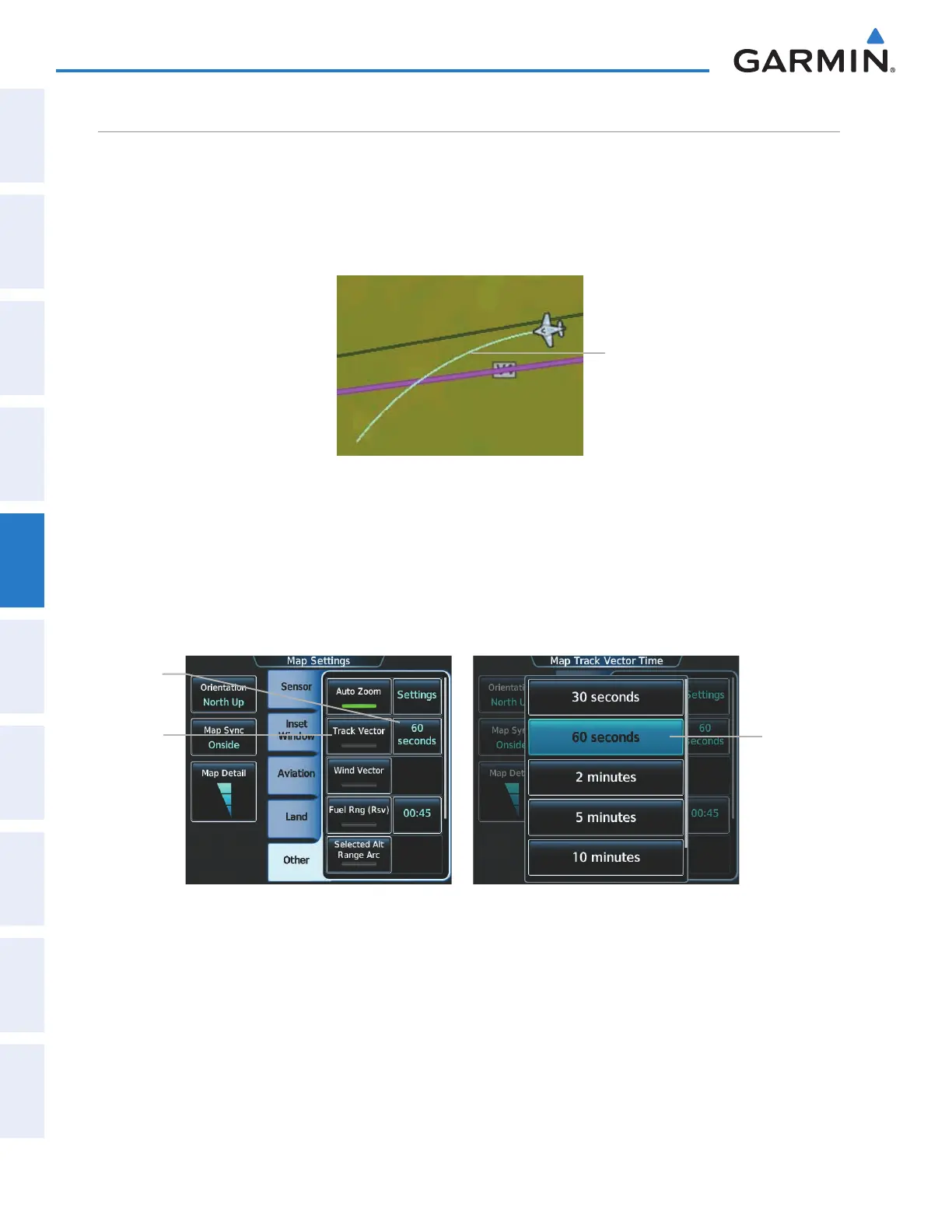
The Navigation Map can display a track vector that is useful in minimizing track angle error. The track vector
is a solid light blue line segment extended to a predicted location. The track vector look-ahead time is selectable
(30 sec, 60 sec (default), 2 min, 5 min, 10 min, 20 min) and determines the length of the track vector. The track
vector shows up to 90 degrees of a turn for the 30 and 60 second time settings. It is always a straight line for
the 2 min, 5 min, 10 min and 20 min settings.
Figure 5-23 Navigation Map - Track Vector
Track Vector
Displaying/removing the track vector:
1) From Home, touch Map > Map Settings.
2) Touch the Other Tab, if necessary.
3) Touch the Track Vector Button to display/remove the track vector.
Track
Vector
Button
Figure 5-24 Map Options Screen - Track Vector Setup
Time
Selection
Button
Time
Button
Selecting track vector look-ahead time:
1) From Home, touch Map > Map Settings.
2) Touch the Other Tab, if necessary.
3) Touch the time button to display the time selection buttons.
4) Scroll the list, if necessary, and touch a time selection button to select the look-ahead time.
This manual downloaded from http://www.manualowl.com



 To Next Page