190-01263-01 Rev. A
Garmin G2000 Pilot’s Guide for the Cessna T240
199
Flight ManageMent
SYSteM
OVeRVieW
Flight
inStRUMentS
eiS
aUDiO Panel
& CnS
Flight
ManageMent
haZaRD
aVOiDanCe
aFCS
aDDitiOnal
FeatUReS
aPPenDiCeS inDeX
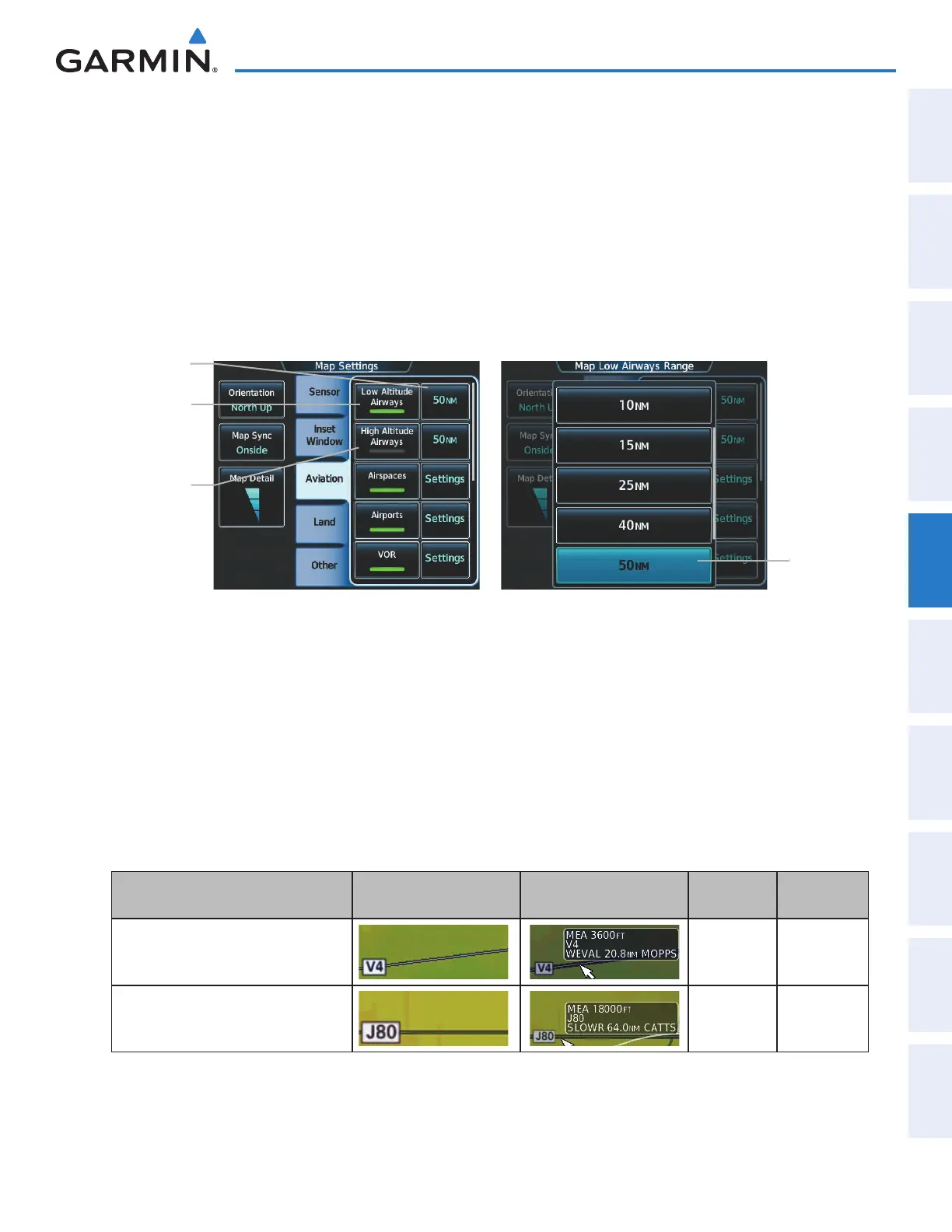
Airways may be displayed on the map at the pilot’s discretion using the Touchscreen Controller. The airway
range can also be programmed to only display airways on the MFD when the map range is at or below a specific
value.
Displaying/removing airways:
1) From Home, touch Map > Map Settings.
2) Touch the Aviation Tab, if necessary.
3) Touch the Low Altitude Airways Button to display/remove the low altitude airways.
4) Touch the High Altitude Airways Button to display/remove the high altitude airways.
Low
Altitude
Airways
Button
Figure 5-22 Map Options Screen - Airways Setup
Range
Selection
Button
Range
Button
High
Altitude
Airways
Button
The airway range is the maximum map range on which airways are displayed.
Selecting an airway range:
1) From Home, touch Map > Map Settings.
2) Touch the Aviation Tab, if necessary.
3) Touch the low altitude or high altitude range button to display the range selection buttons.
4) Touch a range selection button to select the maximum map display range.The following range items are
configurable on the airways menu.
Airway Type Airway Symbol/Line Highlighted Airway
Information Box
Default
Range (nm)
Maximum
Range (nm)
Low Altitude Airway
50 250
High Altitude Airway
50 250
Table 5-4 Airway Range Information
This manual downloaded from http://www.manualowl.com



 To Next Page