Garmin G2000 Pilot’s Guide for the Cessna T240
190-01263-01 Rev. A234
Flight ManageMent
SYSteM
OVeRVieW
Flight
inStRUMentS
eiS
aUDiO Panel
& CnS
Flight
ManageMent
haZaRD
aVOiDanCe
aFCS
aDDitiOnal
FeatUReS
aPPenDiCeSinDeX
5.5 direct-to navigation
The Direct-to method of navigation, initiated by touching the Direct To Button on the Touchscreen Controller,
or by pressing the ¯ Button on the GDU Controller, is quicker to use than a flight plan when needing to
navigate to a single point such as a nearby airport.
Once a direct-to is activated, the system establishes a point-to-point course line from the present position to the
selected direct-to destination. Course guidance is provided until the direct-to is replaced with a new direct-to or
flight plan, or cancelled.
A vertical navigation (VNAV) direct-to creates a descent path (and provides guidance to stay on the path) from
the current altitude to a selected altitude at the direct-to waypoint. Vertical navigation is based on barometric
altitudes, not on GPS altitude, and is used for cruise and descent phases of flight.
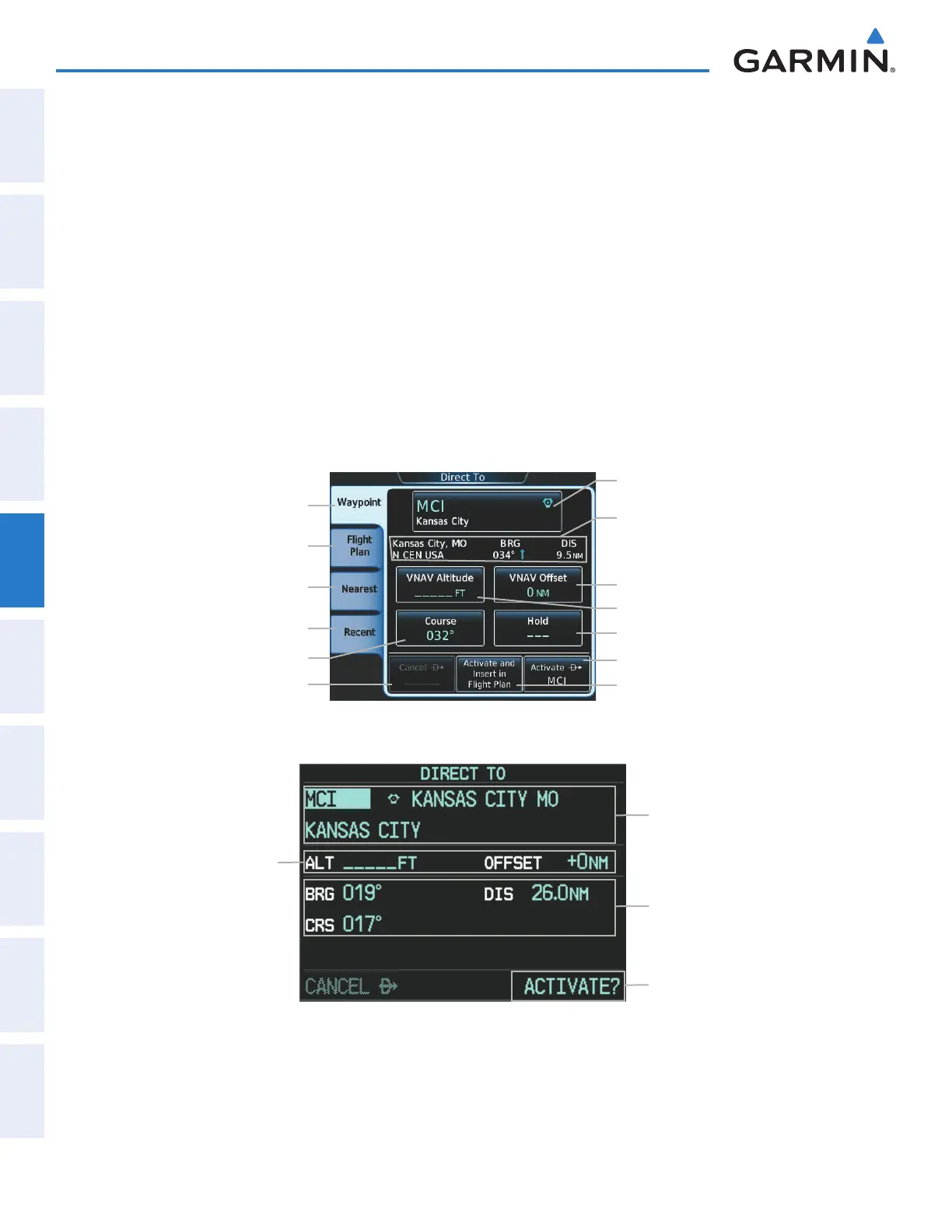
The Direct-to Window on the PFD and the Direct To Screen on the Touchscreen Controller allows selection and
activation of direct-to navigation, and displays selected direct-to waypoint data on the PFD and the Touchscreen
Controller. Any waypoint can be entered as a direct-to destination.
Figure 5-72 Direct To Screen
Nearest Tab
Waypoint Selection Button
- Identifier/Symbol/City
VNAV Altitude Button
Direct-to Point Info
- City/Region
- Bearing/Distance
Waypoint Tab
Flight Plan Tab
Recent Tab
Cancel ¯ Button
VNAV Offset Button
Hold Button
Activate and Insert in Flight Plan
Button
Activate ¯ Button
Course Button
Figure 5-73 Direct To Window - PFD
Direct-to Point Info
- Identifier/Symbol/City
- Facility Name
Activation Command
Direct-to Point Info
- Bearing/Distance
- Desired Course
VNV Constraints
- Altitude at Arrival
- Along Track Offset
This manual downloaded from http://www.manualowl.com



 To Next Page