190-01263-01 Rev. A
Garmin G2000 Pilot’s Guide for the Cessna T240
201
Flight ManageMent
SYSteM
OVeRVieW
Flight
inStRUMentS
eiS
aUDiO Panel
& CnS
Flight
ManageMent
haZaRD
aVOiDanCe
aFCS
aDDitiOnal
FeatUReS
aPPenDiCeS inDeX
wind vector
The map displays a wind vector arrow in the upper right-hand portion of the screen. Wind vector information
is displayed as a white arrow pointing in the direction in which the wind is moving for wind speeds greater than
or equal to 1 kt.
Figure 5-25 Navigation Map - Wind Vector
Wind Vector
note: The wind vector is not displayed until the aircraft is moving.
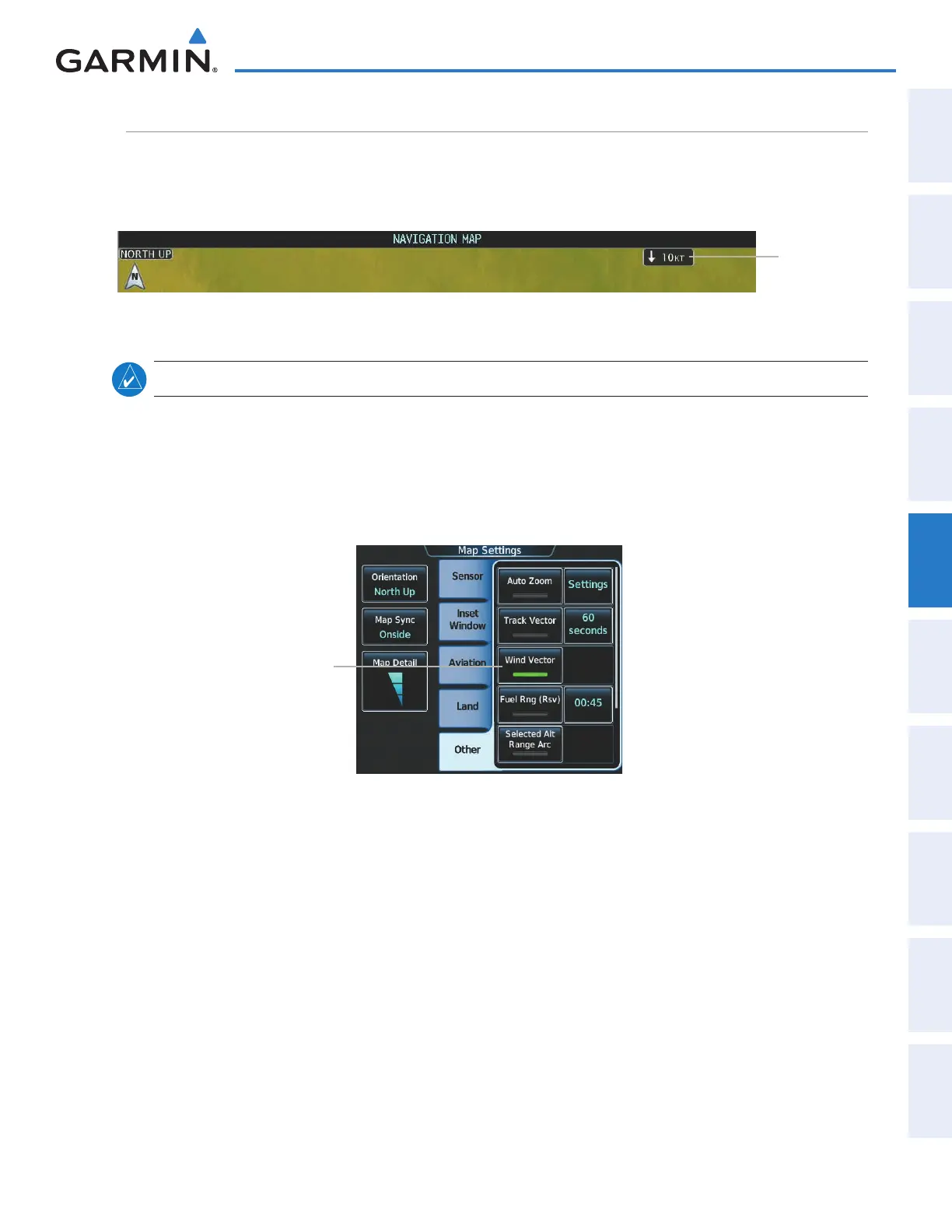
Displaying/removing the wind vector:
1) From Home, touch Map > Map Settings.
2) Touch the Other Tab, if necessary.
3) Touch the Wind Vector Button to display/remove the track vector.
Wind
Vector
Button
Figure 5-26 Map Options Screen - Wind Vector Setup
This manual downloaded from http://www.manualowl.com



 To Next Page