Garmin G2000 Pilot’s Guide for the Cessna T240
190-01263-01 Rev. A14
SYSTEM OVERVIEW
SYSTEM
OVERVIEW
FLIGHT
INSTRUMENTS
EIS
AUDIO PANEL
& CNS
FLIGHT
MANAGEMENT
HAZARD
AVOIDANCE
AFCS
ADDITIONAL
FEATURES
APPENDICESINDEX
SYSTEM
OVERVIEW
FLIGHT
INSTRUMENTS
EIS AUDIO & CNS
FLIGHT
MANAGEMENT
HAZARD
AVOIDANCE
AFCS
ADDITIONAL
FEATURES
APPENDICESINDEX
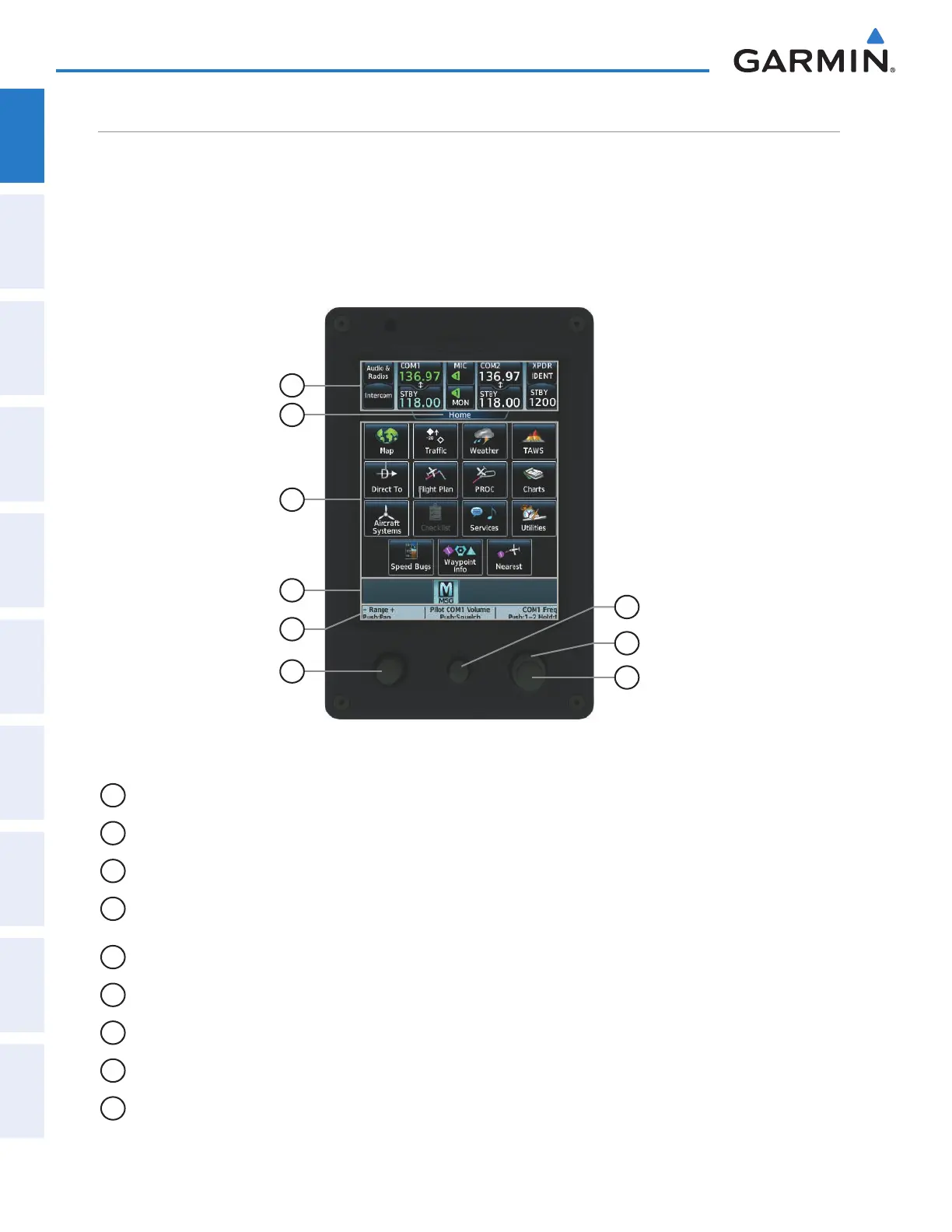
TOUCHSCREEN CONTROLLER
The Touchscreen Controller is a pedestal-mounted user interface allowing for ease of data entry, MFD/Display
Pane operation, NAV/COM tuning. The touchscreen uses an infrared grid to determine the location of the
touch input and also allows usage with gloves or stylus. Many procedures in this Pilot’s Guide are performed
using the Touchscreen Controller.
Radio tuning can be accomplished using the CNS Bar at the top of the Touchscreen Controller screen (refer
to the Audio and CNS Section for detailed information about NAV/COM tuning).
Figure 1-11 GTC 570 Touchscreen Controller
8
6
2
3
1
4
5
9
7
1
CNS Bar Displays/controls COM, NAV, XPDR, and Intercom functions
2
Screen Title Displays the title of the current screen
3
Screen Displays set context sensitive controls and data
4
Button Bar Displays System level buttons (e.g. Home, MSG, Full/Half, Scroll Up/Down, Back, Enter,
Cancel)
5
Label Bar Displays labels to show status and current functions of Joystick and knobs
6
Joystick Provides functions as shown on the Label Bar (e.g. Map Panning, Map Range)
7
Middle Knob Provides functions as shown on the Label Bar (e.g. COM volume/squelch)
8
Large Right Knob Provides functions as shown on the Label Bar (e.g. COM Freq/switching, Data Entry)
9
Small Right Knob Provides functions as shown on the Label Bar (e.g. COM Freq/switching/Hold, Data Entry)
This manual downloaded from http://www.manualowl.com



 To Next Page