190-01263-01 Rev. A
Garmin G2000 Pilot’s Guide for the Cessna T240
13
SyStem Overview
SyStem
Overview
FLiGHt
iNStrUmeNtS
eiS
AUDiO PANeL
& CNS
FLiGHt
mANAGemeNt
HAZArD
AvOiDANCe
AFCS
ADDitiONAL
FeAtUreS
APPeNDiCeS iNDeX
SYSTEM
OVERVIEW
FLIGHT
INSTRUMENTS
EIS AUDIO & CNS
FLIGHT
MANAGEMENT
HAZARD
AVOIDANCE
AFCS
ADDITIONAL
FEATURES
APPENDICES INDEX
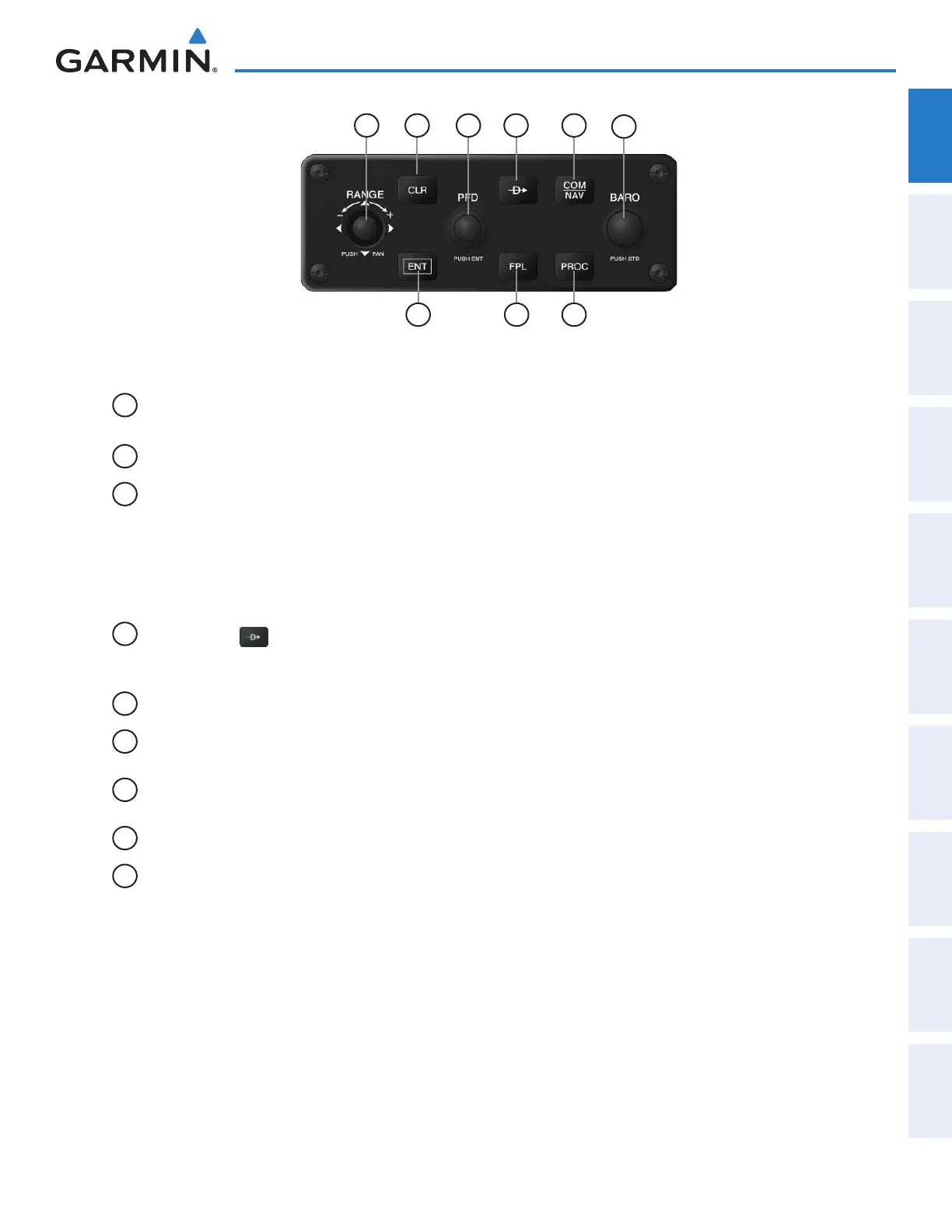
Figure 1-10 GCU 275 GDU Controller
2
1
6
3
79 8
54
1
Joystick Turn to change PFD map range
Press to activate Map Pointer for PFD map panning, and move laterally to move map pointer
2
CLR Key Erases information, cancels entries, or removes menus
3
PFD Knob Press to enable/disable the selection cursor.
Data Entry: With cursor enabled, turn to enter data in the highlighted field (large knob moves
cursor location; small knob selects character for highlighted cursor location)
Scrolling: When a list of information is too long for the window/box, a scroll bar appears,
indicating more items are available to view. With cursor enabled, turn large knob to scroll
through the list.
4
Direct-to Key ( )
Activates the direct-to function and allows the user to enter a destination waypoint and
establish a direct course to the selected destination (specified by identifier, chosen from the
active route)
5
COM/NAV Key Selects/deselects COM/NAV radio tuning mode on the PFD Controller
6
BARO Knob Turn knob to increase/decrease altimeter barometric pressure setting. Press knob to set
barometric pressure setting to Standard.
7
PROC Key Gives access to IFR departure procedures (DPs), arrival procedures (STARs), and approach
procedures (IAPs) for a flight plan or selected airport
8
FPL Key Shows/hides flight plan information
9
ENT Key Validates or confirms a menu selection or data entry
This manual downloaded from http://www.manualowl.com



 To Next Page