Garmin G2000 Pilot’s Guide for the Cessna T240
190-01263-01 Rev. A270
Flight ManageMent
SYSteM
OVeRVieW
Flight
inStRUMentS
eiS
aUDiO Panel
& CnS
Flight
ManageMent
haZaRD
aVOiDanCe
aFCS
aDDitiOnal
FeatUReS
aPPenDiCeSinDeX
parallel track
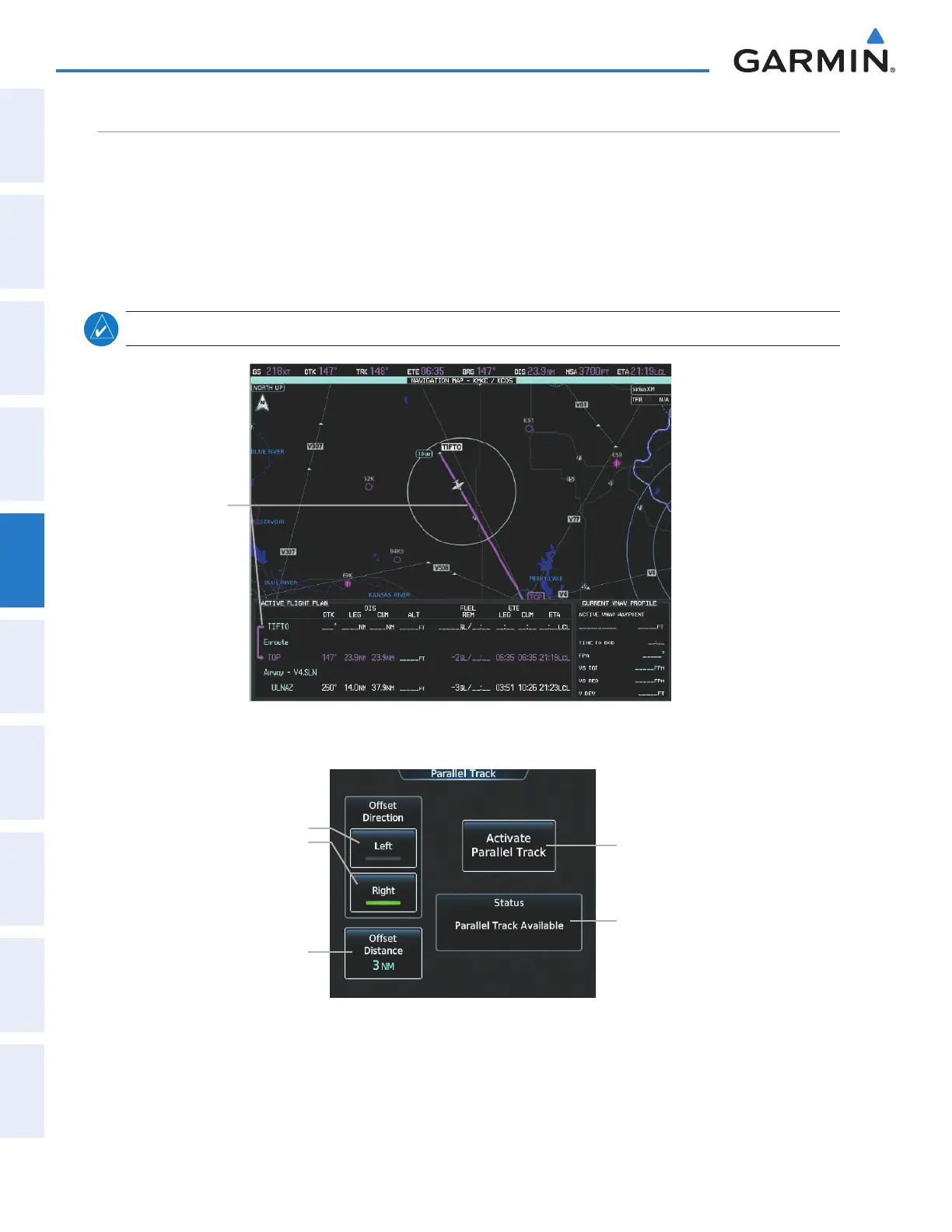
The Parallel Track feature allows creation of a parallel course offset of 1 to 50 nm left or right of the current
flight plan. When Parallel Track is activated, the course line drawn on the map pages shows the parallel course,
and waypoint names have a lower case “-p” placed after the identifier.
Using direct-to, loading an approach, a holding pattern, or editing and activating the flight plan automatically
cancels Parallel Track. Parallel Track is also cancelled if a course change occurs greater than 120° or the parallel
tracks overlap as a result of the course change.
note: Vertical navigation is unavailable while the Parallel Track feature is active.
Figure 5-117 Active Flight Plan Pane - Prior to Activating Parallel Track
Active Flight Plan
prior to Parallel Track
Figure 5-118 Parallel Track Screen - Selecting Parallel Track
Offset Distance Button
Offset Direction
Left Button
Right Button
Activate Parallel Track Button
Parallel Track Status
This manual downloaded from http://www.manualowl.com



 To Next Page