Garmin G2000 Pilot’s Guide for the Cessna T240
190-01263-01 Rev. A206
Flight ManageMent
SYSteM
OVeRVieW
Flight
inStRUMentS
eiS
aUDiO Panel
& CnS
Flight
ManageMent
haZaRD
aVOiDanCe
aFCS
aDDitiOnal
FeatUReS
aPPenDiCeSinDeX
5.3 waypointS
Waypoints are predetermined geographical positions (internal database) or pilot-entered positions, and are
used for all phases of flight planning and navigation.
Communication and navigation frequencies can be found and tuned from waypoint data, Refer to the Audio
and CNS section for details.
Waypoints can be selected by entering the ICAO identifier, entering the name of the facility, or by entering the
city name. See the System Overview section for detailed instructions on entering data in the system.
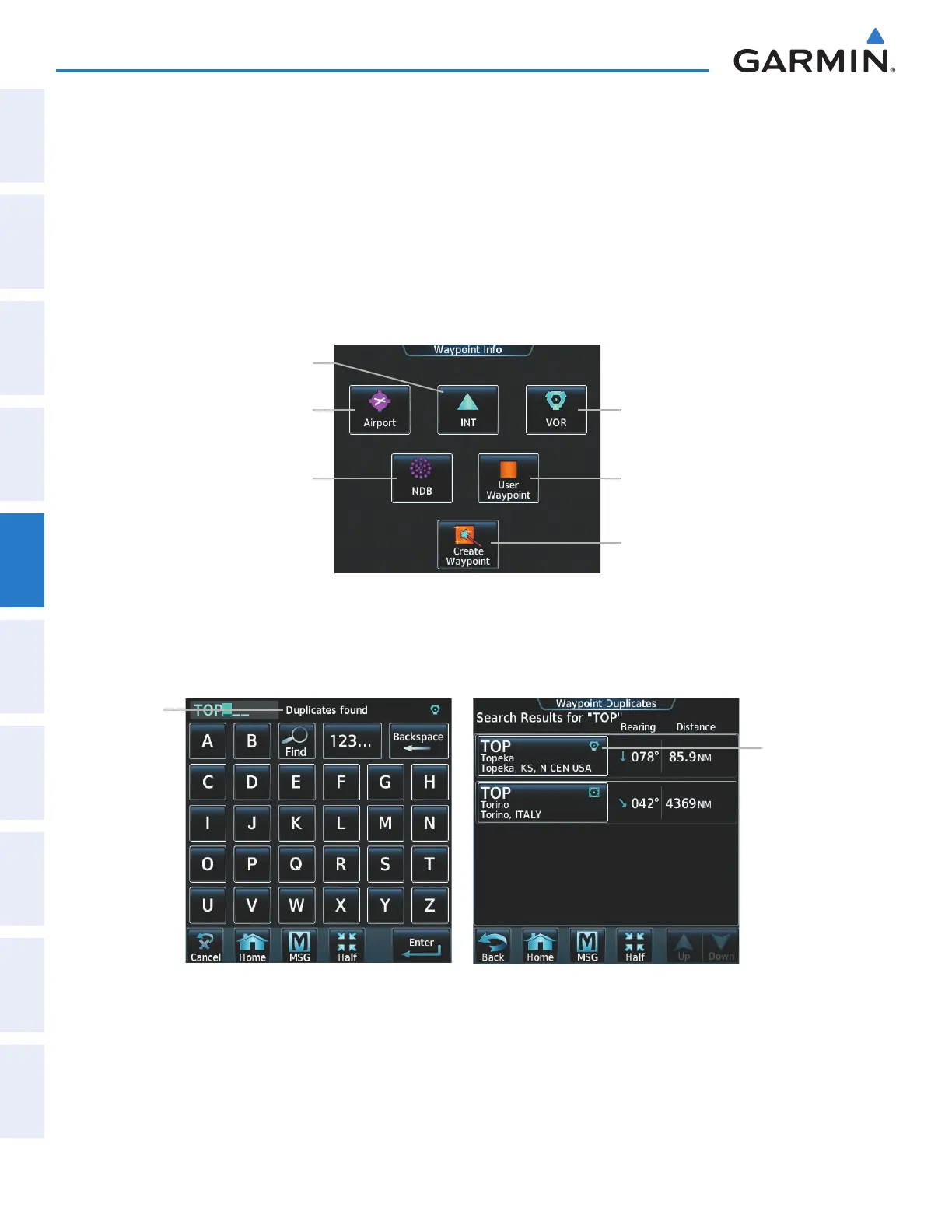
Figure 5-35 Waypoint Info Screen
Airport Button
INT Button
NDB Button
VOR Button
User Waypoint
Button
Create Waypoint
Button
If duplicate entries exist for an identifier, a Waypoint Duplicates Screen is displayed when the Enter Button is
touched or the small right knob is pressed.
Duplicates
Found
Message
Figure 5-36 Waypoint Duplicates Screen
Waypoint
Selection
Button
This manual downloaded from http://www.manualowl.com



 To Next Page