190-01263-01 Rev. A
Garmin G2000 Pilot’s Guide for the Cessna T240
249
Flight ManageMent
SYSteM
OVeRVieW
Flight
inStRUMentS
eiS
aUDiO Panel
& CnS
Flight
ManageMent
haZaRD
aVOiDanCe
aFCS
aDDitiOnal
FeatUReS
aPPenDiCeS inDeX
adding waypointS to an exiSting Flight plan
Waypoints can be added to the active flight plan or any stored flight plan. Choose the flight plan, select the
desired point of insertion, enter the waypoint, and it is added to the flight plan. Flight plans are limited to 99
waypoints (including waypoints within airways and procedures). If the number of waypoints in the flight plan
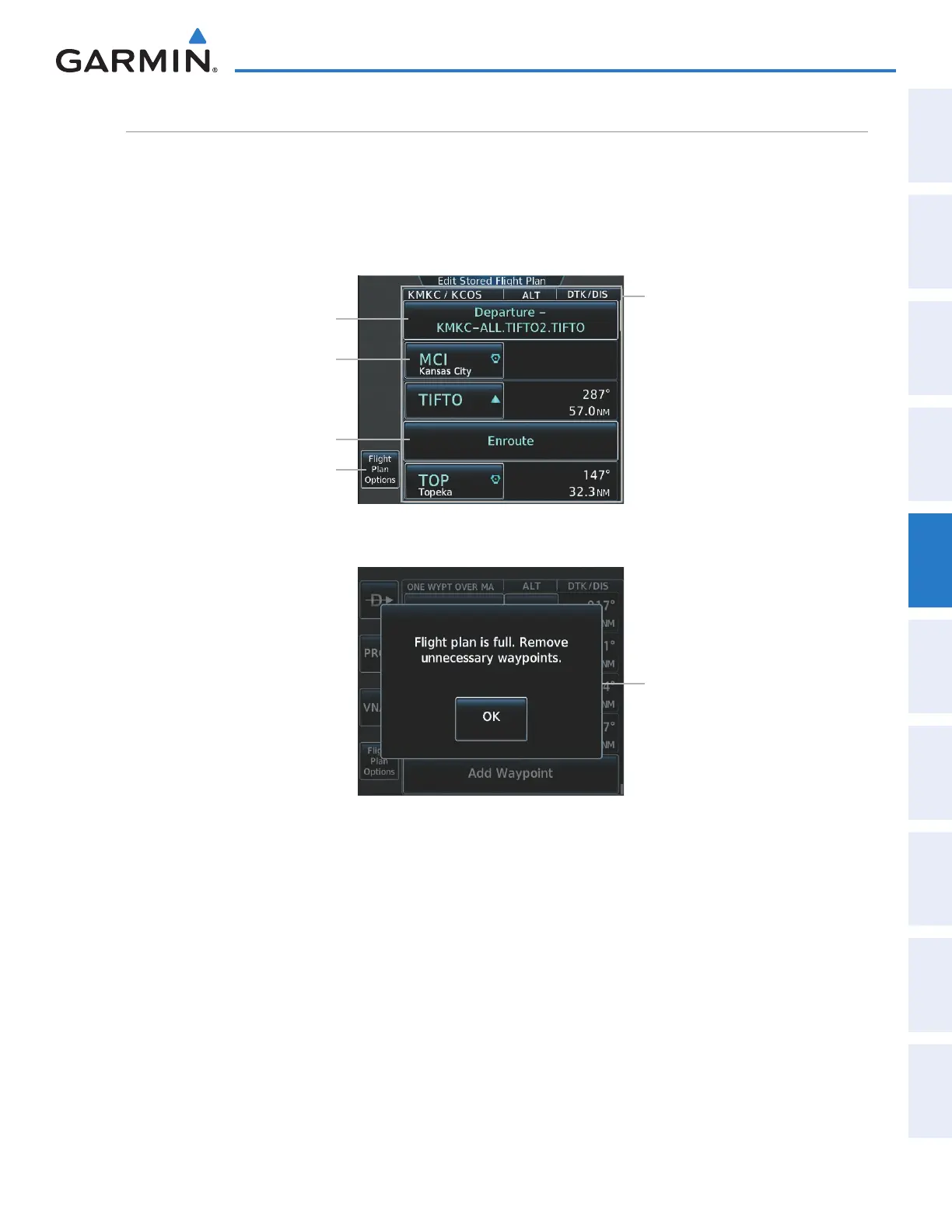
exceeds 99, the message “Flight plan is full. Remove unnecessary waypoints.” appears and the new waypoint(s)
are not added to the flight plan.
Figure 5-89 Edit Stored Flight Plan Screen
Flight Plan Options Button
Waypoint Options Button
Procedure Options Button
Stored Flight Plan Selected
- Comment
- Procedure Identifier
- Waypoint Identifier
- Airway Identifier
- Flight Plan Segment Identifier
- Desired Track to Waypoint
- Distance to Waypoint
- Waypoint Altitude Constraint
Enroute Options Button
Figure 5-90 Edit Stored Flight Plan Screen - Flight Plan Full
Flight Plan Full Message
Adding a waypoint to a stored flight plan:
1) From Home, touch Flight Plan > Flight Plan Options
2) Touch the Catalog Button to display the Flight Plan Catalog Screen.
3) Touch a flight plan selection button to display the Catalog Options Window.
4) Touch the Edit Button to display the Edit Stored Flight Plan Screen.
5) Touch a waypoint options button to display the Waypoint Options Window.
6) Touch the Insert Before Button or the Insert After Button to select where the new waypint will be placed in
relation to the selected waypoint. The keypad is displayed.
7) Use the keypad, right knob, or the Find function to select the new waypoint.
8) Touch the Enter Button to accept the waypoint and place it in the flight plan.
This manual downloaded from http://www.manualowl.com



 To Next Page